Contracts are assembled by hand from old files, versions get lost in email, signatures wait for weeks and nobody watches the renewal dates. The result is an unwanted service renewed for another year, a missed notice window or a price that was never indexed. Contract management automation for small business does not need a heavy system. It needs one chain from template to renewal, and clear owners for each step. Below is that chain, what the law says about e-signatures in the EU and the US, and a plan for four to six weeks.
Contract management automation for small business: where companies lose money on contracts
Losses are quiet. One supplier contract renews automatically because the notice period passed unseen. Another client agreement goes out with an old price because the template was copied from last year’s file. And a signed copy sits in someone’s mailbox and cannot be found during an audit. Each case is small, and together they cost a small business real money and time in contract management. The cause is the same: the contract has no owner after it is signed.
The contract path: from template to renewal
Six steps in one chain
A template, an approval and a reminder form one chain, and the contract passes through six steps: draft, approval, signature, storage, tracking and renewal. Automate the step where time is lost first, not all six at once, and keep the e-signature step simple.
| Step | What can be automated | Who owns it |
|---|---|---|
| Draft | Template filled from CRM data | Sales or operations |
| Approval | Routing to finance and legal | Department heads |
| Signature | E-signature request and status | Contract owner |
| Storage | One repository with versions | Operations |
| Tracking | Register of dates and terms | Contract owner |
| Renewal | Reminders before the notice period | Finance |
Templates and CRM data: how to remove manual copying
To automate contract creation from crm, keep one approved template per contract type and fill the fields from the deal: client name, address, price, term. Copying by hand is where mistakes enter. Keep the legal wording locked, let only the data fields change and keep a version history so you can see which wording went to which client. Start with the one contract type you sign most often, so the e-signature and the template are tested on real deals.

Electronic signature in the EU and the US: what a business should know
The rules differ by region, and this is general information, not legal advice. In the EU, the eIDAS Regulation sets rules for electronic identification and trust services, and qualified trust services carry the same legal status as their paper equivalents. For electronic signature for small business eu, check which level of signature your contract type needs. In the US, the ESIGN Act says a signature or contract cannot be denied legal effect only because it is electronic, and it has exceptions. Ask your lawyer which rules apply to your contracts.
Register and reminders: how to track dates
A register is a single table or tool with every contract, its counterparty, start, end, notice period, renewal terms and owner. Contract renewal reminders work from that register, which turns contract management into a routine: one alert well before the notice period ends, another closer to it, both sent to a named person and a backup. Add the indexation date where prices change by a formula. Without an owner, a reminder is just another email nobody reads.
A ready service or an integration: how to choose
Contract lifecycle management for small business can start with a ready service if you have one contract type and a standard CRM. Choose it when the tool covers templates, signatures and reminders and exports your data. Choose an integration or a custom build when contracts depend on your own data, several systems or special approval rules. Ask who owns the data and the audit trail in each case, and what it costs to leave.
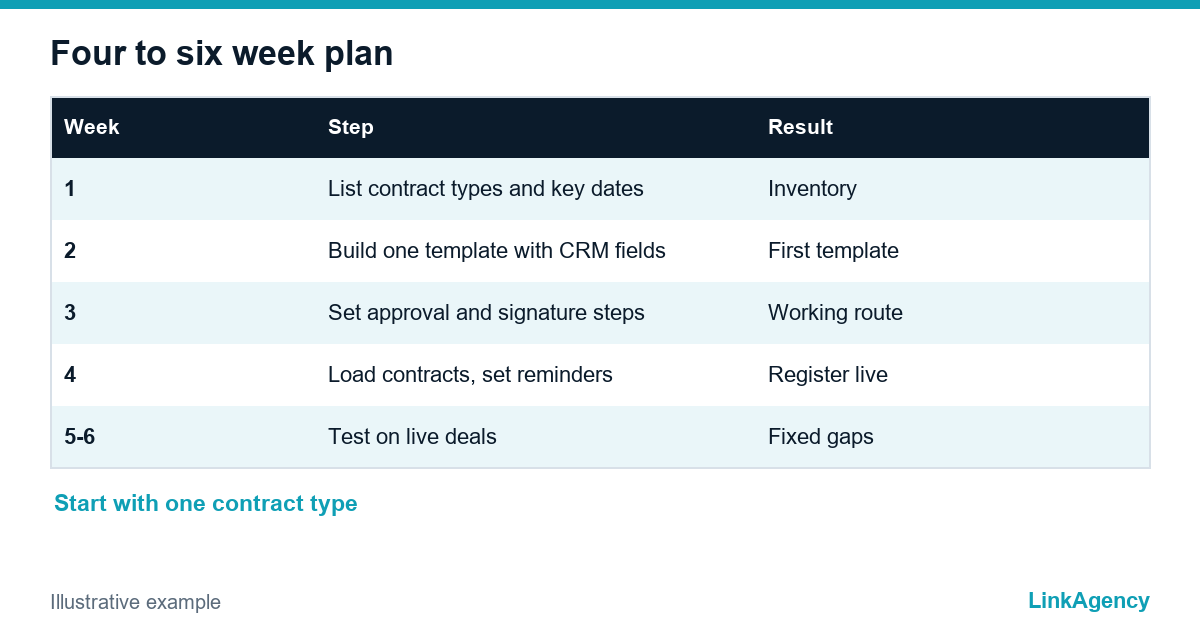
A four to six week implementation plan
- Week 1: list contract types, owners and the dates you must not miss.
- Week 2: build one template with fields from the CRM.
- Week 3: set approval routes and the e-signature step.
- Week 4: load existing contracts into the register and set reminders.
- Weeks 5 to 6: test on live deals and fix the gaps.
When the chain needs your own rules, AI workflow automation connects the steps, custom software development services build what a ready tool lacks, and a web application development service adds a portal for approvals and signatures.
Contract management automation for small business: a free review
Send us how contracts are prepared and stored today. We will show which steps to automate first and what a first version needs. Our AI workflow automation can then build contract management automation for small business around your tools.
- a map of your contract path;
- the first steps to automate.
Leave a request and we will reply within one working day.

Frequently Asked Questions (FAQ)
What does contract management automation cover?
The whole path: a template filled from CRM data, approval, e-signature, one storage with versions, a register of dates and reminders before the notice period. Start with the step where most time is lost.
How do I automate contract creation from a CRM?
Keep one approved template per contract type and fill its data fields from the deal: client, address, price and term. Lock the legal wording and keep a version history. Start with your most common contract.
Is an electronic signature valid in the EU and the US?
In general, yes, but rules differ. The EU eIDAS Regulation sets rules for trust services, and the US ESIGN Act says a contract cannot be denied effect only for being electronic, with exceptions. Ask your lawyer which level and rules apply to your contract.
How do contract renewal reminders work?
They work from a register of contracts with end dates and notice periods. Send one alert well ahead and another closer to the deadline, to a named owner and a backup.
Should I buy a ready service or build an integration?
A ready service fits one contract type and a standard CRM. An integration or custom build fits contracts that depend on your own data, several systems or special approval rules. Check data ownership and exit costs either way.
How long does implementation take?
A first version often fits four to six weeks: inventory, one template, approval and signature, a register with reminders and a live test. Timing depends on how many contract types and systems you have.
Can LinkAgency help with contract management automation for small business?
Yes. We map how contracts are prepared and stored, pick the first steps to automate and build them. The first review is free. Leave a request and we reply within one working day.