Most stores spend their SEO effort on product descriptions and wonder why Google traffic stays flat. Shoppers rarely search for one model: they type “men’s winter boots”, and the pages that win are category pages. Ecommerce category page SEO is how you get your own into that spot. This checklist is for the owner of a store on Shopify, WooCommerce or a custom platform.
Ecommerce category page SEO: why categories bring more search traffic than product pages
A category page answers a broad question: show me everything of this kind. That is the question behind most buying searches, and it matches a page that lists many products with filters, prices and photos, so a shopper can compare options without opening ten tabs. A product card answers a narrow question. It wins only when someone already knows the exact item.
How to choose categories and subcategories that match real search demand
Ecommerce category page SEO starts from what people type, not from your internal catalog tree. Collect long-tail queries from Google Search Console, from your internal site search and from a keyword tool, and group them by product type. Each group with steady demand and enough products becomes a category. Each new filter gives Google another page to crawl and decide whether to index.
Do not create a category for a keyword when you only have two or three products: a filter handles that case better, and a thin page can compete with its parent. Keep nesting to two or three levels.
| Signal | Decision |
|---|---|
| Steady search demand and many products | Create a category |
| Demand exists but few products | Use a filter or wait for range |
| Two categories answer the same query | Merge or differentiate them |
| Seasonal demand, products return each year | Keep the page live all year |
Faceted navigation and sorting: which pages to open for Google and which to close
Why faceted navigation URLs get out of hand
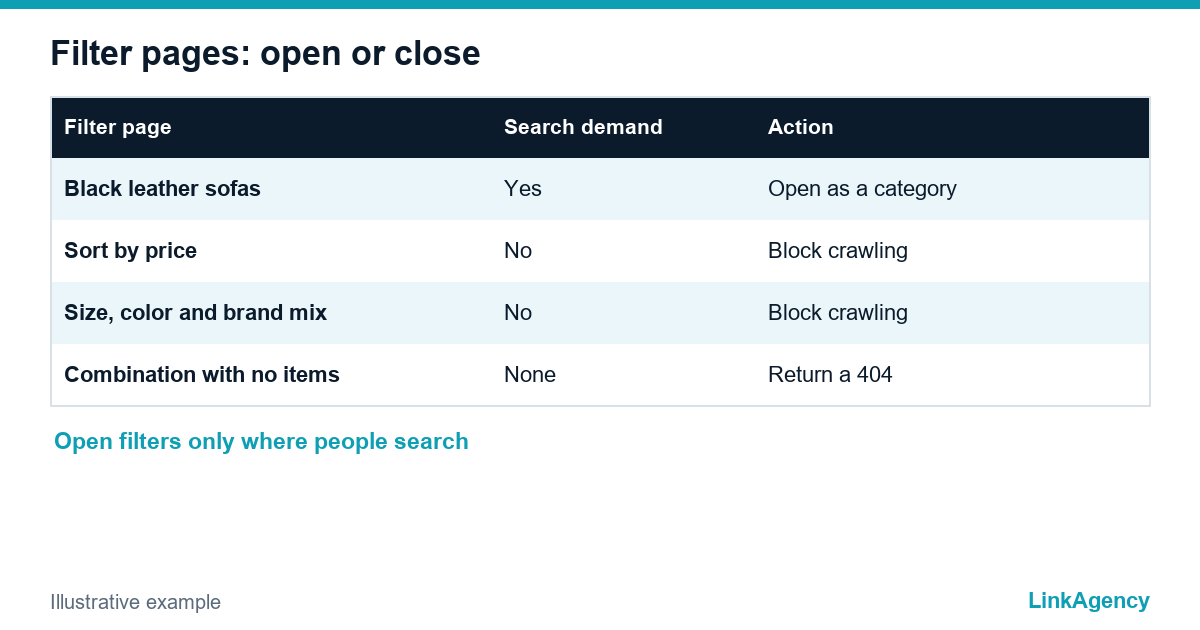
Most stores build filters with URL parameters, and Google warns that this can create an almost endless number of URLs, so crawlers may spend time on combinations nobody searches for. The official page on managing faceted navigation URLs is worth reading first. For faceted navigation seo, decide which filter pages deserve to exist in search, and prevent the rest from being crawled.
Rules that work in practice
- If filtered pages do not need to appear in search, block them with robots.txt. Google lists this as the most reliable method.
- Canonical tags and nofollow links help, but Google calls them less effective over time.
- Use “&” to separate parameters, and keep filter order the same in path-based URLs.
- Return a 404 status for a filter combination with no products.
Open a filter page on purpose only when it has its own demand, such as “brand plus category”, and give it a unique title and text. Technical SEO for ecommerce stands or falls on this step, and our technical SEO services include a crawl and index review.
Pagination without losing products
Long categories need pages or “load more”. Google’s pagination guidance says each page needs its own URL such as ?page=2, pages must link to each other with real links, and page one must not be the canonical for the rest. Google no longer uses rel next and rel prev, and sorting variants such as ?order=price should stay out of the index.
Title, description, text and FAQ: what to put on a category page and where
Here is how to optimize category pages. Put the category name and the main query into the H1 and the title, and keep the title short enough to display. Write the meta description as a small offer.
Category page content for ecommerce works best in two layers. A short intro above the product grid tells a shopper how to choose. A longer block below it holds buying advice, sizing and a few questions with direct answers. Skip keyword walls. Shopify collection page SEO follows the same checklist: edit the collection title, description and URL handle.
Add structured data where it fits: ItemList describes the products on the page, and BreadcrumbList supports the path shown in search results.

Internal links, breadcrumbs and pagination without losing positions
Link every parent category to its children. Cross-link close relatives, such as “office chairs” and “desk accessories”. Show breadcrumbs, because they help people and spread internal links up the tree. Use clear anchors.
Empty and seasonal categories: delete, hide or keep
A seasonal category such as “Christmas decor” should keep its URL all year, so it keeps its history and links. In the off season, show a short note and related categories instead of an empty grid. A category you retire for good should redirect to the nearest parent, not to the home page.
How to measure the result with Search Console reports for category pages
Open the Performance report and filter pages by the folder that holds your categories. Compare impressions and clicks, then click-through rate, for each category over the last three months, and look at the queries behind each page.
- High impressions and low clicks: rewrite the title and description.
- Queries that do not match the page: the category covers the wrong intent, so split it or rename it.
- No impressions at all: check indexing, internal links and the robots rules for that folder.
Review the list once a month and change one thing at a time, because how to optimize category pages is a loop, not a one-off task. An ecommerce SEO audit through our SEO audit services quickly shows categories that lose impressions to a competitor.
Selling in several EU countries
Stores that sell across several EU countries need a separate version of each category per language, with hreflang tags and a canonical tag on each version. Translate the text instead of copying the main language, and check each market in its own Search Console data.
Ecommerce category page SEO: a free express review of your catalog
Send us your store link. We will show which categories already get impressions, where filters create duplicate pages and which categories are missing for the demand in your niche. Our ecommerce SEO services team can then fix the structure and the page templates.
- a list of categories with impressions and clicks;
- a map of filter URLs that waste crawl time.
Leave a request and we will reply within one working day.

Frequently Asked Questions (FAQ)
Why does ecommerce category page SEO matter more than product pages?
Category pages answer broad searches such as “office chairs” and list many products, while a product card wins only for an exact item. They also link to every product inside.
Should filter pages be indexed?
Usually not. Google recommends blocking crawling of faceted URLs with robots.txt when you do not need them in search. Open only filter pages with real demand and give them unique text.
Do category pages need text?
Yes, but short and useful. Category page content for ecommerce is a brief intro above the product grid and a buying guide below it. Keyword stuffing adds nothing for a shopper.
What should I do with an empty or seasonal category?
Keep a seasonal page live all year with links to related categories. Redirect a retired category to its closest parent, and return a 404 status for filter combinations with no results.
How do I check category pages in Google Search Console?
Open the Performance report, filter pages by your category folder and compare impressions, clicks and click-through rate. The queries behind each page show whether intent matches.
Can LinkAgency review our store categories?
Yes. We check which categories get impressions, where filters create duplicates and which categories are missing. The first consultation is free. Leave a request and we reply within one working day.