A purchase request waits in an inbox for days, a discount goes unanswered while the buyer cools off, and a holiday request is approved by whoever sees it first. None of this is a software problem yet. It is a missing rule. Fix that first. This guide shows how to design an approval workflow for a small team: which requests to start with, how to write the rule on one page, how to route by amount and cover absences, how to keep a decision log and when no-code tools are enough. Figures from vendor guides are labelled as examples, not norms.
Why every approval workflow stalls: unclear owners, lost emails and silent waiting
Most delays come from the same few causes. The request arrives incomplete, the approver is unknown, nobody set a deadline, and silence is treated as a pause instead of an answer. When the approver is away, the request simply waits. The Productive guide calls a workflow broken when a request passes through more than two handoffs, which is a vendor test, not a law. Count the handoffs in your own last five requests before you buy anything. That shows where to start.
Which approvals to automate first: purchases, discounts, time off and contracts
Start with requests that are frequent and follow clear rules. Rare, strategic decisions are poor candidates. The rule changes every time, so no tool can follow it.
- Purchases: a purchase request in a standard category, from a known supplier and inside a limit.
- Discounts: a corridor the manager may grant alone and a higher step for exceptions.
- Time off: dates, the remaining balance and who covers the work.
- Contracts: the tool only routes the draft and records the decision, while the legal review stays human.
List each type, note how many requests it produces and where they get stuck, then pick one. Automate one step of the approval first and keep the rest of the workflow manual until the rule works. Our business process automation work follows this order: one process, one rule, one measurement.
One-page approval rules: the table to write before you choose any tool
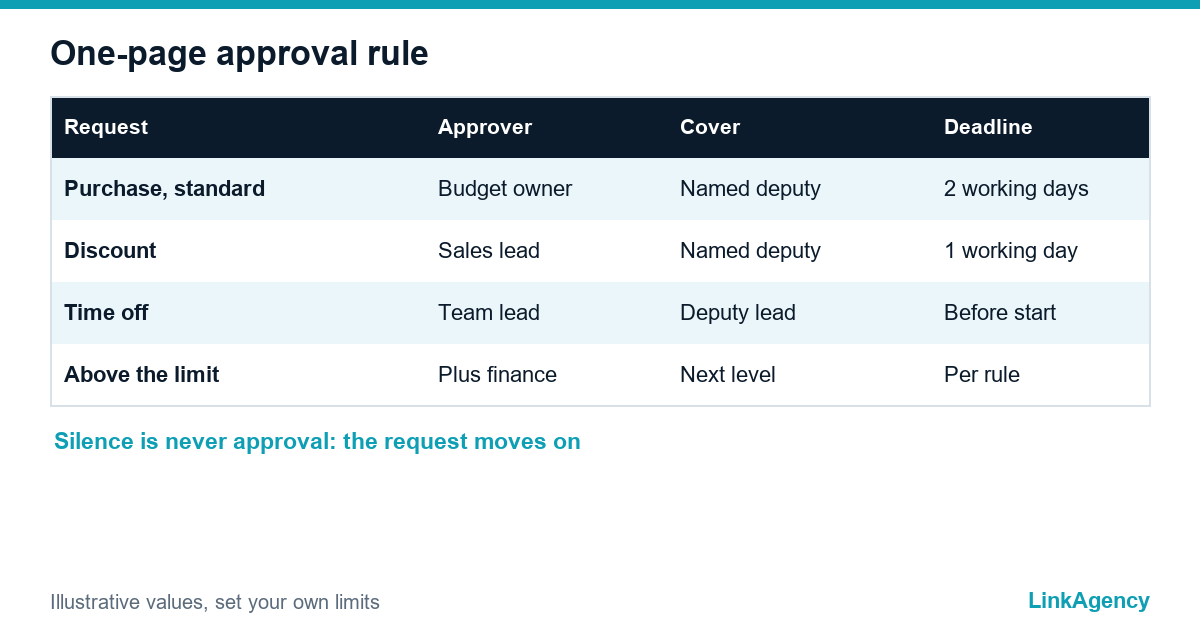
A rule that fits on one page removes most arguments. Productive suggests five columns: what is approved, who approves, when a second approver joins, who covers when the first is away, and the decision deadline. The values below are illustrative, so replace them with your own limits.
| Request | Approver | Second approver | Cover | Deadline |
|---|---|---|---|---|
| Purchase, standard category | Budget owner | Finance, above the limit | Named deputy | Two working days |
| Discount | Sales lead | Director, above the corridor | Named deputy | One working day |
| Time off | Team lead | None | Deputy lead | Before the start date |
Write what silence means in the last column. In our rule silence is never approval: after the deadline the request goes to the cover and then to the next level.
- Name one request type and its owner.
- Fill the five columns in about an hour.
- Show the page to every approver and fix disagreements on paper.
- Only then open a tool.

A request form instead of an email chain
An email chain hides the status and loses attachments. An approval request form gives every request the same fields, so an incomplete one bounces back before it reaches the approver. These approval requests then carry the amount, the reason, the budget code and the supplier or dates in one place.
What the form must collect
Requester, request type, amount or dates, the reason in one sentence, the attachment and the deadline. An AI step can read a free-text message and fill the fields, as in AI workflow automation, but the route and the final decision stay with fixed rules and a person.
Routing by amount and type, reminders and a named deputy
Routing sends each request to the right person without a manager forwarding it by hand. A low amount goes to the budget owner, a higher one adds finance, and an exception adds the director. Add a reminder before the deadline and an automatic step to the cover after it. The Approveit guide advises naming who covers when the approver cannot act, and a named deputy is the cheapest fix for time off. Test it. Run three requests: a complete one, an incomplete one and one that is rejected. That is how the guide compares tools. Automated approvals of low-risk, standard cases are fine, but payments and commitments above the limit stay with a person.
The decision log: who approved what, when and on what basis
A log settles the dispute you will have in six months, when nobody remembers who agreed to the exception and why the amount was raised. Record the requester, the approver, the time, the version of the request, the decision and a comment. The Wrike guide describes the same idea as an activity stream of who asked, who approved, why it was denied and when. Time-off requests hold employee data, so ask a lawyer how long to keep them under GDPR or UK GDPR and who may read them. The log is a record of decisions and does not replace accounting or HR records.
No-code or custom development: how to choose the right tool
For a few rules and one or two systems, forms plus workflow automation tools such as Slack, Teams, Make or Power Automate are usually enough for a small business workflow. Custom work pays off when requests must read and write to your ERP or CRM, when exceptions are frequent, or when you need roles and a full audit trail. Check what the free tier hides: Activepieces, for example, lists audit logs on its paid custom plan, according to its own guide.
- No-code: few rules, one team, a person who owns the flow.
- Custom: many exceptions, ERP integration, strict roles and logs.
- Either way: write the one-page rule first.
If you decide to order approval workflow automation, our custom software development services build the form, the routing and the log around your rule. Measure the time from request to decision and the number of requests without an owner before and after, and do not promise yourself a fixed gain.
Approval workflow: a free review of your approval rules
We map one of your processes, write the one-page rule and show where a form, routing and a log would remove the waiting.
- the rule table for one request type;
- a recommendation: no-code or custom.
Send a request and we will reply within one working day with a plan for the review and, if you need it, for business process automation.

Frequently Asked Questions (FAQ)
Which approvals should a small business automate first?
Start with frequent requests that follow clear rules: standard purchases, discounts inside a corridor and time off. Leave rare strategic decisions and legal review with a person, and let the tool only route and record them.
What goes into a one-page approval rule?
Five columns: what is approved, who approves, when a second approver joins, who covers when the first is away, and the decision deadline. Add what silence means, so that no answer is never treated as approval.
How do I handle an approver who is on holiday?
Name a deputy in the rule and let the tool pass the request to that person after the deadline, then to the next level. Test it before launch with a real request.
Do I need special software or can forms and Slack be enough?
For a few rules and one team, forms plus Slack, Teams, Make or Power Automate are usually enough. Custom development pays off with ERP integration, many exceptions or strict audit needs.
What should the decision log contain?
The requester, the approver, the time, the version of the request, the decision and a comment. Ask a lawyer how long to keep it and who may read it, because requests such as time off contain employee data.
How do I know that automation helped?
Measure the time from request to decision and the number of requests without an owner before and after. Do not set a target before you have measured a couple of weeks of real requests.
How can LinkAgency help with approval workflow automation?
Send us one process. We write the one-page rule, advise no-code or custom, and build the form, routing and decision log if you decide to order the work.