Pages that once brought visitors lose clicks quietly, while the budget keeps going into new articles. Before you commission another post, look at the old posts: a refreshed page keeps its address, its links and its history. This is a content refresh checklist for an owner without technical skills. It shows how to find the pages that fell, how to choose between update, merge and redirect, what to change beyond the date and how to judge the result without promising growth. It is the practical answer to how to update old blog posts for seo, and the numbers quoted come from named sources as examples, not as guarantees.
How to update old blog posts for SEO: why content ages and loses traffic
Content decays for ordinary reasons. Facts and prices go out of date, competitors publish better pages, the intent behind the query shifts and screenshots show interfaces that no longer exist. Animalz, a content agency, treats a fall of more than 20 percent in organic traffic over 90 days as a signal to look closer, though that is one vendor’s threshold and not a law. A drop is not always a problem. Seasonal demand and a changed results page can both lower clicks while the page stays fine. Pages losing clicks are the first candidates for a content refresh. So the first job is to separate pages that really lost ground from pages that merely moved with the season.
How to find pages losing clicks in Search Console in 15 minutes
Open the Search results report in Google Search Console. Set the date range to compare the last three months with the previous three, or with the same three months of last year if your business is seasonal. Open the Pages tab and sort by the difference in clicks, largest loss first. Export the list.
What to note for each page
Note clicks, impressions and average position. If clicks fell while impressions held, the snippet or the results page changed. If impressions fell, positions or demand dropped. Before you edit a page, write down the queries it ranks for, as Orbit Media advises, so you do not remove what works.
Update, merge or remove: a simple decision table
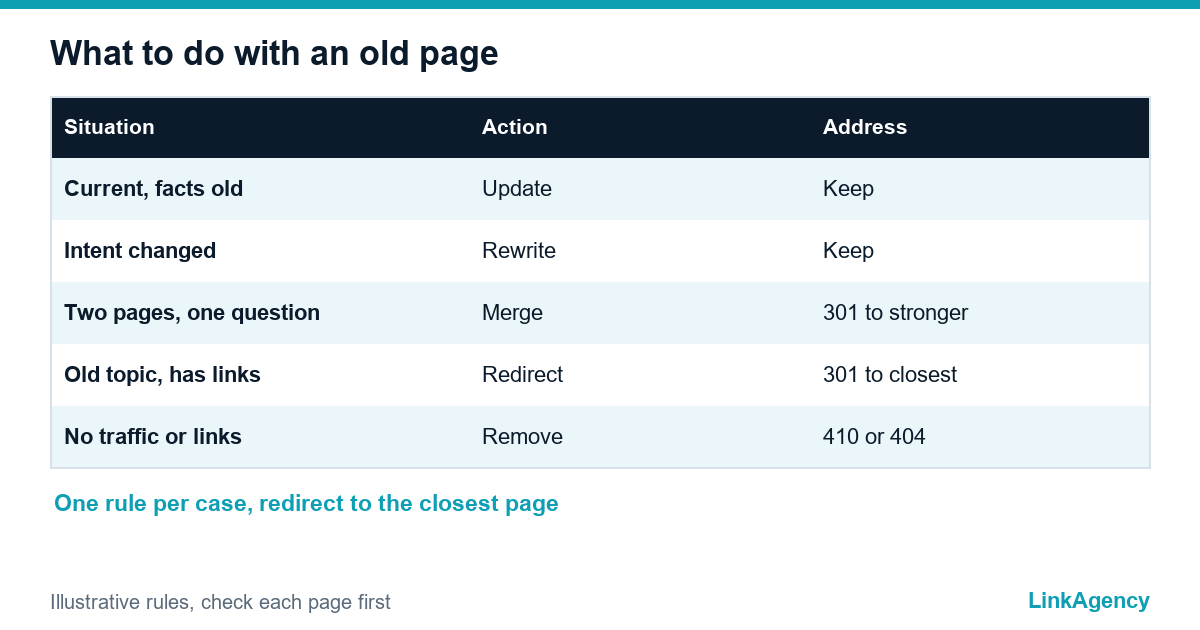
Start with a content audit of the pages the report flagged. Use one rule per case. Old posts that still draw clicks need only an update. A page that is still relevant but partly outdated gets an update. A page whose intent has changed or that never answered the question well gets a rewrite on the same address. Two pages that answer one question get merged, with a 301 redirect from the weaker address to the stronger. A page with no traffic, no links and no business value can go, which is the content pruning that SEO guides describe. Yoast advises a 301 redirect to the closest related page, never to the homepage, and a 410 status when no relevant target exists.
| Situation | Action | Address |
|---|---|---|
| Still relevant, facts old | Update | Keep |
| Intent changed, weak answer | Rewrite | Keep |
| Two pages, one question | Merge | 301 to the stronger |
| Old topic but has links | Redirect | 301 to nearest page |
| No traffic, links or value | Remove | 410 or 404 |
What to change in substance: facts, EU and US rules, examples and client questions
Changing the date is not an update. Replace outdated facts and prices, and put a source next to every figure. Check legal statements against the current rules for the EU and the US, and remove what you cannot confirm. Add examples from real work and answer the questions clients now ask, which you can find in the queries that show impressions but few clicks. Put a short direct answer under each heading. Fix broken links and old screenshots. Change the title and meta description only when the click rate fell, because a title that already earns clicks should stay.
- List the queries the page ranks for.
- Replace outdated facts, examples and screenshots.
- Add answers to current client questions.
- Fix broken links and check every source.
- Show a new date only after a real change.

How not to create keyword cannibalization between your own pages
When several pages target the same query, they split clicks and neither ranks well. In Search Console, filter by one query and look at which pages appear for it. If two or three pages swap places, decide which one should win. Merge the others into it, move the unique parts across and redirect the old addresses. If the pages serve different intents, separate them by rewriting the headings and the first paragraph. This is also how to update old blog posts for seo without hurting what ranks. Run this check before any merge, and never merge pages that answer different questions just to cut the count.
Internal links and a clear next step for the reader
A refreshed page should lead somewhere. Add internal links from newer related pages to the updated one, and from the updated page to your service page where it fits the topic. Orphaned pages, with no links pointing to them, are the first to fade. End each page with one clear action: a question to ask, a service to look at or a form to fill in. Support for such a path comes from SEO services that connect articles to the service pages they should feed, and from content creation services that rewrite the weak ones.
How to judge the result and when to review pages again
Keep a log of content updates: page address, date, what changed and who changed it, and review the content refresh strategy once a quarter. After Google has recrawled the page, compare the next 28 days with the 28 days before, using the same days of the week, and look at clicks, impressions, position and conversions. If two to three months pass with no effect, rewrite the page instead of updating it again. Review price and comparison pages every quarter, how-to pages twice a year and evergreen pages once a year. Do not promise yourself growth: a content refresh gives a page a fair chance, not a guarantee, and Search Console shows the evidence. Our digital marketing SEO work puts such a review on a calendar.
How to update old blog posts for SEO: free content audit of your site
We will check which pages lost clicks, which to update first and which to merge, and give you a short plan with a review date.
- list of pages that lost clicks;
- decision for each page and an order of work.
Send a request and we will reply within one working day with a free audit plan.

Frequently Asked Questions (FAQ)
How do I find old pages that lost clicks?
In Search Console open the Search results report, compare the last three months with the previous three, open the Pages tab and sort by the difference in clicks. Export the list and check impressions and position for each page.
Should I update, merge or delete an old post?
Update a page that is relevant but partly outdated, rewrite one whose intent changed, merge pages that answer the same question and remove pages with no traffic, links or value. Redirect to the closest related page when the address has links.
Is changing the date enough to refresh a page?
No. Change the date only after a real edit such as new facts, examples or answers. A date without a change is not an update and may be treated as a warning sign.
Should I change the URL when I update a post?
Keep it. The address is already indexed and may hold links. If you must change it, set a 301 redirect from the old address.
How long until I see a result?
Wait for the page to be recrawled, then compare 28 days after with 28 days before, using the same days of the week. If two to three months pass with no effect, rewrite instead of updating again.
How do I avoid keyword cannibalization?
In Search Console filter by one query and see which pages appear. If several swap places, pick one to win, merge the others into it and redirect, or separate their intents.
How can LinkAgency help with old content?
Send a request with your site address. We run a free content audit, list the pages that lost clicks and give you a decision and an order of work for each.