You have a blog and a set of service pages, yet the articles never lead to a service and the most important pages sit three clicks deep. Some pages have no links at all, so neither Google nor a customer ever finds them. This guide gives a one-day plan for internal linking for business website owners: pick five key pages, find the pages nobody links to, connect articles to services and write clear link text. It ends with a checklist for every new article.
Why internal linking for business website owners matters beyond search engines
Internal links are the signposts of your site. For a visitor they answer “where do I go next?”, and for a search engine they show which pages exist and which matter most. A blog post that explains a problem and then points to the service that solves it turns a reader into an enquiry. Without that sign, the reader leaves. Inside the website, a few well-placed links change which pages internal visitors reach. Good internal linking therefore pays twice: it helps people and it helps Google.
Five key pages that should receive the most internal links
Do not try to link everything. List the pages that earn money or build trust (each one is a pillar page for its topic): your main service pages, a pricing or contact page, and one or two proof pages such as a case study. Those five get the most internal links from the rest of the site. Everything else supports them. A short list keeps the plan finishable in a day.
| Page type | Gets links from | Links out to |
|---|---|---|
| Service page | Blog posts, menu, footer | Case study, contact page |
| Blog post | Related posts, hub page | One service page |
| Case study | Service page | Contact page |
| Contact page | Everywhere via the menu | None needed |

How to find pages with no links in thirty minutes
Orphan pages and how to spot them
An orphan page has no internal links pointing to it. Export your page list from the sitemap, then compare it with the pages that appear in a crawl or in the links report of Search Console. Anything in the sitemap but missing from the crawl is a candidate. The orphan pages seo checks of a good audit do exactly this. Google can only follow links that are real, crawlable links, so see Google’s guidance on crawlable links when you build them.
The internal linking strategy: article, service, proof
The simplest scheme has three steps. A blog post answers a question and links once, naturally, to the service that solves it. The service page links to a case study or an answer to the next question. The case study links to the contact page. That is how to add internal links for service pages without making a maze. A contextual link inside a sentence beats a list of links at the bottom, because the reader gets the reason to click.
Link text for internal links: write it clearly
The anchor text of a link tells both readers and Google what to expect. “Click here” tells them nothing. Use a short, natural phrase that names the destination, such as “SEO audit for small business”. Avoid repeating the same exact phrase for every link and avoid stuffing keywords: describe the page the way a person would. Our guide to what an SEO audit report includes shows how this reads in practice.
Menu, footer and breadcrumbs: what a developer must do
- Put the main service pages in the menu, and keep the number of items short.
- Use the footer for pages you want visible everywhere, such as contact and privacy.
- Add breadcrumbs so every page shows its place in the structure.
- Keep important pages within three clicks of the home page, because crawl depth and click depth both grow when pages hide in sub-menus.
Our web development services add these elements when a site is built or reworked. Menus and breadcrumbs also follow the advice in the Google SEO starter guide on clear site structure.
A checklist for every new article
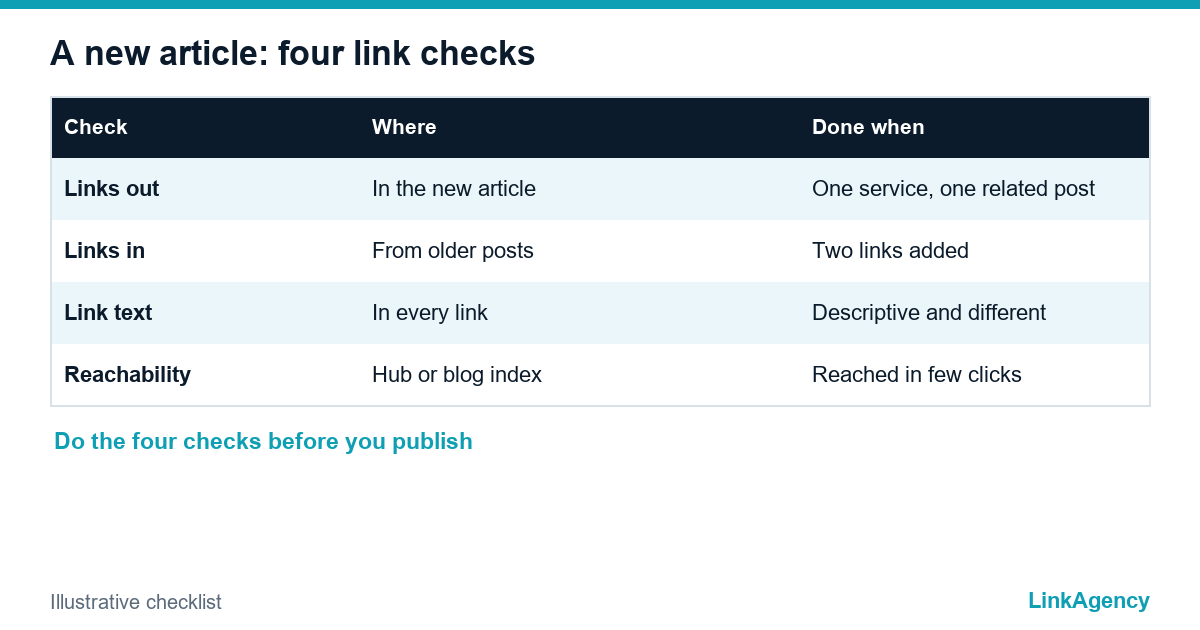
- Link from the new article to one relevant service page and one related post.
- Link to the new article from two older posts where it fits.
- Check each link text: is it descriptive and different?
- Confirm the article is reachable from a hub page or the blog index.
This routine keeps the internal linking strategy alive after the one-day project, and our SEO services can run it for you.
How to check the result once a month
Once a month, open the links report of Search Console and look at the pages that receive the fewest internal links. Make sure the five key pages are near the top. Look for new orphan pages, broken links and redirects, and fix them. Note the date and what changed, so you can see over time whether more of the pages that matter get found.
Internal linking for business website: a free audit
Send us your site address. We will look at its structure and show five pages that need more links first, and the orphan pages we find. If you want it done, our SEO services and SEO audit services cover the whole plan.
- a list of five pages to strengthen first;
- a map of pages without internal links.
Leave a request and we will reply within one working day.

Frequently Asked Questions (FAQ)
What is internal linking for a business website?
It is the set of links between your own pages, such as a blog post that points to a service page. It helps visitors move towards an enquiry and helps search engines find and understand your pages.
How do I add internal links to existing articles?
Pick the pages you want to strengthen, find older articles that mention the topic and add a natural link inside a sentence. Use descriptive link text and avoid repeating the same phrase everywhere.
How do I find orphan pages?
Compare the pages listed in your sitemap with the pages found by a crawl or shown in Search Console. Pages that appear in the sitemap but receive no internal links are orphan pages.
How many internal links should a page have?
There is no magic number. Add links where they help the reader, keep them relevant and make sure every important page is reachable within a few clicks from the home page.
Should service pages link to blog posts or the other way round?
Both, with different jobs. Blog posts link to the service that solves the problem, and service pages link to proof such as a case study or an answer to the next question.
How can LinkAgency help with internal linking?
We review your structure, find orphan pages and show the five pages to strengthen first. The first audit is free. Leave a request and we will reply within one working day.