The dashboard says you got 400 clicks, but the leads come from 40. The rest of the budget went to people who searched for a job, a free version or a different service. Google Ads negative keywords stop that spend, and the process behind them is simple: look at what people actually typed once a week, sort the phrases into three groups and add the right words in the right match type. This guide shows how, and how to avoid the one costly mistake, blocking a search that brings customers.
Where the clicks really go: Google Ads negative keywords and the hidden spend
You pay for the words people type before the click, not for the keywords you chose. A broad keyword can match searches that look related but are not, and the panel hides this behind averages. Only the list of real queries shows it. That is why negative keywords google ads small business owners need start with the data, not with a generic list of one hundred words.
What negative keywords are in plain words, and how to add them
A negative keyword is a word or phrase that tells Google not to show your ad when a search contains it. Add “free” and your ad will skip searches such as “free accounting software”. It saves clicks that never turn into customers, so the same budget reaches more buyers. One negative word can save many clicks on keywords that never pay. Here is how to add negative keywords: choose the campaign, open its negatives page and paste the words, one per line. They work like a filter, and a filter needs checking.
| Group | Examples | What to do |
|---|---|---|
| Clearly wrong | jobs, free, course, diy | Add as negative now |
| Doubtful | price, review, near me | Wait for more data |
| Needed | your service plus a city | Keep, never block |

The search terms report: what to look at once a week
A fifteen-minute weekly review
Open the search terms report and sort it by cost. For each phrase that spent money, ask one question: would I want this person as a customer? Mark the answer. A weekly review catches waste while it is small, and the report shows the queries behind every click.
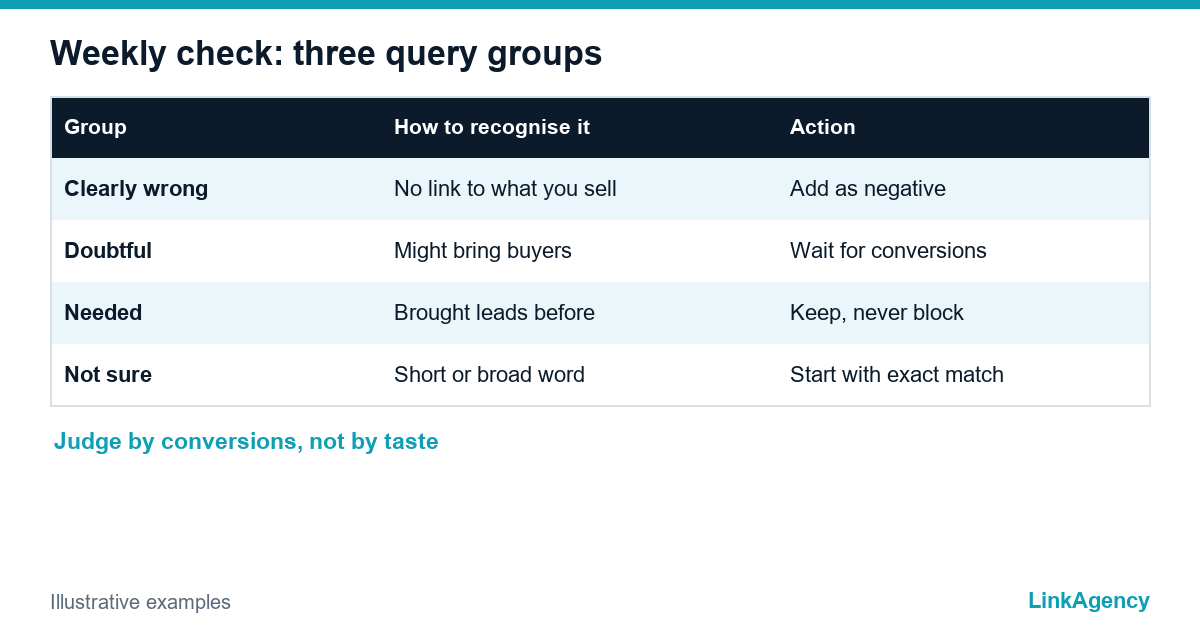
Three groups of queries to sort
Clearly wrong phrases have nothing to do with what you sell: jobs, free, tutorials, a competitor’s product. Doubtful phrases might bring buyers, for example “price” or “reviews”, so wait until they have enough clicks and look at conversions before you decide. Needed phrases bring leads and must stay. Judge by conversion, not by taste, because a phrase that looks odd can still pay.
Match types and the traps of broad match negatives
There are three match types. A broad match negative blocks a search only if it contains all your words, in any order. A phrase match negative blocks the exact phrase with extra words around it. An exact match negative blocks only that exact query. According to Google’s help page on negative keywords, negatives do not match close variants such as plurals and misspellings, so you add those yourself. Broad match negative keywords mistakes are common: one short word, such as “how” or “cheap”, can silently block good searches. Start with phrase or exact match when you are unsure.
How not to block customers
- Search your own list in the conversion data: did this phrase ever produce a lead?
- Check that the word is not part of a phrase you bid on.
- Add in exact or phrase match first and watch for a week.
- Look at impressions after the change: a sudden drop means you blocked too much.
Keep a short log of what you added and why, so that a mistake can be undone.
Negative keyword lists at account and campaign level
Do not type the same words into every campaign. Use a negative keyword list: a shared list for words that are wrong for the whole business, such as jobs and free, and separate lists for single campaigns where a word is wrong only there. Account level and campaign level work together, so decide where each word belongs. If you want a second opinion on the setup, our Google Ads management team reviews it.
Five questions to ask a contractor
- How often do you review the search terms report, and where can I see the notes?
- Who approves new negatives, and how do you check they do not block leads?
- Which lists exist at account and campaign level?
- Can I get the change log and a report of wasted spend saved?
- Do you also check Performance Max and broad match campaigns?
A contractor who cannot answer these is probably not doing the weekly work. For wider context, our guide to Google Ads vs Meta Ads shows when search is the right channel, and a performance marketing agency can run the whole routine. Pair it with SEO audit services when you want the organic side checked too.
Google Ads negative keywords: a free account review
Send us read-only access to your account. We will look at the search terms report and show where the extra clicks go and which negatives to add first. If you want the routine done for you, our Google Ads management and performance marketing agency services handle it.
- a list of wasted queries with a suggested match type;
- a short weekly routine for your team.
Leave a request and we will reply within one working day.

Frequently Asked Questions (FAQ)
How do I add negative keywords in Google Ads?
Open the search terms report, mark phrases that bring no customers and add them as negative keywords in a campaign or in a shared list. Choose phrase or exact match when unsure, and keep a log of changes.
How often should I review the search terms report?
Once a week is a good rhythm for a small account, and more often in the first weeks of a new campaign. A short review catches waste while it is small.
What is the difference between broad, phrase and exact match negatives?
A broad match negative blocks a search that contains all your words in any order, phrase match blocks the phrase with extra words, and exact match blocks only that query. Negatives do not match close variants, so add plurals yourself.
Can negative keywords block real customers?
Yes, a short or broad negative can block good searches. Check conversion data before adding, start with exact or phrase match and watch impressions for a week.
Should I use account-level negative keyword lists?
Yes, for words that are wrong for the whole business, such as jobs or free. Use campaign lists for words that are wrong only in one campaign.
How can LinkAgency help with Google Ads negative keywords?
We review your search terms report, show where the extra clicks go and set up a weekly routine. The first review is free. Leave a request and we will reply within one working day.