Meta has put an assistant inside the WhatsApp Business app that answers customers on its own. For a shop or a service firm that sounds like free staff at night, and also like a risk: a wrong price or a promise nobody approved goes straight to a real customer. A whatsapp business ai agent is worth switching on only after a few checks. Below are seven of them and a two-week pilot that keeps the downside small.
WhatsApp Business AI agent: what it does and what you still own
According to Meta, the assistant answers questions, recommends products from your catalog, books appointments, qualifies leads and hands the chat to a person when needed. It replies in the customer’s language and in the tone you set. You turn it on in the WhatsApp Business app under Tools, in the section called Meta Business Agent, and it learns from your website, catalog and Facebook Page. Read the official product page first, because details change.
What stays with you is everything the agent reads and everything it promises. The tool is not magic, and it does not know your return policy unless the policy is written somewhere it can read.
Seven checks before you switch on a whatsapp business ai agent
These points fit the Meta Business Agent and any other ai agent for whatsapp customer service you may pick later. Customer chats are both the data you protect and the material you test with.
1. Availability for your country and account
Meta describes the feature as available to eligible businesses in select markets. Check whether your country is among the eligible markets and what your account type allows. Do it before you plan anything. The developer overview lists conditions such as a number on the WhatsApp Business Platform, an allowed country and no other AI agent on the same number, and some industries are excluded. The list can change, so verify it in your own account.
2. Sources the agent will read
An agent answers only from the source you give it, so every source needs a named owner. Walk through the website, the catalog and the Facebook Page, and fix old prices, closed branches and outdated hours before launch. Add a short FAQ for hours, returns and delivery, because a wrong page becomes a wrong answer in the chat.
3. Language and tone
Write down how you speak to customers: formal or friendly, short or detailed, and which phrases you never use. Then test the replies in every language your customers write in.
4. Handoff to a human in whatsapp business
Handoff keeps customer chats from ending in a dead end. Decide which topics always go to a person: complaints, refunds, custom quotes, anything legal. The handoff can be set up by topic, according to Meta. Write an escalation rule: who receives the chat, at what hours and how fast.
5. Data, consent and GDPR
Customer chats contain personal data. For a whatsapp ai assistant gdpr questions come first: what is stored, who processes it and on what basis. Consent has conditions of its own, described in Article 7 of the GDPR. Ask your lawyer to confirm the privacy notice and the roles of the parties. If chats feed a longer chain of orders and billing, business process automation keeps the data flow under control.
6. A test chat with real customer questions
Collect the questions customers actually ask, using old customer chats with names removed, including the awkward ones, and run them in a test chat. Mark each answer as correct, incomplete or wrong, and fix the source for every wrong one.
7. Metrics and the price
Choose what you will count: response time, the share of chats passed to a human, bookings and orders that came from chats. The company says it starts free and will later move to paid subscriptions, so check the current price in your account and plan for it.
| Check | What to look at | Red flag |
|---|---|---|
| Availability | Country, account type, industry | Feature not shown in the app |
| Sources | Website, catalog, Page | Old prices and hours |
| Language and tone | Replies in each language | Wrong register |
| Handoff | Topics, owner, hours | Nobody picks up |
| Data | GDPR, notice, consent | No legal review |
| Test chat | Real questions | Wrong answers uncorrected |
| Metrics | Response time, handoffs | Nothing measured |

A two-week pilot instead of a full launch
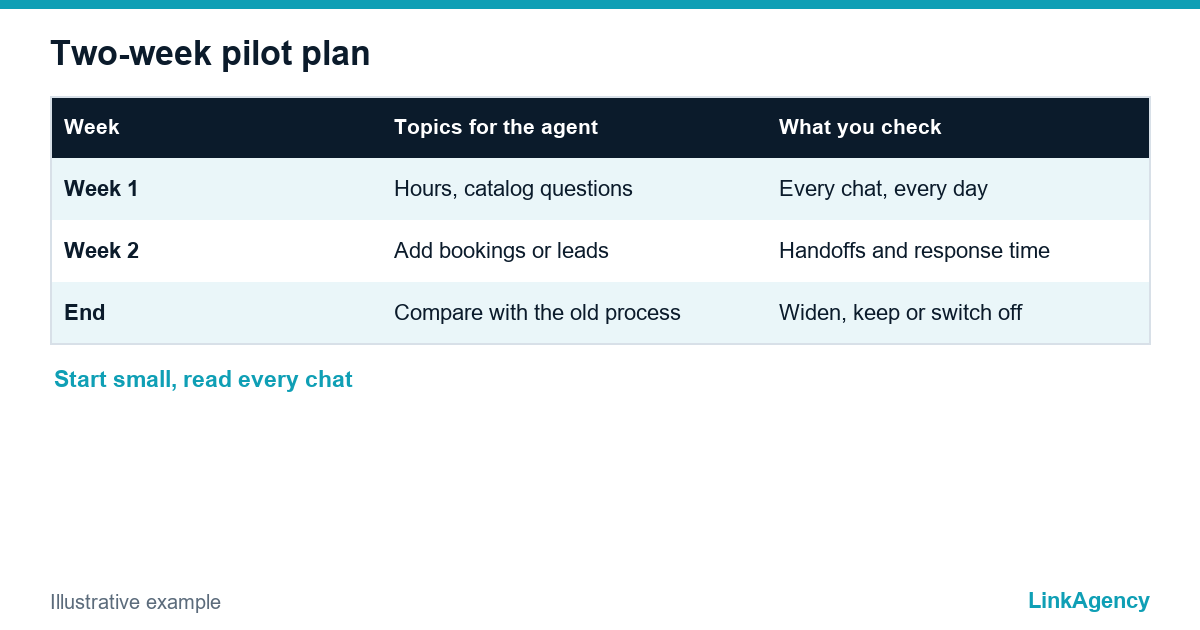
In the first week, let the agent handle two or three safe topics, such as opening hours and catalog questions, and read every chat each day. In the second week, add booking or lead questions if the first week was clean. At the end, compare response time and handoffs with the old process and decide: widen, keep as is or switch off. Repeated steps that appear in the pilot, such as copying a lead into the sheet, are a job for AI workflow automation.
When a chat agent is not enough
A tool inside the app answers questions. It will not update your CRM, route an order to the warehouse or tie chats to billing. For those, a whatsapp chatbot for small business needs connections to your systems, and an ai agent for whatsapp customer service often grows into a wider project. That is where AI integration services help to link the agent to your data, and the same team can set the handoff to a human so the chat never ends in a dead end. Fast. Clear.
- Check availability for your country and account.
- Clean the sources and name owners.
- Set the tone, the handoff and the legal basis.
- Run the test chat, then a two-week pilot.
WhatsApp Business AI agent: plan the launch with us
Tell us about your chats. We review the sources, the handoff rules and the data side of your whatsapp business ai agent, and tell you whether the built-in tool is enough or you need a custom ai agent for whatsapp customer service.
- a checklist of the seven points for your business;
- a pilot plan with metrics.
Leave a request and we will reply within one working day.

Frequently Asked Questions (FAQ)
What can the Meta AI agent in WhatsApp Business do?
According to Meta, it answers customer questions, recommends catalog products, books appointments, qualifies leads and passes the chat to a person when needed. It uses your website, catalog and Facebook Page as sources.
Is it available in my country?
Meta says it is available to eligible businesses in select markets. Check your country and account type in the app and in Meta’s documentation, because the list and the conditions can change.
How much does it cost?
Meta says it starts free and will move to paid subscriptions later. Check the current price in your own account before you plan the budget.
Is it safe for customer data under GDPR?
That depends on your setup, your privacy notice and the roles of the parties. Customer chats contain personal data, so ask your lawyer to review the notice, the legal basis and the processing terms before launch.
How do I stop it from giving wrong answers?
Clean the sources, because the agent answers from them. Then run a test chat with real customer questions and fix the source for every wrong answer before you go live.
Can I choose which chats go to a human?
Meta says the handoff can be configured by topic. Decide which topics always go to a person, such as complaints, refunds and custom quotes, and name who receives them.
Can LinkAgency help connect the agent to our systems?
Yes. We review your sources, handoff and data side, then connect chats to your CRM and order flow if the built-in tool is not enough. Leave a request and we reply within one working day.