The site seems to work, yet on a phone it loads slowly, jumps when it opens and lags when you tap. The owner sees a red score in a report and does not know what it means for leads or what to ask the developer. Core Web Vitals for business websites are not a concern of programmers: they measure whether a visitor stays long enough to enquire. These five checks take one evening and need no developer.
Core Web Vitals for business websites: why website speed means money and leads
A slow page costs the owner leads long before a developer hears about it. The visitor taps, waits and leaves, and the site never learns why. Core Web Vitals turn that feeling into three numbers, and the website speed they describe is measured on real visits, not on your laptop. Fix the biggest problem first. You often gain more than a redesign would give.
LCP, INP and CLS explained in plain words: which values count as good
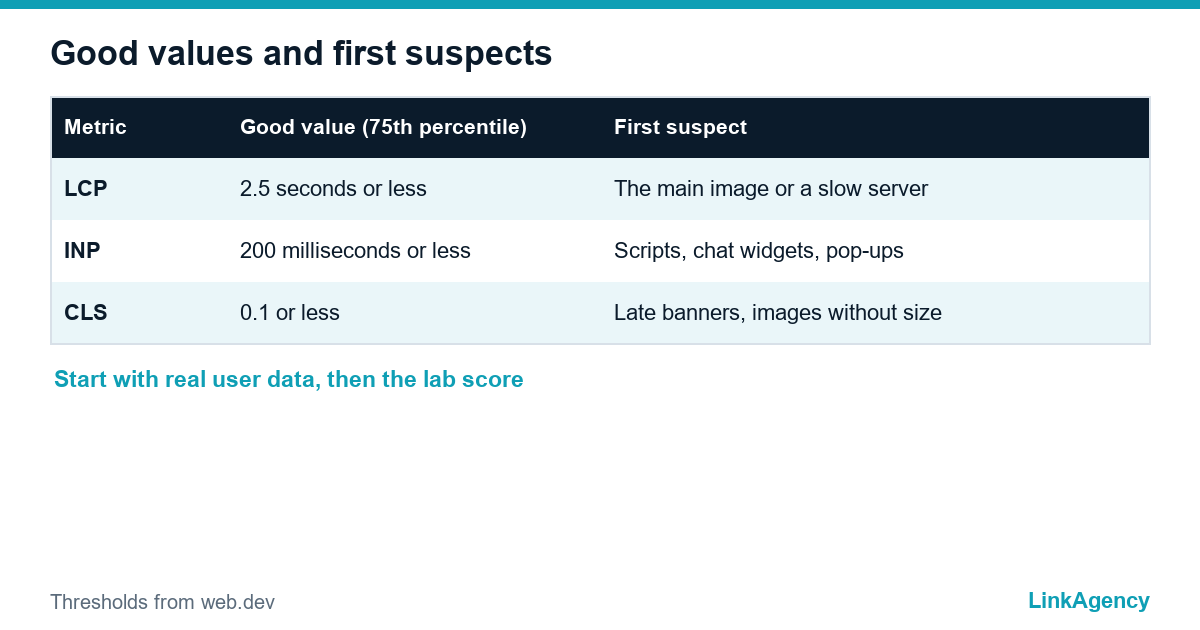
Google publishes the thresholds on web.dev. LCP, how fast the main content appears, should be within 2.5 seconds. INP, how fast the page reacts to a tap, should be 200 milliseconds or less. CLS, how much the layout jumps, should be 0.1 or less. LCP INP CLS explained in one line: loading, reaction, stability. These values apply to the 75th percentile of page loads, separately for phones and computers. INP replaced the older FID metric in 2024.
| Metric | What it shows | Good value |
|---|---|---|
| LCP | When the main content appears | 2.5 seconds or less |
| INP | How fast the page reacts to a tap | 200 milliseconds or less |
| CLS | How much the layout jumps | 0.1 or less |

Check 1: real user data, not only a lab score
Open PageSpeed Insights, enter your page and look first at the top block with real user data, from CrUX. The lab score below it is one test on one simulated device. Field data shows what visitors actually experience over the last 28 days. If the page has no field data, the Search Console report on Core Web Vitals shows groups of pages. How to check website speed starts with field data, then lab data.
Check 2: what is the heaviest thing on the first screen (LCP)
PageSpeed Insights names the element behind LCP, usually the main image or a large headline block. Look at it. Is it huge, in an old format or loaded late? Compress it, serve a modern format and do not lazy-load the main image. Poor hosting also slows the start, so ask what the server response time is.
Why the first image matters most
The first screen decides whether the visitor stays. Slow website causes often hide in one oversized image or one slow server response, so start there before touching anything else.
Check 3: which scripts and widgets slow down taps (INP)
Chat widgets, pop-ups, trackers and sliders each add script weight that keeps the page busy. Try the page on a phone: tap the menu, a filter and the form. If it hesitates, list the scripts and ask which of them you really need. Remove the ones that do not bring leads, and ask the developer to delay the rest until after the first tap.
Check 4: what makes the page jump while loading (CLS)
A banner that appears late, an image without set dimensions or a font that swaps can push the content down just as the visitor taps a button. Watch the page load on a phone and note what moves. The fixes are simple: set width and height for images, reserve space for banners and load fonts sensibly.
Check 5: a test on an average smartphone and a mobile network
Do not test only on a new phone with fast Wi-Fi. Use a mid-range phone, switch to a mobile network and complete a real task: find a service and send a form. Note where it slows. Mobile visitors are often the majority, and PageSpeed Insights for small business owners is most useful when read for the mobile tab first.
What to fix yourself, what to give the developer, and how to state the task
- Yourself: compress images, remove unused plugins and widgets, reserve space for banners.
- Developer: delay scripts, improve hosting and caching, fix layout shifts in the template.
- State the task as an outcome: «LCP on the home page under 2.5 seconds on mobile, checked in field data».
- Re-measure after 28 days, because field data needs time to update.
Our web development services fix the template and the scripts, our technical SEO services check the site against these metrics, and a website redesign services project starts only when the slow parts cannot be repaired. The Google page on Core Web Vitals in Search explains how these signals are used.
Core Web Vitals for business websites: a free speed review
Send us your site address. We will show what slows it on a phone and give you a short list of fixes in priority order. If you want it done, our web development services and technical SEO services take it on.
- a phone test of your key pages;
- a short list of priority fixes.
Leave a request and we will reply within one working day.

Frequently Asked Questions (FAQ)
What are Core Web Vitals for business websites?
They are three measures of the visitor’s experience: LCP for how fast the main content appears, INP for how fast the page reacts to a tap and CLS for how much the layout jumps. Google lists good values for each.
Which values are considered good?
LCP within 2.5 seconds, INP of 200 milliseconds or less and CLS of 0.1 or less, measured at the 75th percentile of page loads. Check phones and computers separately.
How do I check website speed without a developer?
Open PageSpeed Insights, enter your page and read the real user data block first, then the lab score. The Core Web Vitals report in Search Console shows groups of pages.
Why is real user data more important than the lab score?
Field data shows what visitors actually experience over recent weeks, on real devices and networks. A lab score is a single test on a simulated device and can differ a lot.
What most often makes a page slow?
Oversized images, slow hosting, many third-party scripts and widgets, and late banners that shift the layout. Check the first screen image and the scripts first.
What can I fix myself?
Compress images, remove unused plugins and widgets and reserve space for banners. Delaying scripts, improving hosting and fixing layout shifts in the template are tasks for a developer.
How can LinkAgency help with Core Web Vitals for business websites?
We test your key pages on a phone, show what slows them and give you a short list of fixes in priority order. The first review is free. Leave a request and we reply within one working day.