The app exists, but users do not come back, and push notifications are either not allowed on the first launch or switched off within a week. The owner does not know what may be sent, how often and how to stay within consent rules. These mobile app push notifications best practices are six rules from a business point of view, not newsletter tricks: when to ask, what to separate, how often to write and what to measure. This is general information, not legal advice.
Mobile app push notifications best practices: why a business needs them and when they harm
A push notification is a message on the home screen that reaches a user who is not in the app. Used well, it brings back someone who ordered, booked or waited for a status. Used badly, it teaches the user to switch notifications off or delete the app. Treat each push notification as a promise. Users keep notifications on when messages are useful and the settings are theirs.
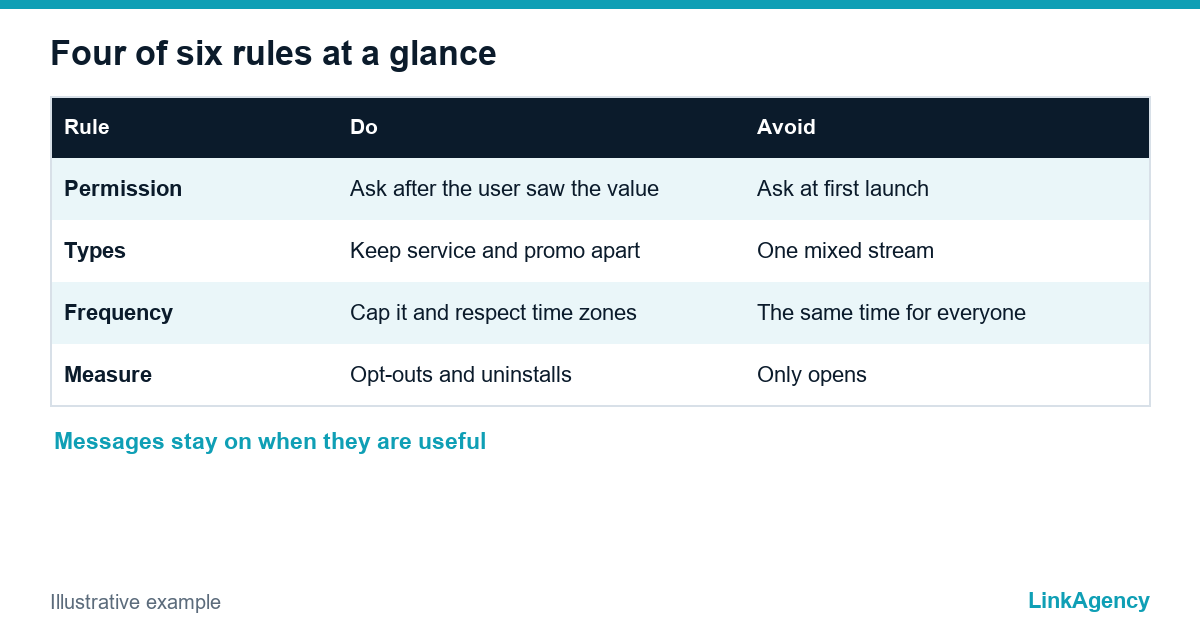
Rule 1: ask for permission after the user has seen the value, not at first launch
On iOS the app must ask the user for permission, and Android 13 and newer require a runtime permission too, called POST_NOTIFICATIONS. On Android, new installs start with notifications off, and the dialog is best shown in context. So the question when to ask for push notification permission has a simple answer: after the user did something that makes a message useful, such as placing an order. Show your own short explanation first, a pre-prompt before the system permission prompt, because a refused one is hard to undo.
What a good pre-prompt says
One sentence in plain words: «Allow notifications to get the status of your order». Offer «Not now» without guilt. A user who sees the benefit says yes more often, and a polite no can be asked again later.
Rule 2: separate transactional and promotional messages
Transactional messages tell about something the user did: an order status, a booking, a delivery. Promotional messages offer something: a discount, a new product. The difference between transactional vs promotional push notifications matters for consent and for tone. Keep them in separate categories so a user who wants order updates is not forced to accept offers.
| Type | Example | Consent and control |
|---|---|---|
| Transactional | Your order is on its way | Expected by the user, still switchable |
| Reminder | Your appointment is tomorrow at 10:00 | Tied to a booking, with a clear opt-out |
| Promotional | A new offer for your last category | Needs clear consent where the law requires it |
Rule 3: frequency, time and time zones
Set a cap on push notifications for promotional messages and respect each user’s time zone, so nobody gets a message at night. Push notification frequency is a setting you tune with data: start low and watch opt-outs. More messages rarely mean more return, and a fixed schedule in one time zone is a common cause of annoyed users abroad.
Rule 4: segment push notifications by behaviour, not one message for everyone
A message that suits one user annoys another. Mobile app push notifications work best when they are personal. Segment by what a person did: a new user, a user with an open cart, a user who bought last month. An app notification strategy for business starts from three or four segments, each with its own message and trigger, not from a calendar of broadcasts.
Rule 5: notification settings inside the app
Give users a screen in the app where they choose topics and frequency, and make it easy to unsubscribe, as easy as subscribing. Users who can turn off promotions but keep order status stay opted in, while users with only an all-or-nothing choice switch everything off. Our mobile app design puts this screen where users find it.
Rule 6: measure opt-outs and uninstalls, not only opens
Opens look good. Users silently leave. Track the opt-in rate, the share who disable notifications, and uninstall after a campaign, with analytics that link them to the message sent. If a campaign raises opens but also raises uninstalls, it failed. Our mobile app development services build the events and the dashboard for this.
Consent and EU rules: what to check with a lawyer before launch
- Ask a lawyer whether your promotional messages need a separate consent in each market.
- Record when and how the user agreed, and how they withdraw.
- Keep transactional messages limited to what the user expects.
- Read the GDPR conditions for consent with your lawyer for your own case.
When the app needs new scenarios and settings, our custom software development services add them to the product.
Mobile app push notifications best practices: a free consultation
Tell us about your app. We will go through which messages it may send, when to ask for permission and what to measure, and suggest a first set of scenarios. If you want it built, our mobile app development services and mobile app design take it on.
- a list of messages the app may send;
- a plan for permission, settings and measurement.
Leave a request and we will reply within one working day.

Frequently Asked Questions (FAQ)
What are mobile app push notifications best practices?
Ask for permission after the user has seen the value, separate transactional and promotional messages, limit frequency and respect time zones, segment by behaviour, offer settings inside the app and measure opt-outs and uninstalls.
When should an app ask for push notification permission?
After the user did something that makes a message useful, for example placing an order. Show your own short explanation first, because a refused system prompt is hard to reverse.
Do Android and iOS require permission for notifications?
Yes. iOS asks the user for permission, and Android 13 and newer have a runtime permission called POST_NOTIFICATIONS. New installs on Android start with notifications off.
What is the difference between transactional and promotional push notifications?
Transactional messages report something the user did, like an order status. Promotional messages offer something, like a discount. Keep them separate because consent and tone differ.
How often should an app send push notifications?
Set a cap for promotional messages, start low and watch opt-outs and uninstalls. Respect each user’s time zone so no one gets a message at night.
Do EU rules affect push notifications?
For promotional messages consent usually matters in the EU. This is general information, not legal advice, so ask a lawyer about your own case and record how users agree and withdraw.
How can LinkAgency help with mobile app push notifications best practices?
We go through which messages your app may send, when to ask for permission and what to measure, and build the scenarios and settings. The first consultation is free. Leave a request and we reply within one working day.