On 17 November 2026 Google announced in its release notes that every tag of this kind becomes a container. For a business that pays for Google ads, the news sounds technical, and many owners either panic or miss it. Your reports and ad budget rest on tags, yet few owners know who controls the account or which events count as a lead. The google tag and tag manager merge is voluntary for most sites and existing tags keep working, so there is no need to rush. Use these six checks first. Do it calmly.
What the google tag and tag manager merge changes for a site without a developer
According to Google’s help page on the update, the upgrade does not change the in-page behavior of the tag. A site that had only the tag now gets the interface of a full container: tag settings, triggers, debugging and version control. Optimization of a container is optional, and Google says no changes are made automatically. As Search Engine Roundtable reports, installs that are not supported get the upgrade in January 2027, and Google advises adjusting the setup before then.
Check 1: who owns the account behind your tags
Find the account. Name its owner. It should be a company address, not a freelancer’s personal mailbox. One owner should hold the tracking account, because nobody else sees what breaks. Add a workspace for each change and ask who has edit, approve and publish rights, and remove access for people who left.
Check 2: the list of events that count as a lead or a sale
Write the events in plain words: a sent form, a call click, a paid order. Each one should exist as a conversion in GA4 and in Google Ads, with a clear destination for the data. If you cannot list them, a conversion tracking checklist starts here. Google Ads conversion tracking not working is often a missing event, not a broken tag.
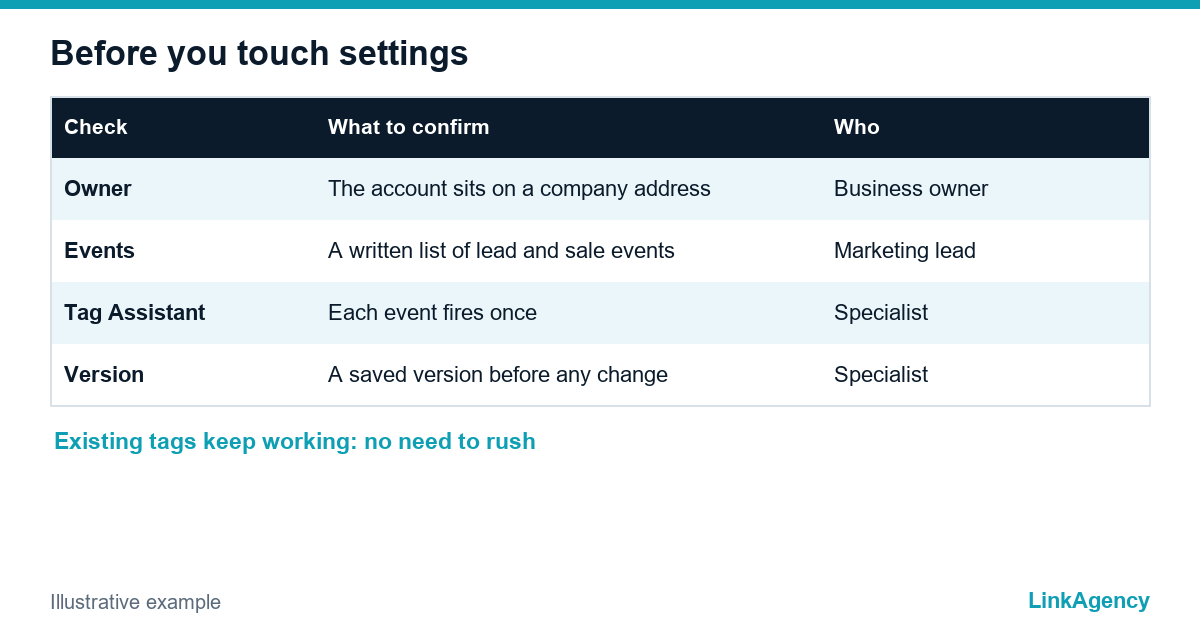
| Check | What to confirm | Who answers |
|---|---|---|
| Owner | The account sits on a company address | Owner |
| Events | A written list of lead and sale events | Marketing lead |
| Test | Tag Assistant shows each event firing | Specialist |
| Versions | A saved version before any change | Specialist |
| Visual tagging | Used only where the beta fits | Specialist |
| Consent | Data gaps from cookie choices are known | Owner and lawyer |
Check 3: a test in Tag Assistant before anything is published
Tag Assistant replaces the old preview mode of Tag Manager. Open your site through it, click through the key path and watch each event fire once, not twice and not zero times. Google says that the permissions of a container decide who sees the data in Tag Assistant. Run this test before and after every change. Keep a screenshot as proof.
Check 4: versions and a rollback in case of a mistake
Version control is the part that a plain tag never had. Before each change, save a version with a short note. If a change breaks conversions, you return to the previous version. Ask your specialist to confirm what a rollback restores, because some settings such as access rights may not follow versions.
Check 5: visual tagging (beta): where it fits and where it does not
Google offers visual tagging as a beta for purchase conversions in Google Ads. It suits a simple store with one clear purchase step. It does not suit a complex funnel with several forms and consent rules. Treat a beta as a draft. Test it on a copy of the container, compare its numbers with your orders, and write down every difference you find before you trust a single figure in a report.
Check 6: cookie consent and data gaps (GDPR, ePrivacy)
Why consent choices change the numbers
In the EU, a visitor who declines cookies may not be measured, so reports show fewer conversions than you really have. Read the GDPR conditions for consent and ask a lawyer how GDPR and ePrivacy apply to your banner. Compare Google Ads figures with your CRM, orders and call logs before you judge a campaign, because a gap in consent data can make a good campaign look weak and a weak one look fine.
When to update yourself and when to hand the setup to a specialist
- Update yourself only if the site has a single tag and one simple event.
- Hand it to a specialist if several tags, a shop or a consent banner are involved.
- Always save a version first and test in Tag Assistant.
- Do not rush. Existing tags continue to work.
Our Google Ads management checks that conversions reach the account, a performance marketing agency team ties tracking to sales, and our SEO services use the same data to find which pages bring leads.
Google tag and tag manager merge: a free tracking audit
Send us your site address. We will check who owns the accounts, which events count as leads and whether they reach Google Ads and analytics. If you want it fixed, our Google Ads management and performance marketing agency work take over.
- a map of accounts and owners;
- a list of events and what reaches Google Ads.
Leave a request and we will reply within one working day.

Frequently Asked Questions (FAQ)
Do I have to change anything because of the Google tag and Tag Manager update?
Not urgently. Google says the upgrade does not change how your existing tags behave and that optimization is optional. Check who owns the account and which events count as leads, and save a version before any change.
What is the difference between google tag vs google tag manager now?
A Google tag sends data to Google products from your pages. Google Tag Manager is the container and interface that manages tags, triggers and versions. After the update each Google tag gets that interface.
What is Tag Assistant used for?
It lets you open your site, run through the key path and see which tags and events fire. It replaces the old preview mode of Tag Manager, and container permissions decide who sees its data.
What is visual tagging?
A beta feature that lets you set up purchase conversions for Google Ads by clicking on the page. It fits a simple store with one purchase step and should be tested before it is published.
Can cookie consent hide conversions from Google Ads?
In the EU, visitors who decline cookies may not be measured, so reports can show fewer conversions than you have. Compare the numbers with your CRM and ask a lawyer about your banner.
When is January 2027 important?
Google said installs that are not supported will be upgraded in January 2027 and advised adjusting the setup before then. The exact day was not named, so ask your specialist to check how your tags are installed.
How can LinkAgency help with the google tag and tag manager merge?
We check account owners, the list of events and whether they reach Google Ads and analytics, and give you a short list of fixes. The first audit is free. Leave a request and we reply within one working day.