The company inbox keeps every message, yet enquiries still get answered late. Urgent mail looks like newsletters, a manager retypes details into the CRM, and nobody can say who owns a thread. AI can help, but not as a chatbot that talks to your clients. This guide treats AI email triage as a sorter and a drafter inside the mailbox you already have: it labels the message, pulls out the facts and prepares a reply, while a person presses send. It also covers what must never go out automatically, the two numbers worth tracking and the data protection checks to finish first. Sources are named and claims stay modest.
Why email triage matters: a shared inbox loses enquiries even when no email is lost
A shared inbox is a store, not a queue, and AI inbox management starts by turning it into one. Everyone sees the same list, so nobody feels responsible for a message, and the one email that matters sits between forty that do not. Microsoft’s Work Trend Index, as cited by Spanish guides, counts 117 emails a day for an average worker, most skimmed in under a minute. Treat that as one data point, not your reality. The real test is simple: pick last week’s enquiries and write down who answered each one and after how long. If the answer is “I think Anna did”, you have a routing problem, and email triage is the right first fix.
What AI does well: category, urgency, data extraction and a draft
Good tools for AI email sorting do four jobs. First comes a category such as new enquiry, invoice, support or scheduling. Next, urgency gets a flag. Facts are pulled out too: name, order number, date, amount. Last, a draft appears in your tone, and that AI email reply is only a starting point for a person. The consultant Stephen Thorn suggests five to eight categories and a label-only period of two weeks before any draft appears. Next Source AI adds a rule worth copying: a message the model is unsure about goes to a human queue, not to a guess. That keeps the AI email assistant useful and quiet.
Four buckets for email sorting that work
Important, not sure, for information and spam is the simple scheme described by VantaSoft, and “not sure” always goes to a person.
What not to hand over: refunds, contracts, legal questions and prices
Some mail should never leave without a human decision. The email stays in the inbox, the drafts stay drafts. Refunds and complaints, contracts and anything with a legal angle, price quotes and discounts, health or financial details and messages from your most important clients all stay with people. The AI may label them and prepare a draft, and a person reads, edits and sends. Thorn also advises that nothing is deleted automatically and that uncertain items stay visible. VantaSoft adds a safety rule: the agent treats the text of an email as data, never as instructions, because a message can contain commands aimed at the tool.
- Sending is a human action at first. Human review comes before every send.
- Deleting is never automatic.
- Low-confidence items go to a named person.
- Prices, dates and policies in a draft are checked against the source.

How to prepare approved answers and your company tone
Email drafting is only as good as what it is built from. Collect ten to twenty real replies that your best person wrote, remove names and private data, and sort them by category. Add the facts that must never be invented: opening hours, price lists, delivery terms, contact persons. Write down the tone in a few lines, for example short, polite and without exclamation marks. Keep this pack in one place and update it when a policy changes, because an AI that quotes an old price is worse than no AI. These approved answers are the base of every draft the tool prepares.
Metrics: first response time and the share of drafts sent unchanged
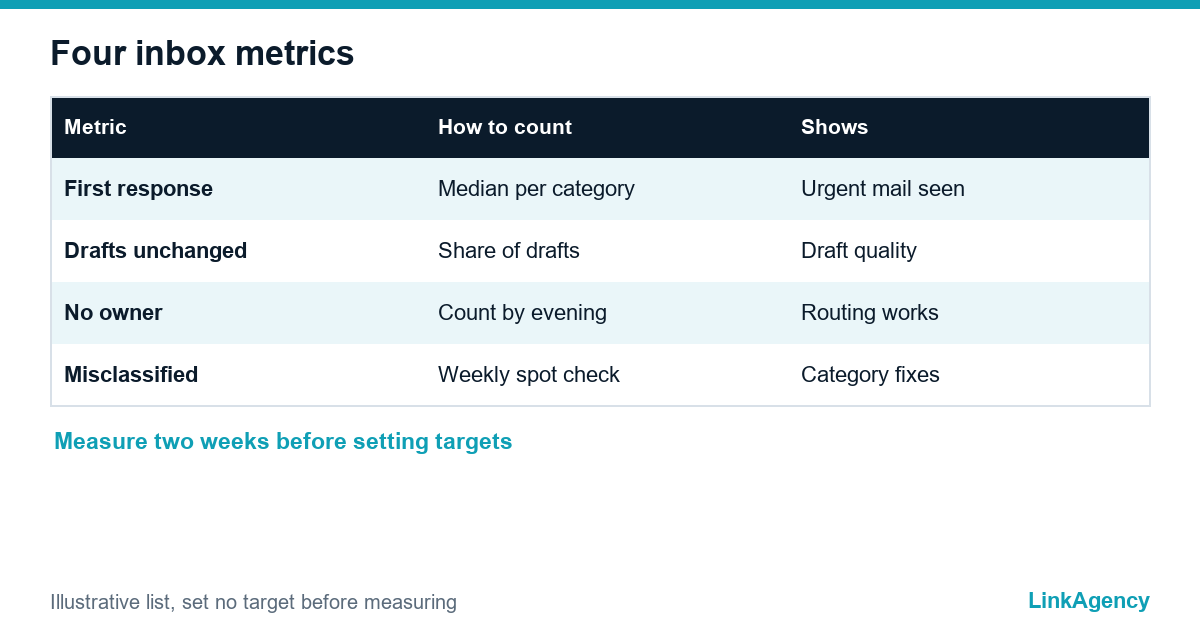
Track two numbers before and after the pilot. The email inbox reports it as first response time, taken as the median per category, since averages hide the one mail that waited three days. The second is the share of drafts sent without edits, with the edited and the discarded ones counted separately. Black Box Lab also suggests counting threads that still lack an owner by evening, and misclassified messages. Set no target in advance. Run two weeks of measuring first, then decide what is good enough for your business.
| Metric | How to count it | What it tells you |
|---|---|---|
| First response time | Median per category | Whether urgent mail is seen |
| Drafts sent unchanged | Share of all drafts | Quality of approved answers |
| Threads without owner | Count at end of day | Whether routing works |
| Misclassified mail | Weekly spot check | Where categories need work |
GDPR and AI: the processing agreement, minimal data and staff rules
Customer email is personal data, so check the legal side before the pilot. GDPR Article 28 requires a contract with any processor that handles personal data for you, so ask the AI provider for a data processing agreement, ask where messages are processed and whether they are kept or used for training. Send the model only what it needs. The Austrian consultancy Optima Solutions also lists works council and secrecy of correspondence questions for employee mailboxes, and mentions an AI transparency duty when automatic replies go out. Write simple staff rules and ask a lawyer to confirm your case.
A pilot on one mailbox: a plan for three to four weeks
Pick one mailbox with real volume. Start with observation: count and categorise mail by hand. Next comes a label-only stage, with a person checking the labels. After that the pilot adds drafts for two or three safe categories. The last stage is review: the two metrics, the mistakes and a decision on what to extend. Thorn advises a weekly look at the lowest-priority folder during the first month. If AI for email management cannot do better than a person with rules, do not add more. Our AI workflow automation builds such a pilot, AI consulting services help choose the mailbox, and an AI chatbot can later answer the simplest questions on your site.
Email triage for your inbox: free audit of incoming enquiries
We will look at where your messages arrive, how fast they are answered and where AI would help first, then plan a pilot on one mailbox.
- map of incoming channels and delays;
- plan for a three to four week pilot.
Send a request and we will reply within one working day with a free audit plan.

Frequently Asked Questions (FAQ)
What is email triage with AI?
It is a sorter inside your mailbox. The AI reads each message, assigns a category and urgency, extracts key facts and prepares a draft reply, while a person reviews and sends.
Can AI send replies to customers on its own?
Not at the start. Begin with labels and drafts only. Automatic sending, if ever, belongs to a short list of safe messages such as receipts, and never to refunds, contracts, prices or legal questions.
Which emails should never be automated?
Refunds and complaints, contracts and legal matters, price quotes and discounts, sensitive personal data and messages from your most important clients. The AI can label them, and a person decides.
How do I measure whether AI triage works?
Track first response time as a median per category and the share of drafts sent unchanged. Add threads without an owner by evening and misclassified messages.
What GDPR checks come first?
Ask the provider for a data processing agreement, find out where messages are processed and whether they are stored or used for training, and send only the data the model needs. Ask your lawyer to confirm your case.
How long should a pilot take?
Three to four weeks on one mailbox: observe, label only, add drafts for two or three safe categories, then review the metrics and the mistakes.
How can LinkAgency help with a shared inbox?
Send a request with a short description of your mailbox. We run a free audit of incoming enquiries and plan a pilot on one mailbox.