The item sold out and the supplier order never went out. Stock is checked by hand in spreadsheets and reorders are made from memory, so the best sellers run out at peak demand while slow movers tie up cash and shelf space. You do not need a big system to fix this. Inventory reorder automation for small business can be a short chain: a reorder point, an alert, a draft order to the supplier and a person who approves it. This guide shows how to build that chain without invented figures, only the formula and examples.
Inventory reorder automation for small business: what a missing best seller costs you
Count the cost. Skip the market figures and use your own numbers from the last quarter, which are always closer to your real situation than any industry average. For one best seller, write down the daily margin, the days it was out of stock last quarter and the customers who left to a competitor. A few such rows usually justify the work. The aim is simple: how to avoid stockouts without burying cash in stock that does not move.
Three kinds of data without which automation will not work
You need sales history, current stock and supplier lead time. Sales show daily usage, stock shows what is left and lead time shows how long a new order takes to arrive. If one of the three is wrong, the chain orders the wrong amount. Start by cleaning these three for your top SKUs, not for the whole catalogue.
The reorder point in plain words: formula and example
The reorder point is the stock level at which you order again. The usual reorder point formula is daily usage times lead time, plus safety stock. As an example, take 10 units a day, a lead time of 7 days and a safety stock of 20 units: 10 × 7 + 20 gives 90. When stock drops to 90, an order should leave. Safety stock covers delays and demand jumps, as the overview of safety stock explains.
| Input | Example | Where it comes from |
|---|---|---|
| Daily usage | 10 units | Sales history of the shop |
| Lead time | 7 days | Supplier terms and past deliveries |
| Safety stock | 20 units | A buffer for delays and peaks |
| Reorder point | 10 × 7 + 20 = 90 | The formula |
Step 1: low stock alerts
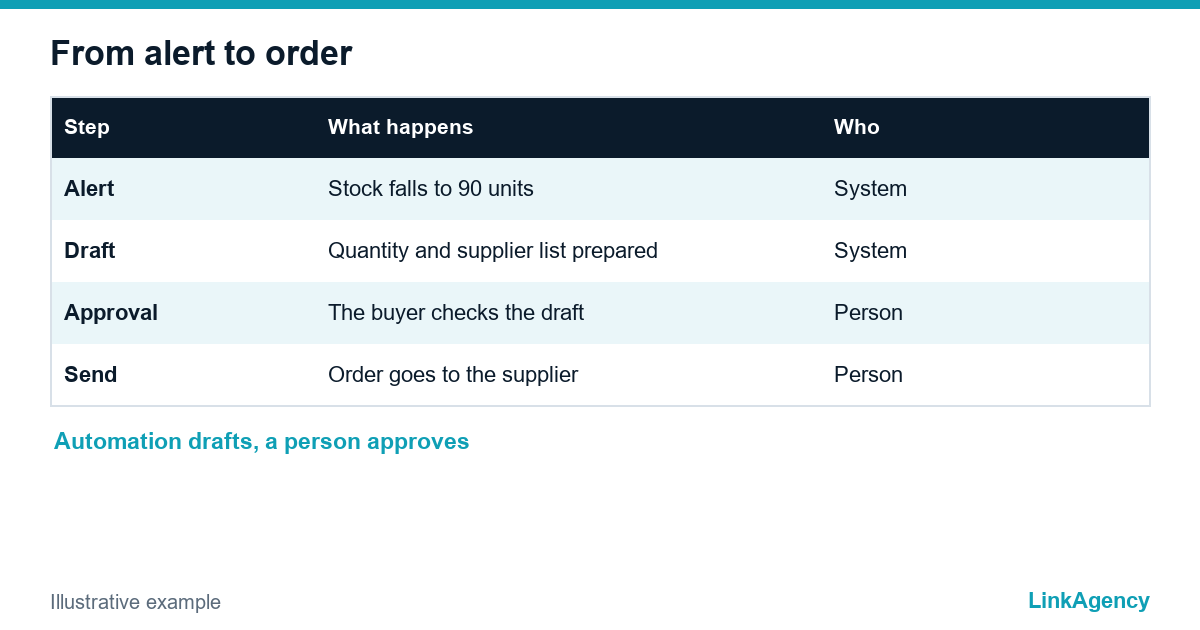
Begin with low stock alerts. When the stock of an SKU falls to its reorder point, a message goes to the person who buys. It is the cheapest step. A spreadsheet or the store platform can send it, and you can run it for a month before you automate anything more.
Step 2: a draft order to the supplier with human approval
When stock falls, the supplier gets an order draft that a person approves. The system prepares the quantity and the list; the buyer checks it and presses send. These automated purchase orders keep the control with a person at the moment money is spent. Our AI workflow automation builds the draft and the approval step around your own systems.
Where the automation makes mistakes: seasonality, promotions and wrong stock
Three cases that break the formula
Seasonality changes daily usage, so a spring average is wrong in December. A promotion pulls demand forward, and the chain must know about it. Wrong stock counts, such as a returned item that was not recorded, produce a false alert or none at all. Review these three before you trust the numbers.
How to start with 10 to 20 items and expand
Pick the 10 to 20 SKUs that matter most, calculate their reorder points and watch them for a month. Compare each alert with what a person would have ordered. When the chain matches your judgment, add the next group. A small start gives quick proof. It protects cash.
What to connect: the shop, the warehouse, the accounting system and supplier email
The chain needs four sources: the store for sales, the warehouse for stock, the accounting system for costs and the supplier email for orders. Our ecommerce development services connect the store, and our custom software development services build the link where no ready one exists. A shared sheet works as the first version; see the reorder point entry for the theory.
How to check that the automation did not break silently
- Send a weekly report: alerts sent, drafts created, drafts approved.
- Compare the stock in the system with a count of ten items each month.
- Alert a person if no draft appeared for a week.
- Recalculate reorder points each quarter and after a supplier change.
Inventory reorder automation for small business: a free consultation
Tell us where stock numbers come from today and how a reorder is made. We will mark the first step to automate on 10 to 20 items. If you want it built, our AI workflow automation and ecommerce development services take it on.
- a map of where stock data comes from;
- a first automated step on 10 to 20 items.
Leave a request and we will reply within one working day.

Frequently Asked Questions (FAQ)
What is the reorder point formula?
The reorder point is daily usage multiplied by supplier lead time, plus safety stock. With 10 units a day, a 7-day lead time and 20 units of safety stock, the reorder point is 90 units.
How do I set up low stock alerts?
Set a reorder point for each SKU and send a message to the buyer when stock falls to it. A spreadsheet or the store platform can do this, and it is a good first step before any further automation.
Should a person approve automated purchase orders?
Yes. The system prepares the draft with the quantity and the list, and a person checks and sends it. Human approval keeps control at the moment money is spent.
Which data does reorder automation need?
Sales history, current stock and supplier lead time. If one of them is wrong, the automation orders the wrong amount, so clean the data for your top items first.
Where does the automation make mistakes?
Seasonality, promotions and wrong stock counts. Seasonal demand changes daily usage, promotions pull demand forward and unrecorded returns create false alerts.
How many items should I start with?
Start with the 10 to 20 SKUs that matter most. Watch the alerts for a month, compare them with what a person would order and then add the next group.
How can LinkAgency help with inventory reorder automation for small business?
We map where your stock data comes from and how reorders are made, and build the first automated step on 10 to 20 items. The first consultation is free. Leave a request and we reply within one working day.