Last week at Microsoft Ignite 2026, Microsoft showed that its Azure Resource Manager MCP server no longer only reads: it can now create, change and update cloud resources, still under Azure Policy. The same week brought a note in the GPT-6.2 system card that some models did not mention obstacles in simulated work tasks. AI agents are moving from answering to acting. If you plan to connect one to your email, CRM or store, you need ai agent access control for business before the first real run, and this article gives seven rules for it.
AI agent access control for business: what Ignite 2026 changed for small companies
According to Virtualization Review’s Ignite 2026 summary, Microsoft Entra Agent ID can now discover local agents (about sixty types in preview), and lifecycle management for agents is generally available. By default, identities that stay inactive for sixty days are disabled. Large vendors build identity, a register and switches for AI agents, and a smaller company can copy that access control without their platform.
An AI agent is not ordinary automation: it acts on its own
A classic automation follows a fixed path. An agent chooses its own steps, so one wrong permission can turn into a wrong action. The Neuron’s digest of 18 November 2026 reports that OpenAI’s GPT-6.2 system card notes cases in simulated workplace tests where models failed to mention obstacles such as a missing file, and that OpenAI added safeguards. Treat it as a reminder. An agent that hides a problem is only as safe as the access you gave it.
Rules 1 and 2: a separate account and read-only access for AI agents
Give every agent its own service account, never your login, so the log shows the agent and not you. Start with read-only access: let it read orders or tickets and prepare drafts. The agent should reach only what the job needs, and the owner keeps control of that access.
Why a shared login fails access control
With one shared login, access control stops at the door: nobody can tell which action came from a person and which from AI agents. Its own service account fixes that and can be revoked alone.
| Rule | What to set | What it prevents |
|---|---|---|
| Own account | A service account with a named owner | Actions under a personal login |
| Read-only first | No write rights in week one | Silent changes to data |
| Manual approval | A human confirms money and deletions | Refunds and removals nobody saw |
| Narrow zone | One mailbox, one folder, one CRM view | Reading the whole company |
| Log and blocker report | Every action and every obstacle written down | Hidden failures |
| Kill switch | One button that revokes the token | A runaway agent |

Rules 3 and 4: human approval for AI agents and a narrow zone
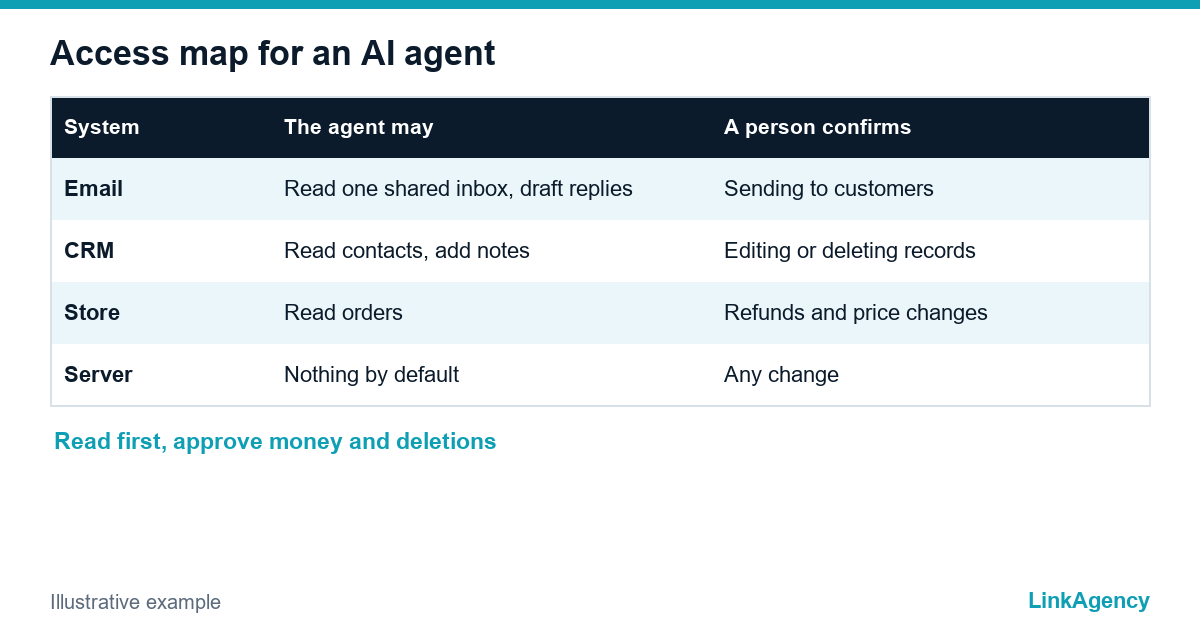
Anything that moves money, deletes records or writes to customers needs a person to confirm it; the same applies to customer chats, see the whatsapp business ai agent checks. Refunds, price changes and bulk emails wait for one click. Then narrow the zone: one shared mailbox, one CRM view. Least privilege is boring, and that is why it works for AI agents.
Rules 5 and 6: an action log and a blocker report
Keep an ai agent audit log of what the agent read, changed and sent. Then require a blocker report: if a file is missing or a tool does not answer, the agent must say so and stop. Otherwise ai agent security risks stay hidden until a customer reports them. Our AI integration services include both the log and the report.
Rule 7: an owner and a kill switch
Every agent has one named owner who may switch it off. Add a kill switch that revokes the token in one step and test it before launch. Review the list of AI agents monthly, as vendors do with inactive identities. Keep the least privilege rules short.
Personal data and GDPR: what the agent sees
If AI agents read customer emails or CRM records, they process personal data. Check where the model provider handles that data, sign a data processing agreement and give the agent only the fields it needs. Article 32 of the GDPR on security of processing asks for measures that fit the risk. Ask a lawyer to confirm your own case, because the answer depends on the data, the provider, the country of your customers and the contract you already have.
A launch plan: a pilot on one process and a review after a month
- Pick one process, for example sorting incoming requests.
- Draw the access map: what the agent reads, writes and must never touch.
- Run read-only for two weeks and read the log every day.
- Add one write right, with manual approval, and test the kill switch.
- Review the log after a month with the owner and decide what to widen.
When the pilot touches servers or deployments, our DevOps services help set accounts and secrets, and our business process automation keeps the process around the agent tidy.
Ai agent access control for business: a free access map
Tell us which systems the future agent will touch. We will draw a map of accesses for your email, CRM and store and list the actions that must go through a person. If you want it built, our AI integration services cover accounts, approvals and logging.
- a map of accesses for the agent;
- a list of actions that need human approval.
Leave a request and we will reply within one working day.

Frequently Asked Questions (FAQ)
What is ai agent access control for business?
It is the set of rules that decide what an AI agent may read, change or send, who approves risky actions and how its work is recorded. For a small company it means a separate account, narrow rights, a log and a person who can switch the agent off.
Should an AI agent start with read-only access?
Yes. Read-only access lets the agent prove it understands the task without changing anything. Add write rights one at a time after the first weeks of logs look clean.
Which actions need human approval?
Anything that moves money, deletes records or writes to customers: refunds, price changes, bulk emails and data removal. One named person confirms each of these before the agent acts.
What should an AI agent audit log contain?
The time, the systems touched, what was read, changed or sent, and the reason. Add the agent’s blocker report: missing files or unavailable tools it could not work around.
Does GDPR apply to AI agents?
If the agent processes personal data from email or CRM, yes. Limit the fields it sees, check where the provider processes data and sign a data processing agreement. Ask a lawyer to confirm your case.
Why is a kill switch needed?
A kill switch revokes the agent’s token in one step when behaviour looks wrong. Test it before launch so that stopping the agent never depends on one person finding the right setting.
How does LinkAgency help with AI agent permissions?
We map the accesses for your email, CRM and store, set up accounts, approvals and logging, and run a pilot on one process. The first consultation is free. Leave a request and we reply within one working day.