Sales managers usually work leads in the order they arrive. A student asking for a quote and a ten-person firm ready to sign wait in the same queue, and the hot lead cools down. AI lead scoring puts a number on every lead so the team calls the likeliest buyers first. This guide compares three ways to do it for a small company: a points table, the scoring built into your CRM or a model of your own.
AI lead scoring: how it differs from points in a spreadsheet
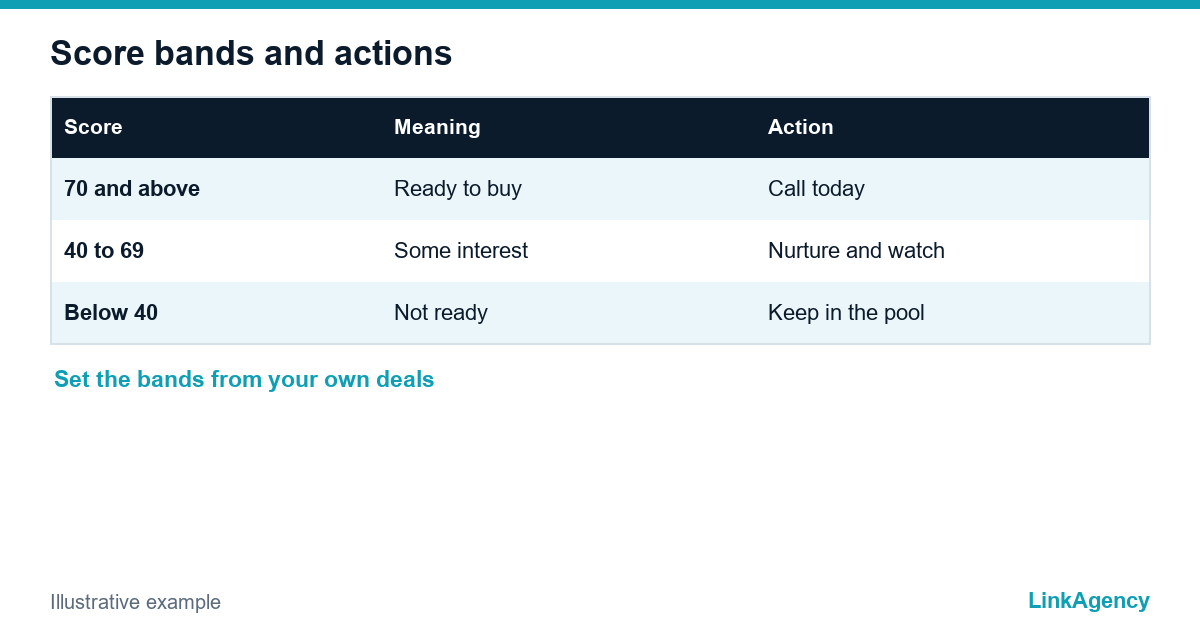
Classic scoring uses points you set by hand. A demo request adds twenty, a free email address subtracts ten, and the total tells a rep where to start. The method is simple and easy to explain, which matters more than it sounds.
AI scoring reads patterns in your closed deals and predicts which new lead looks like the ones that bought. That is predictive lead scoring, and a lead scoring model like this only works when the history behind it is large and clean. Without enough history and clean records, a model learns nothing reliable. For that reason, AI lead scoring for small business usually starts with points and adds the model later. The same logic powers AI lead qualification, where a system reads the first request and decides whether it deserves a call.
Signs you need it: lead volume, deal length and losses at the first contact
You do not need scoring while three people can read every request in the morning, but how to prioritize sales leads becomes the central question once they cannot. Look for these signals:
- Sales leads arrive faster than managers can answer them well.
- The sales cycle is long, so early interest and real intent look alike.
- Good sales leads go cold because they waited behind weak ones, and lead prioritization by gut feeling does not fix it.
- You cannot tell which source sends buyers and which sends noise.

Which data you need: CRM, website, email, calls and deal history
Most of what a scoring model needs already lives in your systems. The CRM holds company size, role, source and the result of past deals. Website analytics show visits to the pricing page, and email shows replies, which count far more than opens.
Check that the history in your CRM holds enough records to train a model, and record the outcome of every deal, including the reason for a loss, because predictive lead scoring depends on it. Clean duplicates before you start: poor records produce a score that looks authoritative and is wrong.
Three ways to launch lead scoring: rules, built-in CRM functions or your own model
| Option | What you need | Fits when |
|---|---|---|
| Rules and points | A scorecard and a number field in the CRM | Few leads, little history |
| Built-in CRM scoring | A plan that includes it and clean records | The CRM already runs your pipeline |
| Your own model | Deal history and a team to build it | Large volume, several segments |
HubSpot lead scoring shows what the middle option looks like. Its scoring tool builds engagement, fit and combined scores with thresholds on Professional plans, while scores created with AI need Marketing Hub Enterprise and a sample of at least 50 contacts, 25 who converted and 25 who did not. Even a vendor’s own AI needs real history first.
One CRM vendor’s guide suggests around 100 leads a month and six months of deal history before predictive scoring pays off. Treat it as an opinion, not a law. Our AI integration services begin by checking whether your history is enough for a model or the funnel needs cleaning first.
Build the first scorecard in a week
- List the traits shared by your last twenty won deals.
- Give points for fit, intent and urgency, and subtract for obstacles.
- Add a score field to the CRM and score every open lead.
- Let reps work the top group first and log what they find.
- Review the misses at the end of the week and change the weights.
How to build lead scoring into sales work: queues, alerts and an answer-time rule
A lead score nobody acts on is a number on a screen. Sort sales leads by score in the CRM and send an alert when a lead crosses your threshold. AI lead qualification can also draft the first reply, but the score still needs an owner. Agree an answer-time rule for the top group, for example the same working hour, and measure it. Our piece on speed to lead shows why slow replies waste a paid click.
Show the reason next to the number. Managers who see why a lead scored high trust the list, and those who see only a figure return to gut feeling within a month. AI workflow automation can create the task, assign the owner and start the first message.
GDPR and lead scoring: which data to avoid and how to explain a score
Scoring is profiling, so keep it proportionate. Use data you already hold for sales contact, and avoid anything sensitive or unrelated to the purchase. Tell people how you use their data in your privacy notice.
Article 22 of the GDPR gives people the right not to be subject to a decision based solely on automated processing that has legal or similarly significant effects. Ranking a call order rarely reaches that level. If a score decides who receives an offer, a price or access to a service, take advice from a privacy lawyer and keep a person who can review and override the result.
How to check that scoring works and when to retrain it
Once a quarter, compare the leads that scored high with the deals that closed. The test of how to prioritize sales leads well is simple: did the top band close more? Check the low-scored leads that bought anyway, because those misses show which weights to change.
Retrain or adjust after any change in your product, price or lead sources, and keep the lead scoring model readable so a new rep can learn it in a day. For the CRM data that feeds the score, start with our guide to website CRM integration.
AI lead scoring for small business: a free CRM and deal history review
We will look at your CRM and past deals and tell you whether the data is enough for a model, or whether the funnel needs order first. Our AI integration services and AI workflow automation team can then set up the score, the alerts and the queue.
- an assessment of your deal history and data gaps;
- a recommendation: points, built-in CRM scoring or a model.
Leave a request and we will reply within one working day.

Frequently Asked Questions (FAQ)
What is AI lead scoring in simple terms?
It ranks new leads by how closely they resemble past buyers, so managers call the likeliest ones first. It learns from your closed deals, which is why it needs clean history.
Does a small business need predictive lead scoring?
Often not at the start. A points table in the CRM works with few leads and limited history. Move to a model when volume and clean deal records grow.
What data do I need to score leads?
CRM records with company size, role and source, website activity such as pricing-page visits, email replies and the outcome of past deals. Duplicates and missing outcomes weaken any score.
How is a CRM’s built-in scoring different from a custom model?
Built-in scoring uses rules or a ready algorithm inside the CRM and is quick to switch on. A custom model fits your data better but needs history and people to build and maintain it.
Is lead scoring allowed under GDPR?
Usually yes, if you use proportionate data, explain it in your privacy notice and keep a person able to review results that significantly affect someone. Take advice from a privacy lawyer for your case.
How often should the model be reviewed?
At least once a quarter, and after changes in product, price or lead sources. Compare high scores with won deals and adjust the weights.
Can LinkAgency set up lead scoring in our CRM?
Yes. We check your CRM and deal history, recommend points, built-in scoring or a model, and connect the score to alerts and queues. The first consultation is free. Leave a request and we reply within one working day.