You pay for ads, and the leads arrive in three places: a shared inbox, a chat tool and a spreadsheet. By the time someone answers, the buyer has called a competitor, and nobody can say which campaign produced the enquiry. One path from site to sales, with no gaps, is the cure. Integrating a website with a CRM is not an IT project but a map of what happens to every lead; the same record shows where customers drop off, see how to reduce SaaS churn. This guide gives a commercial or marketing director six elements and a test for fifteen minutes. It does not choose a particular CRM.
Website CRM integration: where leads get lost between the site and sales
Most website CRM integrations fail at the handover, not in the code. Leads rarely vanish in one dramatic moment. They sit in a mailbox nobody checks at night, arrive without a source, or land on a manager who is on holiday. Every handover without a rule is a place to lose money. Count them. When you connect a website to a CRM, you replace those handovers with one record that has a source, an owner and a status from the first second.
One capture point: forms, chat, calls and messengers
Every channel should end in the same place. A form that mails a person and a chat that exports to a sheet are two systems pretending to be one. Set up the contact form to CRM first, because it brings most leads. Simple. Then use the table to check how each channel reaches the CRM.
| Channel | How it should reach the CRM | What to check |
|---|---|---|
| Contact form | Webhook or native connector, one record per submission | All fields arrive, including the page and the source |
| Chat | Transcript and contact saved on the lead | A chat without contact details still creates a record |
| Calls | Call tracking creates a lead and links the number to the campaign | A missed call becomes a task, not a lost number |
| Messengers | Inbound message creates or updates a contact | The same person is not created twice |

Lead source: how to tell which ad pays back
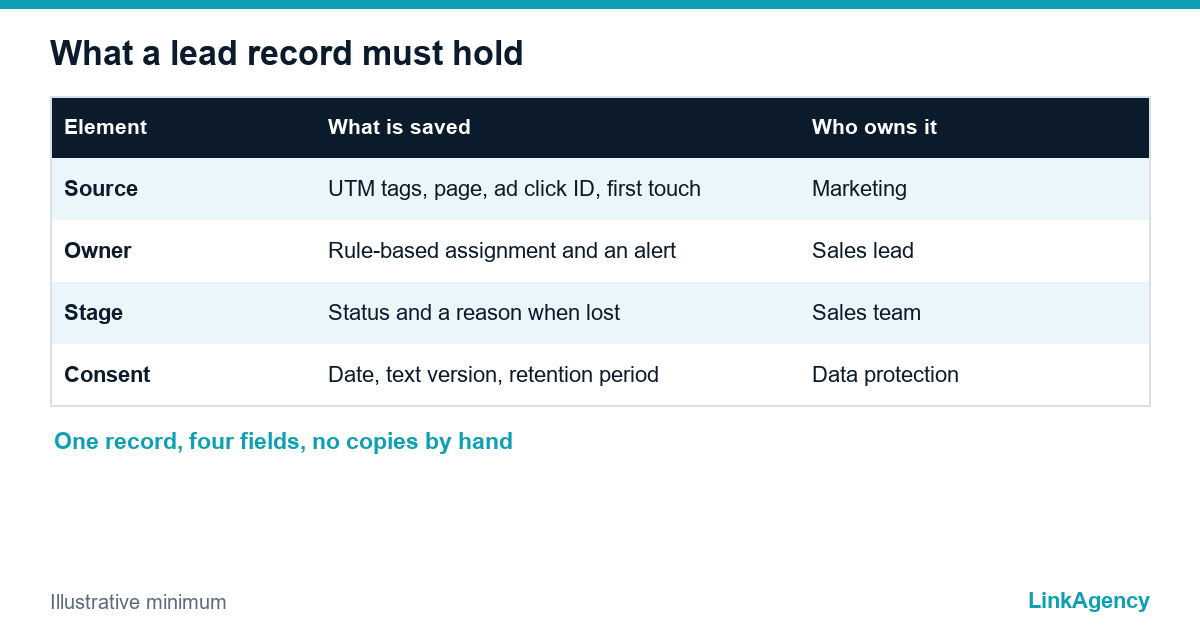
Without a source, a CRM is only an address book, so track lead source from the first click and show the lead source in CRM next to the owner. Add hidden fields to every form so that UTM tags, the landing page and the ad click identifier are saved with the lead, and keep the first source even if the visitor returns later. In Google Analytics the generate_lead event marks the moment a lead is created, so the same lead can be counted in analytics and in the CRM. We cover the sales side of this in our performance marketing agency work, where a lead counts only when the deal closes.
Lead routing and alerts: an owner and the first reply
A lead without an owner belongs to everyone, which means to nobody. Each form should name the owner of the lead before the visitor clicks send. Set the routing rule once and let the CRM apply it, and watch the time of the first reply.
- Assign by a clear rule: product, region, language or load.
- Send an alert to the owner at once, as a notification in the tool the manager actually reads.
- Escalate to a second person if nobody has replied within the time you set, and log who was alerted, when they opened the lead and how long the first answer took.
- Send the customer an acknowledgement so they know the request arrived.
The reason for the speed is described in our guide on speed to lead.
Deal stages and reasons for loss
A website CRM integration without stages is only a faster inbox. A pipeline of five or six stages is enough: new, contacted, qualified, proposal, won, lost. The stage names matter less than the rule for moving a lead and the mandatory reason when it is lost. Integrating a website with a CRM pays off when those reasons show whether the problem is the ad, the price or the reply time. Connect a website to a CRM with a mandatory reason field, and the report writes itself.
- Filter spam and test records before they reach managers.
- Merge duplicates by email or phone, and keep the oldest source.
- Close stale leads on a schedule so the pipeline stays honest.
GDPR: consent, retention and deletion
Consent at the form
A website CRM integration must respect consent, so the form should state who receives the data and why, and the consent should not be a pre-ticked box. The European Data Protection Board explains what counts as valid consent in its guidelines on consent. Save the date and the version of the text with the lead.
Retention and deletion
Decide how long a lead stays in the CRM if it never buys, and delete or anonymise it after that, with the person who owns data protection in your company signing off on the period and the process. When a person asks for deletion, you need one place to do it, which is another reason to keep one record instead of five copies. Confirm the wording with your lawyer.
A fifteen-minute test and results back to the ad accounts
- Submit a test lead through every form with a tagged link.
- Check that the record has the source, the page and the consent.
- Confirm that the owner got an alert and how fast.
- Submit the same lead again and see that no duplicate appears.
- Move the lead through the stages to won and check the result.
- Send the closed deal back to the ad platform, for example through the Conversions API, so the ads learn from real sales.
Our business process automation team builds this path, and our web development services handle the forms and tracking on the site.
Website CRM integration: a free check of your lead path
Send us the address of your site and the name of your CRM. We will follow a test lead from the form to the sale and list where it gets lost, in order of cost.
- a map of your lead path with the weak places marked;
- the first three fixes with an owner for each.
Our business process automation and performance marketing agency teams fix the weak places. Leave a request and we will answer within one working day.

Frequently Asked Questions (FAQ)
What does website CRM integration mean in simple words?
It means every enquiry from your site, chat or phone lands in the CRM as one record with a source, an owner and a status. Nothing is copied by hand, and nothing waits in a shared inbox.
How do I connect a website to a CRM without a developer?
Many CRMs offer a native form connector or a no-code tool that passes form data through a webhook. Use it for a simple contact form to CRM, then add hidden fields for the source and test the result before sending real traffic.
How do I track lead source in CRM records?
Save UTM tags, the landing page and the ad click identifier in hidden form fields and write them to the lead. Keep the lead source in CRM as first touch, and send the closed deal back to the ad platform.
Is lead routing and alerts setup hard for a small team?
No. Lead routing and alerts need one rule, such as region or product, so pick it, assign the owner automatically and alert them in the tool they read. Add an escalation if nobody replies within the agreed time.
What should I do about GDPR in website CRM integrations?
State who gets the data, use an unticked consent box, save the date and the text version, and set a retention period. Confirm the wording with your lawyer.
Can LinkAgency check my lead path?
Yes, we do integrating a website with a CRM and the checks around it. Send us the site address and the CRM name. We follow a test lead to the sale, list where it gets lost and give the first three fixes. The first check is free.