Advertising brings enquiries, but the manager replies a few hours later or the next day, and the client has already chosen someone else. The budget is spent, and the ad takes the blame. Speed to lead is the time from the moment a person sends a request to the first useful reply. It sits where three areas meet: the website, the advertising and the automation. This guide starts with a measurement on your last 20 leads, not with someone else’s averages, and then builds a simple system of notification, auto-reply, after-hours cover and weekly control.
Speed to lead: why a slow reply makes advertising more expensive
You pay for the click and for the form, and the value appears only when a person answers the enquiry. The speed of a reply decides which lead you keep. A slow reply turns a warm visitor into a cold one, and the cost of every lead you do win goes up. Buyers often send the same request to several companies, so the first useful answer shapes the shortlist. We do not quote statistics here, because we have not found a primary source we trust. Measure your own numbers instead, and your own lead response time will make the case better than any average.
Measurement: how to count time to the first reply in 30 minutes
Take the last 20 enquiries from the site, the ads and the phone. Lead response time and time to first response are the same number here. For each, write two times: when the enquiry arrived and when someone first replied with something useful, not an automatic message.
- Export the last 20 enquiries with their arrival time.
- Find the first human reply in email, chat or phone log.
- Calculate the difference for each one.
- Mark enquiries that arrived outside working hours.
- Note the source: ads, search, direct.
The table you get shows the real picture: how long people wait, which hours are weak and which source is slowest. That is your baseline for lead response time, and you will compare against it after every change. It is also the honest answer to how fast to respond to website enquiries in your company.
Instant notification: who gets it and where
Many delays happen before anyone knows an enquiry exists. Time to first response starts when the form is sent, not when somebody opens the inbox. An instant lead notification should reach a named person in the channel they actually watch, usually a messenger or a push, not a shared inbox that nobody opens in the evening. Name a primary owner and a backup. Short. Clear. Written. If the owner does not take the lead within the agreed time, the notification goes to the backup and then to the manager. Keep this chain visible to the team. Instant lead notification only works when everyone knows the chain. To respond to enquiries quickly, people must know whose turn it is.
An auto-reply that helps instead of irritating
An automatic first message should do three things: confirm that the enquiry arrived, say when a human will reply and offer one useful step, such as a link to prices or a booking page. It should not pretend to be a person or promise what you cannot deliver. A good auto-reply does not replace a human reply. It buys the few minutes the human needs, and it is the simplest lead follow up automation. Our guide on lead follow-up automation shows how to build the next steps so that no enquiry is lost after the first message.
Outside working hours: who answers in the evening and at weekends, and the role of an AI assistant
If the ads run in the evening, someone must respond to leads outside business hours, so someone must answer in the evening or tell the person honestly when the answer will come. There are three options: a duty rota, an auto-reply with a booking link, or an AI assistant that answers common questions and collects details for the morning. To respond to leads outside business hours well, the assistant must know where its limits are and hand over complex cases to a person. Our AI agent development team builds such assistants, and our business process automation connects them with your CRM so nothing is lost.
What the assistant must not do
It must not give prices you have not approved, promise terms or hide that it is a machine. Treat the data it collects as personal data under the GDPR and ask a lawyer to check the notice and retention for your country.
Distribution rules and control: a weekly report
Rules decide who gets which lead: by region, by service or by who is free. Add a time limit for taking a lead and an escalation if the limit passes. Then look at the numbers every week: median time to the first reply, the share of leads answered within your own limit and the slowest hours. A one-page report is enough. It shows quickly whether the system works, and whether speed to lead improves from week to week.
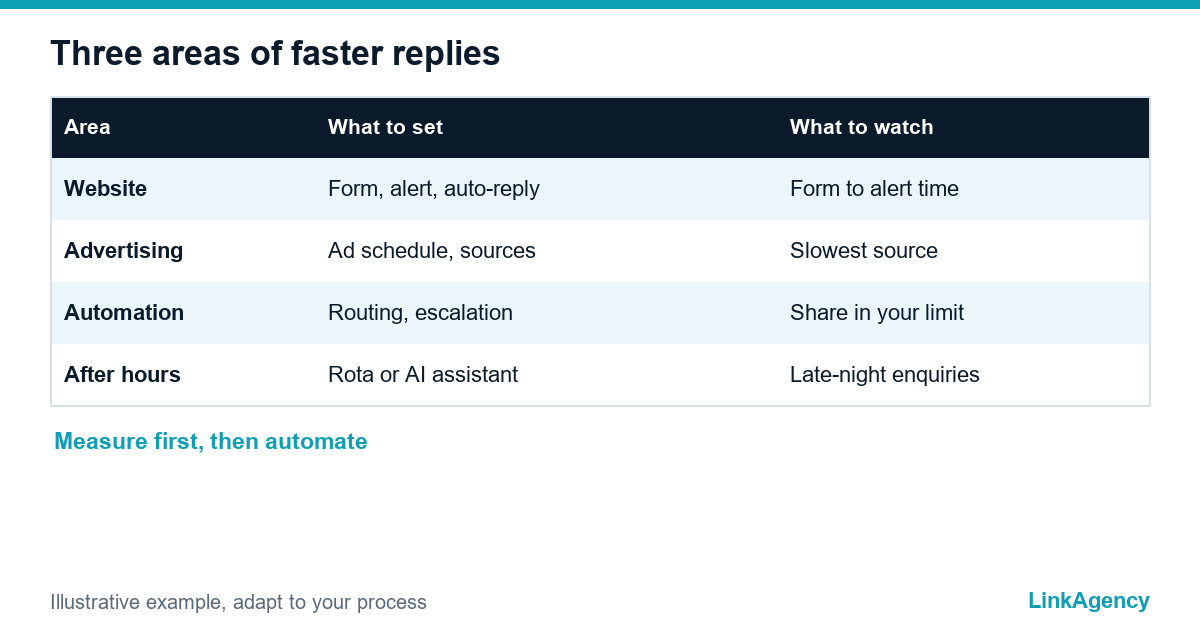
| Area | What to set | What to watch |
|---|---|---|
| Website | Form, instant notification, auto-reply | Time from form to notification |
| Advertising | Ad schedule, lead sources | Which source gets the slowest reply |
| Automation | Routing, escalation, after-hours cover | Share answered within your limit |
How to connect it with advertising: ad schedule and lead sources
Advertising should match your capacity to reply. Google describes ad scheduling as a way to control which days and hours ads appear, and it can also adjust bids by time. If nobody answers at night, do not pay for night leads, or add an after-hours cover. Tag every lead with its source, so that the weekly report shows whether the paid channel or the reply process is the problem. Our performance marketing work starts from exactly this link between ads and replies.

A minimum kit for the first week
- A measurement of the last 20 enquiries.
- One named owner and one backup for every lead source.
- An instant notification in the channel people watch.
- A short auto-reply with a clear next step.
- An after-hours option and a weekly one-page report.
With this kit, response speed becomes a number you track, not a feeling. Start with the measurement. The rest follows.
Speed to lead: free consultation on your path from click to first reply
We will walk through the path of an enquiry from the click to the first reply and show where time is lost. No obligations.
- measurement on your last enquiries;
- plan for notification, auto-reply and after-hours cover.
Leave a request and we will reply within one working day with a free consultation plan from our performance marketing team.

Frequently Asked Questions (FAQ)
What does lead response time mean?
Speed to lead is the time from the moment a person sends an enquiry to the first useful reply. Lead response time is the same idea. You should measure it on your own last enquiries, not on averages.
How fast should I respond to website enquiries?
As fast as you can promise and keep. That is the honest answer to how fast to respond to website enquiries. Measure your current time to first response, set a limit your team can really meet and escalate when it passes. How fast to respond to leads is a number you choose and then track.
How do I measure the time to the first reply?
For instant lead notification and any other fix, first take the last 20 enquiries, write the arrival time and the time of the first human reply, and calculate the difference. Mark the ones that arrived outside working hours.
Does an auto-reply count as a response?
Not as a useful reply. A good auto-reply confirms the enquiry and says when a person will answer, which keeps response speed under control until the human reply comes.
Who should answer outside working hours?
To respond to leads outside business hours, use a duty person, an auto-reply with a booking link or an AI assistant that collects details and hands complex cases to a human. The assistant must know its limits.
Should I stop ads when nobody can reply?
Consider an ad schedule so you do not pay for enquiries you cannot answer, or add after-hours cover. Lead follow up automation helps only when someone owns the next step.
How can LinkAgency help?
Leave a request with your enquiry sources and ask about lead follow up automation. We run a free consultation, walk the path from click to first reply and show where time is lost and what to set up first.