Many online stores send one newsletter a month and call it email. Meanwhile the visitor who left a full cart, the buyer who never came back and the subscriber who joined last week hear nothing. This guide covers ecommerce email marketing as five automatic flows in the order worth launching, with the legal rules for the EU and the US and a checklist of store data that must reach the email service. Figures come from named sources and are examples, not promises. Legal points are general information, so check them with your lawyer for your case.
Why event-based emails beat a mass newsletter in ecommerce email marketing
A newsletter goes to everyone at the time you choose. An automatic flow goes to one person at the moment something happens: they sign up, add a product to the cart, buy or go quiet. That timing is why Klaviyo reports, from its own data, that automations earn far more per recipient than campaigns, but that figure belongs to a vendor and shows what a good setup can do, not what your store will get. The practical point is simpler. A flow answers a signal the customer has just sent, so the message is relevant by design. Ecommerce email marketing works best in this order. Start with the five flows below, and add others only when these run well. Your store sends data about each customer, and the email service turns it into the right message.
Flow 1: the welcome email series
A welcome email is the first message after sign-up and has the best chance of being read. Treat the welcome email as the base of your ecommerce email marketing. A common pattern is three emails over a week: a thank-you and the main promise on day zero, a story or the best sellers a few days later, and a gentle offer at the end of the week. Klaviyo’s Spanish guide suggests days zero, three and seven. Split the welcome email by what the person did, so a new buyer does not get a first-order discount. Send each subscriber the series once. A good welcome email series is short.
Flow 2: the abandoned cart email sequence
This flow recovers people who started to buy. Two or three emails are usual: a reminder an hour or two after the exit, a second one the next day and, if you wish, a third after three days. Stop the abandoned cart email the moment the order is paid or the item is out of stock. Each abandoned cart email works only if the cart event reaches the email service, which is why the data checklist at the end of this guide matters.
Flow 3: the browse abandonment email
When a known visitor looks at products and leaves without adding anything, send one or two emails with the viewed items and a few alternatives. A browse abandonment email needs an identified visitor. Use it only for people the service can identify, because it needs a visitor profile. Keep it short, and skip the discount.
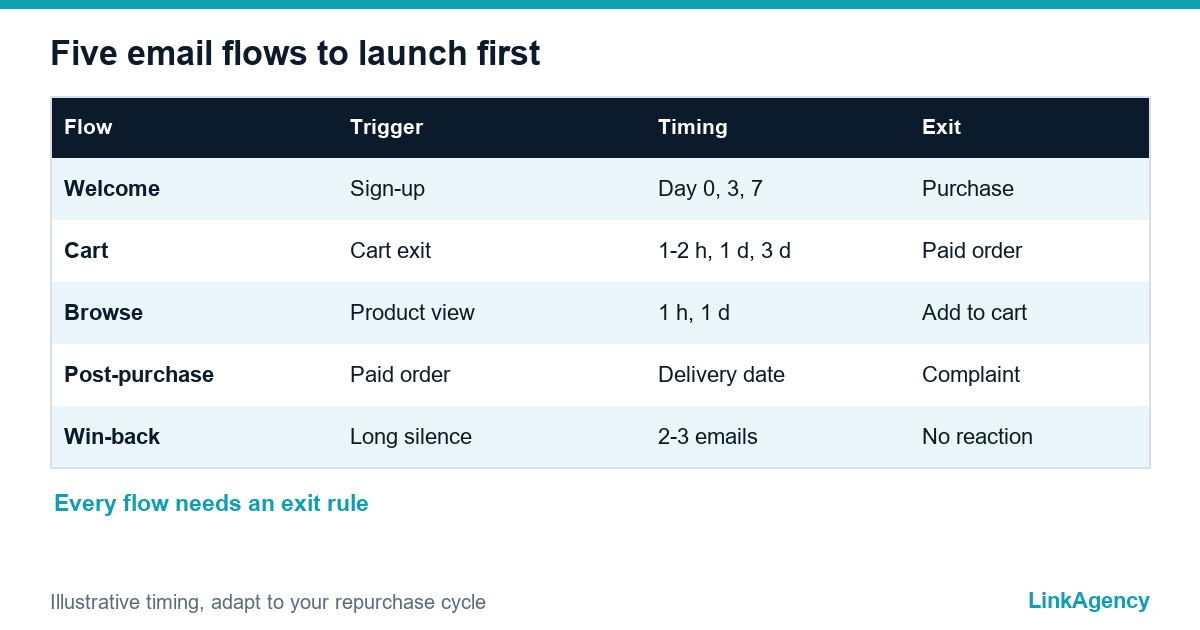
- Welcome series: on sign-up, three emails over a week.
- Abandoned cart: one to two hours, a day and three days later.
- Browse abandonment: one or two emails after a product view.
- Post-purchase: confirmation, delivery help and a review request.
- Win-back: after a long quiet period, with an exit rule.

Flow 4: after the purchase and the request for a review
The post-purchase flow starts with the order confirmation and delivery information, then asks how it went. Time the review request to the real delivery date. Skip customers with an open support ticket. A post-purchase email should help first and sell second. Add care tips or a related product only after the buyer has the item. That is the post-purchase email at its best. If you also want people to return, our ecommerce development services can add the review and loyalty steps to the store itself.
Flow 5: win-back for customers who went quiet
The win-back flow reaches customers who have not bought for a long time. Published guides use 90 to 120 days of silence. Pick your own from your repurchase cycle. A win-back flow sends two or three emails over a few weeks. With no reaction, stop and mark the address inactive. Sending to people who never open hurts delivery for everyone else, so an exit rule is part of the flow, not an extra.
Exit rules worth setting
Stop the win-back flow after a purchase, an unsubscribe or a bounce, and keep a gap before the next campaign.
Consent and rules for the EU and the US
The rules differ by region. In the EU, the ePrivacy Directive says in Article 13 that marketing email needs prior consent, with one exception: a seller who obtained a customer’s address during a sale may market its own similar products if the customer could object, free of charge and easily, when the address was collected and in every message. GDPR recital 32 states that pre-ticked boxes and silence are not consent, so use an unticked box and keep proof of it. In the US, the CAN-SPAM Act requires honest headers and subject lines, a valid physical postal address and a clear opt-out that you honor within 10 business days. The FTC can fine each violating email, so treat opt-outs as a hard rule. A double opt-in and a working unsubscribe link in every message are the safest base, and your lawyer should confirm the rest.
| Question | EU | US |
|---|---|---|
| Consent first? | Yes, with a customer exception | No, but opt-out is required |
| Pre-ticked box? | Not valid consent | Not addressed in CAN-SPAM |
| Opt-out | Free and easy, every message | Honor within 10 business days |
| Address in email | Valid reply address | Valid postal address |
Store data: what must be set up in the integration
A flow is only as good as the events it receives. Before you switch anything on, place a test order, and check the event data and check that the service gets the sign-up, the product view, the cart, the order and the delivery status, with the right customer, products and prices. Test the odd cases: a product that is out of stock, a broken link, a duplicate event and an order that is cancelled. Decide what the email does when a field is empty. The store, the data and the email must agree. If your store needs deeper changes, our web development services can add the events, and business process automation can connect the store to your email service and your CRM.
Ecommerce email marketing: free audit of your store setup
We will check your analytics events, the link to your email service, the sign-up form and the consent text, then list what to fix first.
- review of events, forms and consent;
- order of flows to launch first.
Send a request and we will reply within one working day with a free audit plan.

Frequently Asked Questions (FAQ)
Which email flow should an online store launch first?
Start with the welcome email series and the abandoned cart email flow, because they react to the clearest signals. Then add browse abandonment, post-purchase and win-back once the first two run well.
How many emails belong in an abandoned cart email sequence?
Published guides usually use two or three: one an hour or two after the exit, one the next day and sometimes a third after three days. Stop the sequence when the order is paid or the item sells out.
Do I need consent to send automatic emails in the EU?
Marketing email generally needs prior consent. The ePrivacy Directive has an exception for a seller’s own similar products to its customers, if they could object easily at collection and in every message. Ask your lawyer to confirm your case.
What does CAN-SPAM require for marketing emails?
Honest headers and subject lines, a valid physical postal address, a clear way to opt out and honoring opt-outs within 10 business days, according to 15 U.S.C. 7704. Each violating email can be penalized, so treat opt-outs as a hard rule.
How do I check that store data reaches the email service?
Place a test order and confirm that the sign-up, product view, cart, order and delivery events arrive with correct customer, product and price fields. Test missing stock, broken links, duplicates and cancelled orders.
When should I stop a win-back flow?
After two or three emails with no reaction, stop and mark the address inactive. Sending to people who never open can hurt delivery for the rest of your list.
How can LinkAgency help with store email automation?
Send a request with your store address. We run a free audit of events, forms, consent text and the link to your email service, and give you the order of flows to launch.