A competitor’s product ad suddenly shows “1K+ sold last 30d” while yours shows nothing, although you sell just as much. The cause is often not the product. Your site tells Google Ads that an order happened, but not which products were in the basket. Google Ads conversions with cart data close that gap, and they decide whether Google can count sales per product and show the sold badge at all. Below you will find what the badge needs, how to set cart data up, what changes for stores in the EU and the UK, and a checklist that takes about thirty minutes.
Google Ads conversions with cart data and the sold badge: how they connect
Google has started to show a short note under some products in Shopping ads. It rounds the number of purchases over the last 30 days: according to Google’s example, 1,500 sales appear as “1K+ sold last 30d”. The purchase signal annotations help page describes the feature as google shopping purchase signal annotations, and owners search for it as the google shopping ads sold badge. It works as google shopping ads social proof right next to the price, in mobile and desktop search.
The number is not taken from your store database. Google counts only the sales it can attribute to its own ads and only when each sale is reported product by product. That is the job of conversions with cart data. Google can only count sales for a product when the event names that product, and it cannot count what the event leaves out.
Conversions with cart data in plain words
A normal purchase tag sends the order total and a transaction ID. Google then knows that someone paid 120 dollars, but not whether that was one jacket or three pairs of socks. Cart data adds a list of items to the same event: product ID, quantity and price. With it, item level conversion tracking shopping ads can use turns one order into product sales that Google can add up.
Two conditions matter most. The Google Ads account must be linked to the Merchant Center account, and every item ID must match the ID in your product feed exactly. The cart data requirements page states both. A single extra letter in an ID means Google cannot match the sale to the product.
Why a store may have no badge even with real sales
Real sales are not enough for a sold badge. Check this list before you blame the product:
- Only sales attributed to Google ads count. Orders that came from email, Instagram or direct visits stay out.
- Item IDs in the purchase event differ from the feed IDs, so sales do not land on the right product.
- The product is below a minimum volume that Google keeps private for privacy reasons.
- Google applies extra criteria and does not list them, so meeting all the published conditions does not guarantee a badge.
- The store sells in a region where the feature is not offered. Google’s page says it is available worldwide except the EEA, the UK and Switzerland.
The last point matters for your audience. If your shoppers are in Germany, the Netherlands, Spain or the UK, the badge itself is not offered there for now, so check the help page before you promise it to anyone. The setup is still worth doing, and the reasons are below. A product that is also rejected in the feed cannot collect sales at all, so fix those errors first with our guide on Google Merchant Center disapproved products.
How to set up Google Ads conversions with cart data on Shopify, WooCommerce or a custom site
Owners often ask how to set up cart data google ads without reading ten help pages. The path is the same on every platform: send a purchase event that carries an items array, then check that the feed and the event use the same IDs.
Pick the route that fits your platform
| Platform | Typical route | Check first |
|---|---|---|
| Shopify | Google channel app or Google tag | Product ID in the event equals the feed ID |
| WooCommerce | Tracking plugin or Google Tag Manager | SKU or product ID used in both places |
| Custom site | Purchase event in the data layer | Items array with ID, price and quantity |

In the purchase event, the price of an item excludes tax, shipping and order-level discounts, as the cart data parameters reference explains. You can import the data from GA4 if the properties are linked, auto-tagging is on and your role is at least marketer. You can also add the optional cost of goods sold value, which unlocks profit reports. If the platform is a custom build, our ecommerce development services include the data layer work.
EU shops and cookie consent: why some sales never reach the counter
When a visitor declines cookies, the tag cannot send the full purchase data, so that sale is missing from the report. For a European store this can be a large share of orders. Consent Mode lets the Google tag adjust what it sends depending on the choice, which keeps part of the signal. Google’s badge page does not mention it, so treat it as a data quality step, not as a condition for the badge. Ask your consent platform provider and your lawyer how to configure it for your country.
What else basket data gives you beyond the badge
Even where the badge is not shown, the setup pays back. Every product that sells is one more sale to count, and each product can then be judged by its own sales:
- Reports by product with conversions with cart data: orders, average order value and revenue for each item.
- Profit instead of revenue, once you add cost of goods sold.
- Cross-sell data that shows which products customers buy together.
- Better input for Smart Bidding and Performance Max, because bids learn from real product sales.
Google also offers a diagnostics view for this setup. According to its help page, it appears under Goals and fixes show up after 24 to 48 hours.
A 30-minute checklist for a store owner
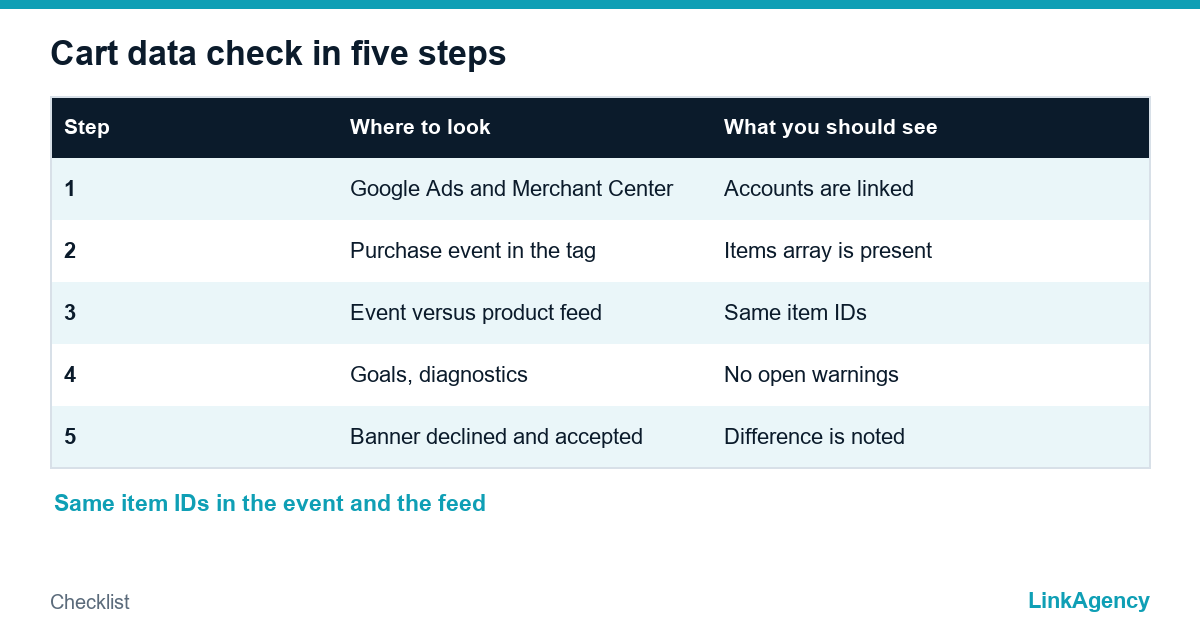
- Confirm that Google Ads and Merchant Center are linked.
- Open one test order and look at the purchase event: is there an items array?
- Compare three item IDs in the event with the same three in the feed.
- Check the diagnostics view for warnings and fix the first one.
- Test with a consent banner declined and accepted and note the difference.
- Wait for the next 30-day window and look for the sold badge on your best sellers.
If you would rather hand this over, our Google Ads management starts with exactly this tracking review, and Google Ads management for a store also covers feed and bids.
Google Ads conversions with cart data: a free tracking check
Tell us your platform. We will check whether products from the basket reach Google Ads and Merchant Center, whether Consent Mode works and what keeps your products from earning badges. Then our Google Ads management team can fix the gaps.
- a list of tracking errors with priorities;
- a plan for item IDs, feed and consent.
Leave a request and we will reply within one working day.

Frequently Asked Questions (FAQ)
What is the sold badge in Google Shopping ads?
It is a short note such as 1K+ sold last 30d under a product. Google rounds the number of purchases over 30 days. It uses only sales that Google can attribute to its own ads.
Do I need conversions with cart data for the badge?
Yes. Google says item-level sales must be reported through conversions with cart data. Without product IDs in the purchase event, the sold badge cannot be calculated.
Why do my products not show the badge?
Common reasons are mismatched item IDs, sales that Google does not attribute, volume below a private threshold, extra criteria and an unsupported region. Meeting the conditions does not guarantee a badge.
Is the badge available in the EU and the UK?
According to Google’s help page, the feature is available worldwide except the EEA, the UK and Switzerland. Check the page again later, because Google may change it.
What does Consent Mode have to do with it?
If visitors decline cookies, part of the purchase data is lost. Consent Mode keeps part of the signal. Ask your consent provider and a lawyer how to set it up for your country.
What else does cart data improve?
You get reports by product, profit data with cost of goods sold, cross-sell insight and better input for Smart Bidding. These benefits of cart data exist even where the sold badge is not shown.
Can LinkAgency check our purchase tracking?
Yes. We check whether basket products reach Google Ads and Merchant Center, review Consent Mode and list what blocks badges. The check is free. Leave a request and we reply within one working day.