Some products stop showing in Google Shopping, ads on them stop running, and sales dip a week later. In Merchant Center there is only a list of notices nobody on the team owns. This guide explains the google merchant center disapproved products problem for an online store owner: seven causes, who fixes each one, and a weekly check that finds trouble before revenue falls.
Google Merchant Center disapproved products: what it means for revenue
A disapproved product is one that Google will not show in ads or free listings until the data or the page is fixed. Disapproved products in Google Merchant Center rarely mean the whole shop is in trouble. Usually a rule fails for a group of items, such as one category with a wrong price or a brand with no identifiers. Still, those disapproved products in Google Merchant Center drop out of Google Shopping while the budget keeps running on the rest.
Notices come in two kinds: an item-level issue hits single products, while a merchant center account suspended message stops all listings at once.
| Cause | What Google sees | Who fixes it |
|---|---|---|
| 1-2. Price and availability | Feed differs from the product page | Developer |
| 3-4. Identifiers and weak data | No GTIN, brand or category | Developer and marketer |
| 5. Images and texts | Overlays, watermarks, claims | Marketer |
| 6. Shipping, returns, contacts | Pages missing or vague | Owner |
| 7. Speed and broken pages | Product page slow or unavailable | Developer |

Causes 1-2: price and availability do not match the site
A merchant center mismatched price
Google compares both. If the feed says 49 and the page shows 54 after a discount script runs, you get a merchant center mismatched price notice. Common sources of a merchant center mismatched price are sale prices that load late, tax shown on one side only, and currency switchers. Price data in structured data must agree with the visible price too. The developer should make the price readable in the page HTML and update the feed from the same source.
Out-of-stock items still marked available
A feed that refreshes once a day will advertise goods that sold out in the morning. Shorten the refresh interval, or send stock changes the moment they happen. Variants matter too. Watch sizes.
Causes 3-4: missing identifiers and weak product data
A merchant center missing gtin error appears when branded goods have no barcode number. Common. Add the GTIN where the manufacturer assigned one, add brand and MPN, and mark custom goods correctly instead of inventing codes. Google describes the rules in its guide to missing or incorrect GTINs.
Weak data causes quieter losses. Titles stuffed with promo words, a wrong category, and a missing colour or size make products hard to match. Google shopping feed errors of this type, such as an empty colour field, hide as warnings and pile up unnoticed until a product is disapproved. Titles and categories belong to the marketer. Whoever builds the template that fills the fields is the developer.
Cause 5: images and texts that break the rules
Google merchant center disapproved products caused by pictures are the easiest to prevent. Images need to show the product on a clean background, with no logo overlay, promo text or watermark, and they must meet the minimum size. The exact numbers sit in the Merchant Center help on data quality violations, and they change, so check the current page rather than an old blog. Texts must not promise guaranteed results.
Cause 6: shipping, returns and contact pages
This is the cause owners forget. Merchant Center disapprovals of this kind come from business gaps, not from code. Google expects clear shipping terms, a return policy and real contact details on the site. If they are missing or hidden, products can be disapproved, and in severe cases the account is limited. The fix is business work, not code: write the terms, publish the pages, and make them match what the checkout says. Ask a lawyer.
Cause 7: slow site or unavailable product page
If Google cannot open a product page, or it loads so slowly that the visit fails, the item is disapproved as unavailable. Page speed matters, and every landing page behind an ad should open without errors. Check redirects, server errors during sales peaks, and pages that need a login. A store built with proper ecommerce development services keeps product pages fast and stable, and the feed reads clean markup instead of scripts.
- Open Diagnostics and sort the issues by number of affected products.
- Compare three affected items with their live pages: price, stock, image.
- Fix the template or the source field, not one product at a time.
- Send the feed again and mark the issue for review.
A weekly 15-minute check and who owns what
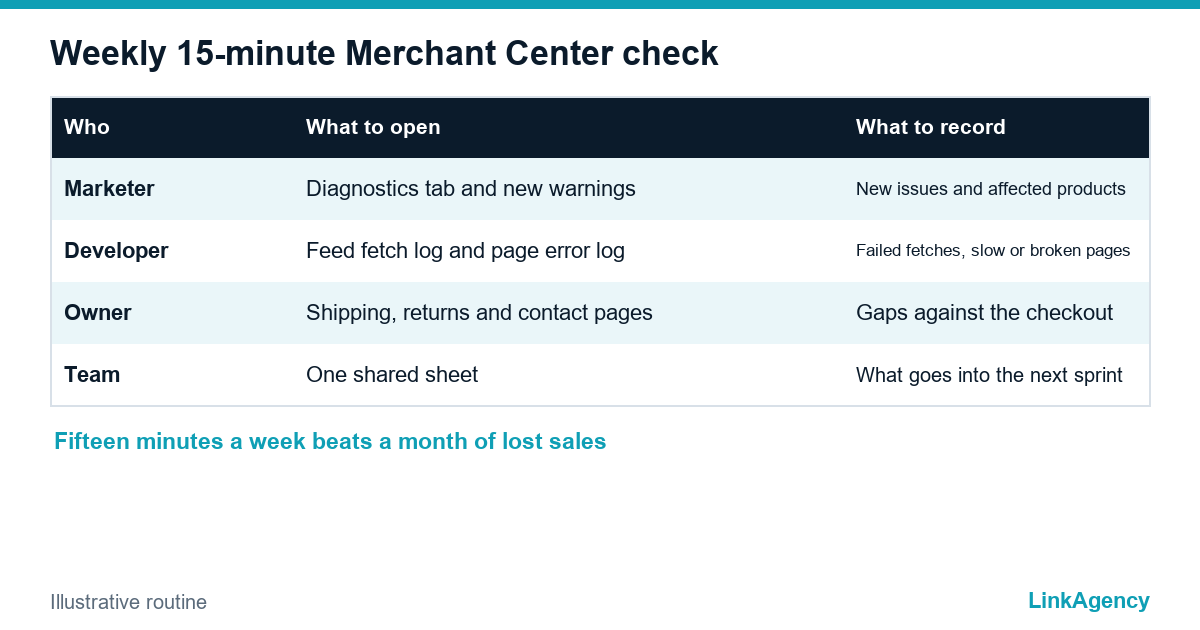
Book a slot and log every new google shopping feed error and merchant center account suspended warning in one sheet. Marketer: open the Diagnostics tab, count new issues and note any new warning. Developer: read the feed fetch log and the page error log. Owner: confirm that shipping and return pages still match the checkout. Anything that grows week over week goes into the next sprint, because Merchant Center disapprovals that wait a month cost a month of sales, and a merchant center account suspended notice is far harder to reverse. When ads are also affected, a performance marketing agency can read the feed together with campaign results, and our Google Ads management team does this review for stores that run Shopping campaigns.
Google Merchant Center disapproved products: a free review of your feed
Send us read-only access to your Merchant Center notices and a link to your store. We will look at the feed and the product pages, and tell you what to fix first and who on your team should do it. If you want the fixes done, our ecommerce development services and Google Ads management cover them.
- a short list of causes ranked by lost products;
- a weekly checklist adapted to your team.
Leave a request and we will reply within one working day.

Frequently Asked Questions (FAQ)
Why were my products disapproved in Google Merchant Center?
Most often the feed does not match the product page: price, stock or images. Other common causes are missing GTIN or brand, rule-breaking images, and missing shipping or return pages. Open Diagnostics to see the exact reason for each item.
How long does it take to restore disapproved products?
After you fix the data and resend the feed, Google re-checks the items. Timing varies, so do not promise a date to your team. Check the status again after the next feed fetch.
What does a merchant center mismatched price notice mean for google shopping feed errors?
The price in the feed differs from the price Google sees on the product page. Make the final price visible in the page HTML and fill the feed from the same source.
Is a merchant center missing gtin warning serious, and do I need a GTIN for every product?
It matters only for goods that have a manufacturer barcode. Custom or handmade items can be marked as having no identifier. Never invent numbers, because wrong codes cause new errors.
Can a store account be suspended for disapproved products?
Yes, serious or repeated violations can lead to account-level limits. Fix the cause listed in the notice, then request a review. Ask your lawyer to check policy and legal pages first.
Who should check Merchant Center every week?
Assign it to the marketer, with the developer on feed and page errors and the owner on shipping and return pages. Fifteen minutes a week is enough to catch most issues. We can set up the routine and review your feed for free.