Google Ads offline conversions can show “success” in the upload report while the CRM lists closed deals and the ad account reports almost nothing. Search Engine Land wrote on 9 November 2026 about exactly this gap, where offline uploads with a success status never reach the conversion columns. This guide is for owners who pay for clicks and want the ad system to learn from real customers. It explains why a status is not a result, gives six checks you can run without writing code and ends with questions for your contractor and developer. Figures come from Google’s own help pages and are named where they appear.
Why Google Ads offline conversions matter: ads learn from real customers, not from form fills
Without CRM data, Google Ads conversion tracking optimises for the form that was submitted, and a form is not a sale. It stops at the lead. Two campaigns can bring the same number of leads while one brings buyers and the other brings people who never answer the phone. When closed deals are sent back, bidding can favour the clicks that ended in revenue. That changes where the budget goes, and it also shows which campaigns looked good only on lead counts. If you want help with the setup itself, our Google Ads management starts with exactly this data loop.
What “success” really means for Google Ads offline conversions
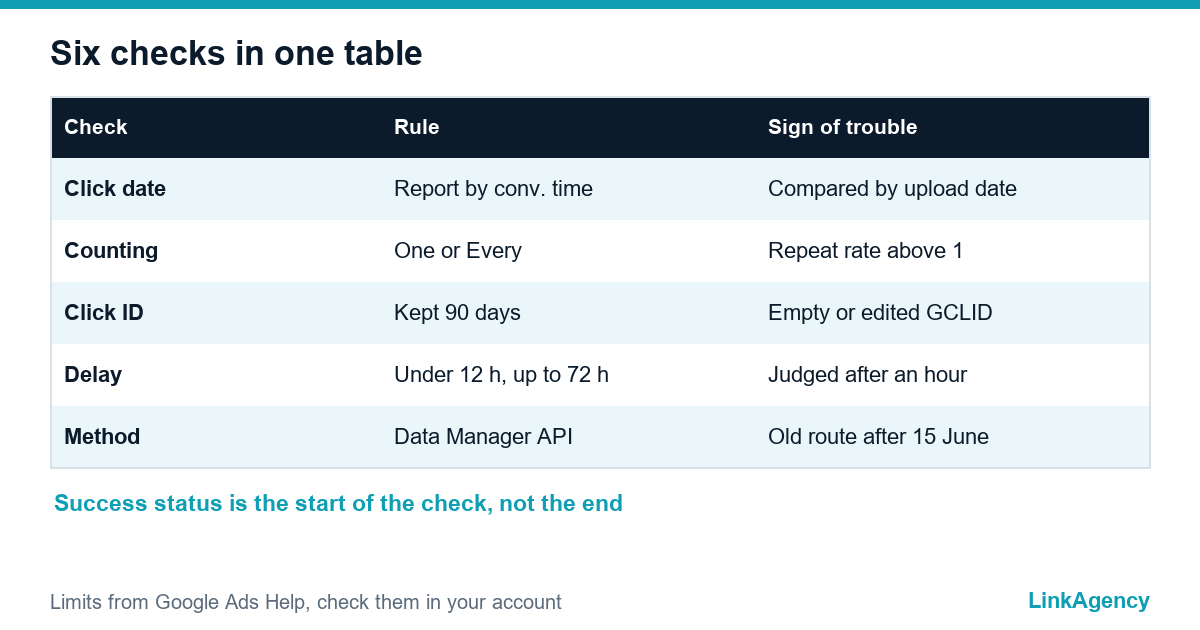
A success status mostly says that the file was readable. It does not promise that each row matched a real click or that the conversion landed in the column you read. Google’s help page on offline import discrepancies lists problems that appear after a successful upload: differences in the reporting date, expected processing delays and conversions that are not processed, for example spam or invalid traffic. So treat success as the start of the investigation. The six checks below follow the order in which owners usually find the cause.
| Check | Where to look | Sign of trouble |
|---|---|---|
| 1. Click date | Columns “by conv. time” | Numbers compared by upload date |
| 2. Counting | Conversion summary, Repeat Rate | One set, repeat rate above 1 |
| 3. Click ID | Lead record in the CRM | Empty or altered GCLID |
| 4. Delay | Offline data diagnostics | Alerts or old pending rows |
| 5. Method | Contractor’s setup | Legacy API after 15 June 2026 |
Check 1: reconcile by click date, not by upload date
Google reports an offline conversion against the time of the ad click, so a deal closed in November can appear in a September column. The help page warns not to compare conversions by upload date and suggests the columns that report by conversion time. Account time zones can differ too, and a conversion time earlier than the click is rejected, so Google suggests adding one or two days or fixing the time zone. Ask the contractor which date they used. Then widen the date range before you call numbers missing.
Check 2: the counting setting, one or every
If the conversion action counts “One”, only one conversion is kept for each ad interaction, and the extra rows are discarded without an error. Open the conversion summary and look at the Repeat Rate column. A value above one with the “One” setting explains part of the gap. “One” suits a lead stage, while “Every” suits repeat orders, so the setting must match the event you send.
Check 3: is the click ID saved together with the lead
How to test the click ID yourself
The click ID is the link between a deal and the ad. Google ties it to a conversion window, so timing matters. Google keeps a GCLID for 90 days, so a deal that closes after that cannot be matched with it. Open the site with ?gclid=test123 in the address, submit the form and check that the value reaches the CRM unchanged. A lowercase copy, a trimmed value or an empty field in a spreadsheet breaks the match. Where the click ID is lost, business process automation between the site, the CRM and the report fixes it once.
- Turn on auto-tagging in the account.
- Add a hidden field for the click ID to every form.
- Save the value in the lead card and never edit it.
- Send the deal with its original click ID inside 90 days.
Check 4: processing delay and the diagnostics report
Google says processing usually takes under 12 hours and up to 72 hours for conversions keyed by GBRAID or WBRAID, so a number checked an hour after the upload proves nothing. A click that is less than six hours old is also rejected for those iOS identifiers. Use the offline data diagnostics in the account rather than the headline status. The developer documentation describes summaries with the statuses excellent, needs attention and no recent uploads, and notes that pending events may take up to 24 hours. A rule of thumb: look once a day, not once an hour.
Check 5: how the data is sent and what the move to Data Manager API changes
Google states that from 15 June 2026 offline conversion imports and enhanced conversions for leads move to the Data Manager API and are blocked in the Google Ads API, and that developer tokens with no requests from January to June 2026 are not allowlisted for the old route. The offline conversion import built on an older script or integration may therefore stop without a visible error on your side. Ask which route is used: a file in the interface, an integration or a custom script. The upload summaries documentation shows how a developer can read the same diagnostics from code.
Questions for your contractor and developer, plus consent and GDPR
Take this list to the next meeting. Which route sends the data, and is it on the Data Manager API? Check the counting setting and the repeat rate. Ask what share of leads has a stored click ID and how old those clicks are. Read the diagnostics together. Find out whether consent is recorded for the people whose data you upload. Customer data is personal data, so hash emails and phone numbers as Google describes, send only what is needed and ask a lawyer to confirm your case under GDPR and UK GDPR. Our performance marketing agency team can run this audit with you.
Google Ads offline conversions: a free conversion audit
We will look at what Google Ads counts today, what the CRM sends and where the data is lost between the form, the CRM and the ad account.
- a map of the data path from click to deal;
- a list of the checks that failed and who fixes them.
Send a request and we will reply within one working day with a plan for the audit and, if needed, for Google Ads management.

Frequently Asked Questions (FAQ)
Why does the upload show success but no conversions appear?
A success status mostly means the file was readable. Rows can still be dropped later for an unknown click, an old click ID, a conversion dated before the click or invalid traffic, and the numbers may sit in a different date column.
How long does Google take to process offline conversions?
Google’s help page says processing is typically under 12 hours, and up to 72 hours for conversions keyed by GBRAID or WBRAID. Check the diagnostics once a day instead of an hour after the upload.
How long is a click ID valid?
Google keeps a GCLID for 90 days. A deal that closes later cannot be matched with that click, so send the conversion as soon as the deal is confirmed.
Should the conversion count one or every?
Use One for a lead stage, where only one conversion per interaction matters, and Every for repeat orders. With One, extra rows are discarded, and the Repeat Rate column above one shows it.
Why compare by click date and not by upload date?
Google reports an offline conversion at the time of the click. Compare with the columns that report by conversion time, widen the date range and check the account time zone.
What changes with the Data Manager API?
Google states that from 15 June 2026 offline conversion imports move to the Data Manager API and are blocked in the Google Ads API. Ask your developer which route the setup uses.
How can LinkAgency help with offline conversion tracking?
Send us your account and CRM setup. We run a free audit of what Google Ads counts, what the CRM sends and where data is lost, then agree who fixes each issue.