One stolen password for your email, your domain or your ad account can stop sales for a week and open the door to customer data. Most firms have switched on a second step somewhere, and nobody can say where. This guide is MFA for small business in the order an owner can act on it: the six accounts to close first, how SMS, authenticator apps and passkeys differ, what to do about shared logins, contractors and lost phones, and how to roll it out in a week. It ends with the requirements clients, insurers and NIS2 may bring, and a quarterly checklist. Claims come from named public sources.
Why a password no longer protects a business, and why MFA for small business is not optional
A password is one secret that travels. It is typed into phishing pages, reused across sites and leaked from services you do not control. A second step means the thief needs something more than the leaked text. CISA says any MFA is better than none and that a business should aim for phishing-resistant MFA. The point for an owner is simple: you do not need a perfect system on day one, you need the second step on the accounts that hurt most.
Six accounts to close first
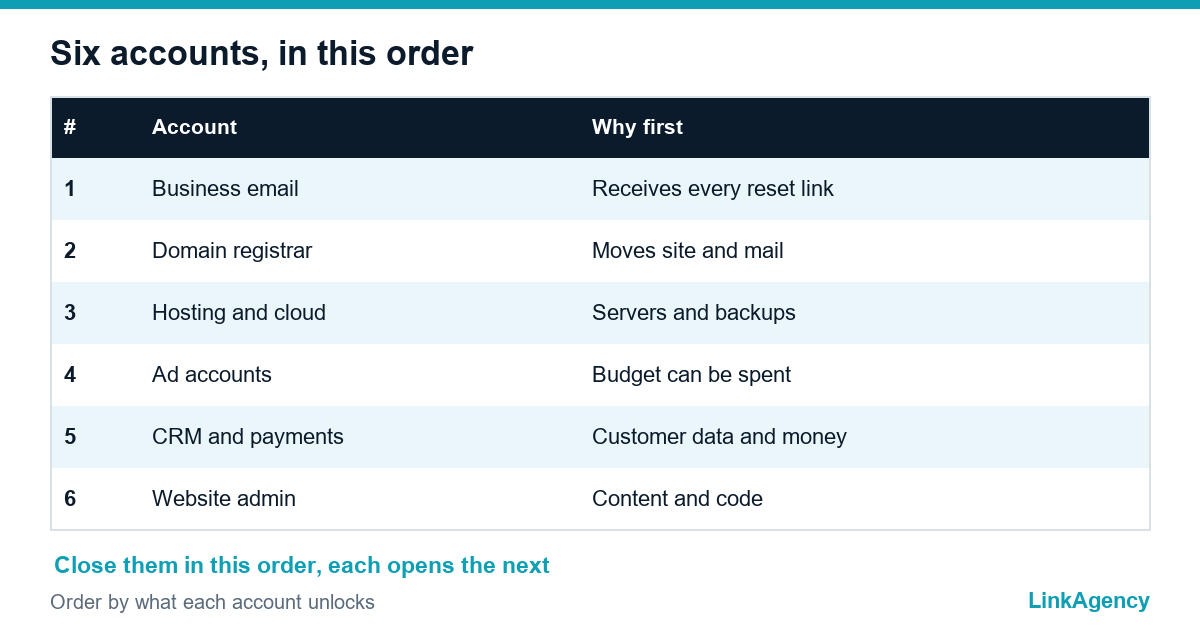
Close them in this order, because each one is a key to the next. CISA advises starting with admin accounts and staff who handle sensitive data, and with email, file storage and remote access.
- Business email, because it receives the reset link for every other account.
- The domain registrar, where one takeover moves your site and mail.
- Hosting and cloud, including the console where servers and backups live. Our cloud hosting services team sets this up with role-based access.
- Ad accounts, where a thief can spend your budget.
- CRM and payment systems, with customer data and money.
- The website admin panel, where a stolen login can change content and code.

SMS, authenticator app or passkey: which method to choose
CISA ranks the options from strongest to weakest: a security key, an authenticator app with number matching, an authenticator app with a changing code, biometrics paired with another method, and last a code by text or email, to be used only when nothing stronger exists. A passkey is a sign-in tied to the unlock of your device, and Google calls it phishing-resistant. Google also notes that Workspace users may not be able to sign in with a passkey alone, so read the passkey help page for your plan.
| Method | Phishing-resistant | Best for | Weak spot |
|---|---|---|---|
| Security key | Yes | Admins, owner | Must be handed out and replaced |
| Passkey | Yes | Daily sign-in | Device loss needs a plan |
| Authenticator app | With number matching | Most staff | Push fatigue |
| SMS code | No | Last resort | Intercept and SIM swap |
Shared accounts and contractors: do not share one code with everyone
A shared login with one phone behind it means nobody is accountable and the code reaches whoever holds the phone. Give each person a named account where the service allows it. Where a tool offers only one login, keep the second factor in a company password manager with access limited to named people, and rotate it when someone leaves. For contractors, create their own accounts with the least access needed and an end date, and remove them on the last day. Our DevOps services include this access review.
Recovery codes and a lost phone: prepare before the day of the incident
Most lockouts are not attacks, they are a broken phone on a Friday. At setup, save the recovery codes in a company vault, not on the same phone. Register a second method for every administrator, for example a security key in a drawer. Write a short rule for a lost device: who confirms the person’s identity, how the old factor is removed and how new access is granted. Google’s page says that if a device with a passkey is lost, the passkey should be removed from the account on another device.
A one-week rollout without staff rebellion
The plan day by day
A good MFA implementation is small and visible. Day one: list accounts and owners. Day two: switch on MFA for the owner and administrators. Days three and four: a pilot with a few volunteers who report friction. Day five: announce the rule and the date. Days six and seven: enrol everyone, help those who struggle and fix the exceptions. People accept a step that takes seconds if the reason is explained and a person is available to help. Pick one method and document it on one page.
What clients, insurers and NIS2 may require
Clients and insurers increasingly ask whether MFA is enforced, and some questionnaires ask for evidence, so keep a dated list of protected accounts. NIS2 applies to medium and large entities in listed sectors and, under its recital, to some small firms with a key role, and the directive names multi-factor authentication among its risk measures where appropriate. Check the official text of the directive and ask a lawyer whether your company is in scope.
A quarterly checklist
Put the review in the calendar and keep it short. Check that every priority account still has MFA. Remove accounts of people and contractors who left. Test one recovery code. Review the exceptions and their end dates. Confirm that administrators have a second method. Our web development services add the website admin panel to this list for every project we hand over.
MFA for small business: a free access audit
We will check who signs in to your email, domain, hosting, ads and website admin, and show where there is no second factor.
- a map of accounts and who can reach them;
- a one-week plan for the missing protection.
Send a request and we will reply within one working day with a plan for the audit.

Frequently Asked Questions (FAQ)
Which accounts should a small business protect with MFA first?
Start with business email, the domain registrar, hosting and cloud, ad accounts, CRM and payments, and the website admin panel. Email comes first because it receives the reset link for every other account.
Is SMS good enough as a second factor?
CISA ranks a code by text or email last and says to use it only when stronger options are not available. It is better than no MFA, but move administrators and key accounts to an app, passkey or security key.
What is a passkey?
A passkey is a sign-in method tied to the unlock of your device, such as a fingerprint, face or PIN. Google describes passkeys as phishing-resistant. Check whether your plan allows passkey-only sign-in.
How do we handle a shared account?
Prefer named accounts. Where one login is unavoidable, keep the second factor in a company password manager with limited access and change it when someone leaves.
What if an employee loses a phone?
Use saved recovery codes or a second method such as a security key, confirm the person’s identity, remove the old factor and add a new one. Write this rule down before it is needed.
Does NIS2 apply to our company?
NIS2 covers medium and large entities in listed sectors and some smaller firms with a key role. Check the official text and ask a lawyer about your case.
How can LinkAgency help with MFA?
We run a free access audit of your email, domain, hosting, ads and website admin, then agree a one-week plan and help implement it.