A company website goes down on a Monday morning, and the sales team finds out from a customer, which is the worst way to learn about an outage, because by then the damage is already done and the only thing left is to explain. The question is rarely “which plan is cheapest”. It is how much one hour of silence costs and who answers the phone. This guide compares VPS vs cloud hosting and shared plans through risk, not through feature lists. We cover hosting for a business website, downtime cost, traffic peaks, backups and data location under GDPR, so you can decide before the next outage. Prices and provider names are left out on purpose, because they change and depend on your region.
VPS vs cloud hosting: what you actually choose between
There are three common options. Shared hosting puts many sites on one server and one pool of resources. A VPS gives you a virtual server with guaranteed memory and processor share. Cloud hosting runs your site on a pool of machines, so capacity can grow or move when one machine fails. Most guides stop at these definitions, but the useful comparison is shared hosting vs VPS vs cloud by risk: what happens to your sales when a neighbour site is attacked, a traffic spike arrives, or a disk fails. A cheap plan is a fine choice for a brochure site and a poor one for a shop that earns money every hour.
Where each option breaks first
On shared hosting the limit is the neighbours and the fixed resources. On a VPS the limit is one physical host and your own admin time. In the cloud the limit is configuration and budget control, since capacity is easy to add and easy to forget. So VPS or cloud hosting is less a technical question than a question of who watches the server.
The cost of website downtime comes first
Before comparing plans, estimate the cost of website downtime. Take orders or leads per hour, multiply by average value, and add the work of the team that fixes things. Use your own figures from analytics and accounting, not benchmarks from the internet. If an hour of downtime costs less than a month of better hosting, a simple plan is enough. If it costs more, the extra spend on cloud hosting vs VPS is insurance, and it should be treated as such in the budget.
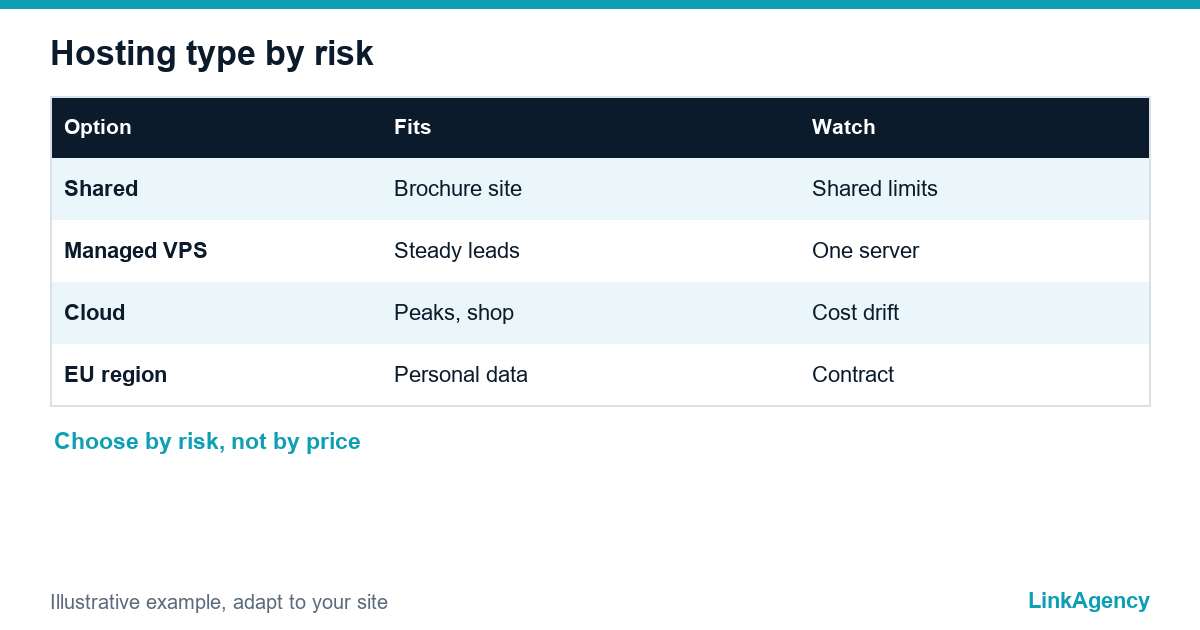
| Situation | Reasonable starting point | Main risk to watch |
|---|---|---|
| Brochure site, few leads | Shared hosting with backups | Slow pages, shared limits |
| Lead-generation site with ads | Managed VPS | Single server, manual updates |
| Online shop or booking, peaks | Cloud hosting with autoscaling | Cost drift, wrong settings |
| Regulated data, EU customers | Cloud or VPS in an EU region | Data location, processor contract |

What other guides say about hosting types, and what they skip
Most VPS vs cloud hosting guides agree on the basics: a VPS fits steady traffic and a predictable bill, cloud fits uneven demand. Network Solutions notes that neither is inherently more secure and that you should back up your site. The one.com guide adds a practical detail for moves: a DNS switch often takes a few hours and can take up to 72 hours, so keep the old server until the change has reached everyone. Webyne warns that if the physical host of a VPS fails, the site can stay down until it is restored. Prices are the weak spot: one guide cites plans from 4 to 5 euros a month, another puts basic cloud plans at 20 to 50 euros, so treat any single number as a definition problem, not a norm. Almost none of them covers data location or the cost of downtime, which is why those sections come first here.
Traffic peaks and growth
A campaign, a mention in the press or a sale can multiply visits within minutes. Shared plans throttle or return errors. A VPS holds only up to the size you bought and needs a manual upgrade, often with a restart. Cloud hosting services can add capacity automatically, which suits uneven traffic, but only if the application is built for it. Ask the developers: does the site keep sessions and files on one machine? That is what blocks scaling.
Who updates, secures and monitors the server
This part decides the outcome. On shared hosting the provider handles the server, and you handle the site. On an unmanaged VPS you own updates, firewall, certificates and alerts. A managed VPS moves part of it to the provider. In the cloud you can buy managed services or run it yourself. Write the answer down per task: operating system updates, security patches, monitoring, restores. A task with no owner fails at night. Always.
Where the data is stored and what GDPR expects
If you serve customers in the EU, personal data falls under the GDPR. Check in which country the servers are, who is the processor, and whether a data processing agreement exists. Hosting for a business website outside the EU is possible, yet it adds transfer rules. Confirm the details with a lawyer, since requirements differ by case.
Backups and recovery speed
A backup stored on the same server is not a backup. The CISA guidance on backing up business data explains why copies should be separate and tested. Two numbers matter: how much data you can lose and how long the restore may take. Our guide on website backup strategy for business shows what to copy and how to test a restore. The faster the recovery you need, the more the choice moves from shared plans toward cloud hosting vs VPS with snapshots and a standby copy.
When to migrate and how to avoid downtime
- Copy the site to the new environment and test it on a temporary address.
- Lower the DNS lifetime a few days before the switch.
- Freeze content changes, run a last sync and switch DNS.
- Keep the old server for a week as a fallback and watch the logs.
- Check forms, payments, email and certificates after the switch.
Signs that it is time to move: slow pages at normal traffic, repeated outages, a growing share of revenue online. Our cloud infrastructure services cover the move without a long pause on the site.
Five questions before you decide
- What does one hour of downtime cost us in money?
- How uneven is the traffic during the year?
- Who updates and monitors the server, and who answers at night?
- Where are the data stored, and does that match GDPR?
- How fast must we restore after a failure, and was it tested?
If most answers point to risk, look at our cloud hosting services and ask for a plan matched to the answers.
VPS vs cloud hosting: free consultation for your site
We review your traffic, downtime cost and backups, then name the hosting type that fits. No commitment.
- comparison of shared, VPS and cloud for your case;
- migration plan with minimal downtime.
Send a request and get an answer within a working day.

Frequently Asked Questions (FAQ)
Which is better for a business website: VPS or cloud hosting?
It depends on downtime cost and traffic. A managed VPS suits steady traffic and a small team. Cloud hosting suits peaks and strict recovery goals. Choosing VPS or cloud hosting by risk is safer than choosing by price.
When is shared hosting enough?
For a brochure site with few leads and steady traffic. Shared hosting vs VPS vs cloud changes once the site earns money every hour or runs paid campaigns.
How do I estimate the cost of website downtime?
Multiply orders or leads per hour by average value and add the team time spent on fixing. Use your own analytics, not benchmarks. This figure shows how much hosting for a business website is worth.
Who is responsible for updates and security?
On shared hosting the provider handles the server. On an unmanaged VPS you do. A managed VPS and cloud hosting services share the work, so name an owner per task in writing.
Does GDPR affect the choice of hosting?
Yes, if you serve EU customers. Check the server country, the processor and the agreement, and confirm the details with a lawyer.
How do I switch hosting without downtime?
Test the copy on a temporary address, lower the DNS lifetime, run a last sync and switch. Keep the old server for a week as a fallback.
How can LinkAgency help me choose?
Send a request with your site address and traffic. We run a free consultation, compare options for your case and propose a migration plan if you need one.