Your Shopify store has collected apps for years. Some are unused, some can read orders and customers, and nobody is sure who owns them. On 5 November 2026 Shopify marked a change as “Action required”: public apps must now configure an IP allowlist. Shopify app security is the owner’s job as much as the developer’s. This text is a short audit of Shopify apps: what has access to your data, what the new rule covers and what it leaves to you, and why the security of Shopify apps cannot be left to vendors alone. We keep to the facts in Shopify’s own notes and flag where sources differ.
Shopify app security: what changed and which dates to remember
The Shopify IP allowlist limits the addresses from which an app’s tokens can be used. According to Shopify’s changelog of 5 November 2026, the reason is simple: leaked tokens can be used from any network location. The developer sets the allowlist in the Dev Dashboard. A request from outside it fails with a 403 code, as the Shopify documentation explains.
| Date | What happens | Where stated |
|---|---|---|
| 12 November 2026 | Public apps using bulk operations without an allowlist: bulk operations fail | Changelog and docs |
| 20 November 2026 | Public apps without an allowlist are removed from the App Store and blocked for new installs | Changelog and docs |
| 15 January 2027 | Merchants using such an app see a warning in the admin | Docs, not the changelog |
| 1 April 2027 | Shopify rejects the app’s GraphQL and REST Admin API requests | Docs, not the changelog |
Existing installs keep working after 20 November, the documentation adds. Time zone and exact hours are in the changelog. Check them there before you plan anything.
Why limit access by IP: how a leaked key becomes a data leak
API token security starts here: an app that reads your orders holds a token, which is a long secret string. Anyone who obtains the token can act as the app. A token that leaks from a log, an old backup or a developer’s laptop works from any country until someone cancels it. An allowlist narrows that: the stolen token is useless from an address that is not on the list. It does not remove the risk. The documentation warns that a hosting provider’s network is shared with its other customers, so a list built on a provider’s network is less strict than one built on exact addresses.
What it does not protect
Shopify says it cannot confirm the source address of some requests, for example tokens used in Shopify Flow’s HTTP request action. Treat the allowlist as one layer, next to short-lived tokens and narrow permissions.
What the rule does not cover: custom apps and integrations built for you
The changelog says the requirement does not apply to custom apps or to apps that merchants create themselves in the Dev Dashboard or the admin. The same page adds that an allowlist is not required for custom apps but is highly recommended, so a Shopify apps security review should include them. For an owner this is the gap that matters: the integration an agency built for you years ago, a connection to your accounting system or a script a freelancer left behind is outside the new rule. The rule changes Shopify app security only for public apps, so ask for a list of every custom connection, every webhook and the person responsible for each one.
An app audit in 15 minutes: the list, the owner, the data each one sees
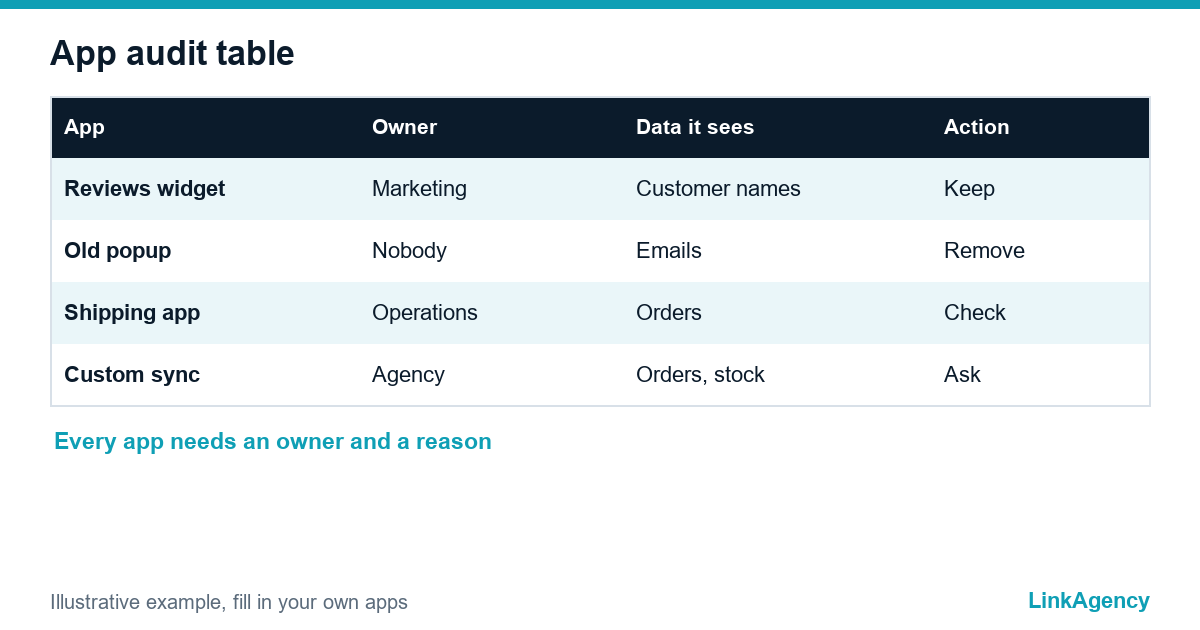
A Shopify store app audit starts in your admin: open Settings, then Apps and sales channels, and list staff accounts next to the apps. Build a simple table: the app, what it does, who owns it, the date of the last review and whether it is still needed. Shopify’s own guidance for users and several community guides agree on the order. Check the permission screen of each app: it separates “view personal data” from “view and edit store data”. Then look at the theme code under Customize and App embeds, because removing an app does not always remove what it added to the theme. Each audit of Shopify apps should end with a check of the access token each app holds.
- List every installed app and every staff account.
- Mark each app as critical, useful or experimental, and give it an owner.
- Remove what nobody can explain, starting with unused Shopify apps and their webhooks.
- Open the permissions of the rest and cut what is not needed.
- Check the theme for leftover code and app embeds you did not expect.
Questions to ask the developer and the app vendor
Send these in writing, and keep the answers with your contract.
- Is the app public or custom, and has the IP allowlist been configured?
- Which data does the app read and write, and why does it need each permission?
- Where are tokens stored, and how quickly can they be rotated?
- Who is the processor of personal data, and is there a data processing agreement?
- What is the plan if the vendor stops supporting the app?
If the app handles personal data of customers in the EU, the GDPR applies to that processing. Confirm the details with a lawyer, because the answer depends on your case.
If an app stopped working: what to check first
If a feature broke after 12 or 20 November, do not reinstall everything at once. First check whether the vendor announced an allowlist change and whether the app is still listed. Then ask the vendor whether requests from their servers fail with 403. Keep a log of what you changed, so you can undo it. If you rely on an app that will not meet the deadline, the sensible plan is a replacement or a custom connection, which our ecommerce development services can build and our DevOps services can host with exact addresses.
A standing routine: who approves new apps and how often to review access
Make one person responsible. No app goes into the live store “to try”. Review access every quarter, and after every staff change. Our comparison of Shopify, WooCommerce and custom platforms shows how much of this work a platform handles for you and how much stays with you.
Shopify app security: free audit of your apps and integrations
We list who has access to your store, what can be switched off and what should be reworked. No obligation.
- review of apps, permissions and custom connections;
- plan for the changes before the November deadlines.
Send a request and get a reply within one working day with a free audit plan.

Frequently Asked Questions (FAQ)
What did Shopify change for app security?
On 5 November 2026 Shopify made an IP allowlist a requirement for public apps. Without it, bulk operations fail from 12 November and the app is removed from the App Store from 20 November, according to the changelog.
Does the rule apply to custom apps?
No. The changelog excludes custom apps and apps that merchants create themselves, but the docs still recommend an allowlist for them. A Shopify store app audit should cover these connections too, and so should every audit of Shopify apps.
What happens to apps already installed?
The docs say existing installs keep working after 20 November. Merchants see a warning from 15 January 2027, and requests are rejected from 1 April 2027 if the allowlist is missing.
How do I see which apps have access?
Open Settings and Apps and sales channels, then check the permissions of each app. An audit of Shopify apps should also look at the theme for leftover code after unused Shopify apps are removed.
Who sets the allowlist, the owner or the developer?
The developer sets it in the Dev Dashboard. You ask the vendor in writing whether it is done, which is part of a Shopify apps security review and of API token security.
Does this affect GDPR duties?
If an app processes personal data of EU customers, the GDPR applies to the processing and you need a data processing agreement. Confirm the details with a lawyer.
How can LinkAgency help?
Leave a request with a list of your apps. We run a free audit of the store apps, mark what to remove and what to rework, and offer custom integrations if you need them.