The app is ready, but the release is broken by a rejection from App Review. Every round of fixes moves the launch and the marketing campaign. This guide lists the App Store rejection reasons from the viewpoint of a project manager, not of a developer. It is a “like the reviewer” checklist: what to check a week before sending, what to build into the launch plan and into the business model, including in-app payments, account deletion and privacy under the GDPR. It does not retell all of Apple’s documentation, and wherever it refers to a section, check the current text of the guidelines.
App Store rejection reasons: why a rejection costs more than it seems
A rejection is not only a delay of a few days. It is a missed date for the campaign, a second round of testing, a conversation with people who were told the launch day, and sometimes a change of plan for the whole team. Why Apple rejects apps is rarely a mystery: Apple publishes the App Review Guidelines, and most rejections come from a handful of sections that are easy to check in advance. Apple reviewers open apps on a device. Reviewers read the app like a customer, and the review follows the guidelines line by line. We do not give App Store review time here, because it changes, so build spare time into the plan instead of counting on a number.
What Apple’s own numbers show about rejections
Apple’s 2025 App Store Transparency Report gives the scale. Apple reviewed 9,100,620 app submissions and rejected 2,093,244 of them, about 23%, and 387,087 were approved after a rejection. By guideline section, Performance accounted for 1,354,418 rejections, Legal for 495,673, Design for 415,532 (including copycats, minimum functionality and spam), Business for 283,820 and Safety for 151,159. One submission can fail under several sections, so the figures do not add up to the total. Other guides quote rejection rates of 35 to 40% without a source, so use Apple’s figures. Performance leads, which fits section 2.1: crashes, incomplete builds and dead demo access are the cheapest problems to prevent. Use the App Store review guidelines checklist below, and plan for the App Store review time instead of a fixed date, because that is how to avoid App Store rejection at the cheapest stage.
Stability and completeness: what is checked on real devices
What section 2.1 asks for
Section 2.1 on app completeness says that submissions should be final versions with all necessary metadata and working URLs, with no placeholder text or empty websites, and that the app should be tested on a device for bugs and stability. Apple rejects incomplete bundles and apps that crash or show obvious technical problems. If you offer in-app purchases, they must be complete and working too. Before sending, install the build on several real devices, walk through the main paths and remove everything temporary. This is the first item of any App Store submission checklist and the cheapest to fix. It is also how to avoid App Store rejection for the simplest reasons.
A demo account and instructions for the reviewer
If the app has a login, the guidelines ask you to include demo account details and to turn on your back-end service. If you cannot provide a demo account for legal or security reasons, you may offer a built-in demo mode with prior approval from Apple, and it must show the full features. A missing demo account for app review is one of the most common reasons Apple rejects apps and most avoidable reasons for rejection. Put the account and a short note into the review notes. Check that it works on the day you send.
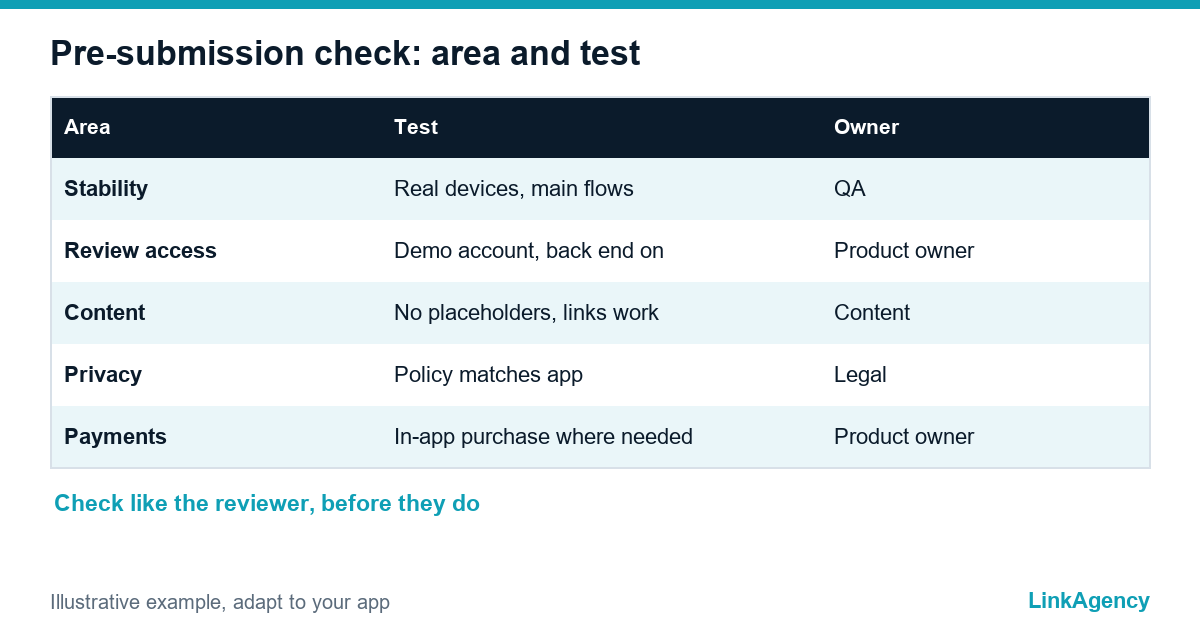
| Check before sending | Why it matters | Who owns it |
|---|---|---|
| Build tested on real devices | Crashes and visible bugs are rejected | QA lead |
| Demo account and back end switched on | The reviewer must reach every feature | Product owner |
| No placeholder text or empty links | Incomplete apps are rejected | Content owner |
| Privacy policy and data description | Privacy is checked in review | Legal contact |
| Payments through in-app purchase where required | Payment rules are enforced | Product owner |
Minimum functionality: when a website in a wrapper does not pass
Section 4.2 is short. It says that an app should include features, content and UI that elevate it beyond a repackaged website. An app rejected for minimum functionality is usually a site in a shell with no reason to exist as an app, and these are the reasons Apple rejects apps most stubbornly. To pass, give the app something a website cannot do as well: use of the camera, notifications, offline use, saved preferences or a flow built for the phone. Before you start, ask what the app does that the site does not. That is the App Store review guidelines checklist in one question. Our guide on mobile app support after launch explains how to keep that value up over time.
Privacy: the policy, the data description, account deletion and GDPR
Apple checks privacy in review. The guidelines ask for a privacy policy and for a clear description of the data you collect. They also say that if the app supports account creation, it must offer account deletion within the app, and that apps may not require personal information unless it is relevant to the core function. For EU users, the same data is covered by the GDPR, so the privacy policy, the store description and the real behaviour of the app must match. Confirm the details with a lawyer.
Payments and subscriptions: what must go through in-app purchase
If the app unlocks features or content inside the app, the guidelines in section 3.1 expect in-app purchase, with exceptions that change, so read the current text. A payment flow that sends users outside the app to buy a digital feature is a typical reason for rejection. Payment rules cost the most to fix late. Decide early. Decide this at the business-model stage, not after the build: it affects pricing, margin and the subscription screens. If the payment flow breaks during review, the whole submission can fail.
The store listing: screenshots and description without extra promises
The listing must describe what the app really does, which is part of any App Store review guidelines checklist. Why Apple rejects apps with inaccurate listings is simple: the review compares words with behaviour. Screenshots should show the real interface, and the description should not promise features that are not there. Inaccurate metadata is the cheapest of the App Store rejection reasons to fix. Short rule: check that names, icons and texts do not use other brands without permission, and that every link in the listing works.
A release plan with spare time for the review
- One week before sending: run the checklist and test on real devices.
- Send the build with the demo account, the privacy details and review notes.
- Keep the campaign date flexible. It is cheap. And it saves a campaign. with spare time for one possible rejection.
- If the app is rejected, read the cited section, fix the cause and answer the reviewer.
- After release, plan updates and support so that the next version does not fail either.
If you want an experienced team to prepare the release, our mobile app development services include the review checklist, and our iOS app development team prepares the build for submission.
App Store rejection reasons: free consultation on your release
We will go through the checklist on your app before submission and say what to fix first. No obligations.
- review of stability, demo account and metadata;
- check of privacy, payments and the release plan.
Leave a request and we will reply within one working day with a free consultation plan.

Frequently Asked Questions (FAQ)
What are the most common App Store rejection reasons?
Crashes and incomplete builds, no demo account, minimum functionality, privacy gaps, payment rules and inaccurate store listings. The reasons Apple rejects apps are mostly found in a few sections of the guidelines, so why Apple rejects apps can be checked in advance.
How can I avoid App Store rejection?
Test on real devices a week before sending, include a demo account and review notes, check privacy and payments against the current guidelines and keep spare time in the plan. This is the core of an App Store submission checklist and of the App Store review guidelines checklist.
Why do I need a demo account for app review?
If the app has a login, the reviewer must reach every feature. The guidelines ask for demo account details and a running back end, or an approved built-in demo mode.
What does minimum functionality mean?
Section 4.2 expects features, content and UI that go beyond a repackaged website. An app rejected for minimum functionality is usually a website in a shell.
Do I need account deletion inside the app?
If the app supports account creation, the guidelines require account deletion within the app. Check the current wording and the GDPR with a lawyer.
Does a rejection delay the whole launch?
It can. Review times change, so plan spare time and keep the campaign date flexible. Running an App Store submission checklist before sending reduces the risk, as do clear reasons Apple rejects apps.
How can LinkAgency help with the release?
Leave a request with the build or a description of the app and ask how to avoid App Store rejection. We give a free consultation, run the checklist on your app and say what to fix before submission.