Somewhere a backup exists, but nobody has checked that the site can be restored from it, and nobody knows how many hours the business will be offline after a failure, a hack or a bad update. Every website backup strategy for business answers three questions: what is copied, where the copies are kept and how fast the site comes back. This guide gives a practical plan: what goes into a copy, the 3-2-1 rule, how often to copy, storage outside the hosting account and a restore test every quarter. For the EU it also covers where copies are physically stored and who can reach them under GDPR.
Website backup strategy for business: why “we have a backup” does not mean “the site will come back”
Copy is only useful if you can restore from it. Many owners discover too late that the hosting backup is incomplete, stored in the same account that was hacked or too old to help. The question is not whether a backup exists but how long recovery takes and what is lost. Strategy for the website means deciding what the backup contains, how fresh it is and who restores it, and writing that down before the day you need it.
What a backup must include: files, database, settings, certificates, code
A site is more than its files. A usable website backup plan covers every part that is needed to rebuild it on a clean server.
- Site files and uploaded media.
- The database with content, orders and users.
- Settings and configuration files.
- Certificates, keys and DNS records.
- The source code and the deployment instructions.
If one of these is missing, a restore may start but fail halfway. Ask what exactly your hosting copies and what stays outside the copy. This is the first step of how to back up a business website properly.
The 3-2-1 rule in simple words
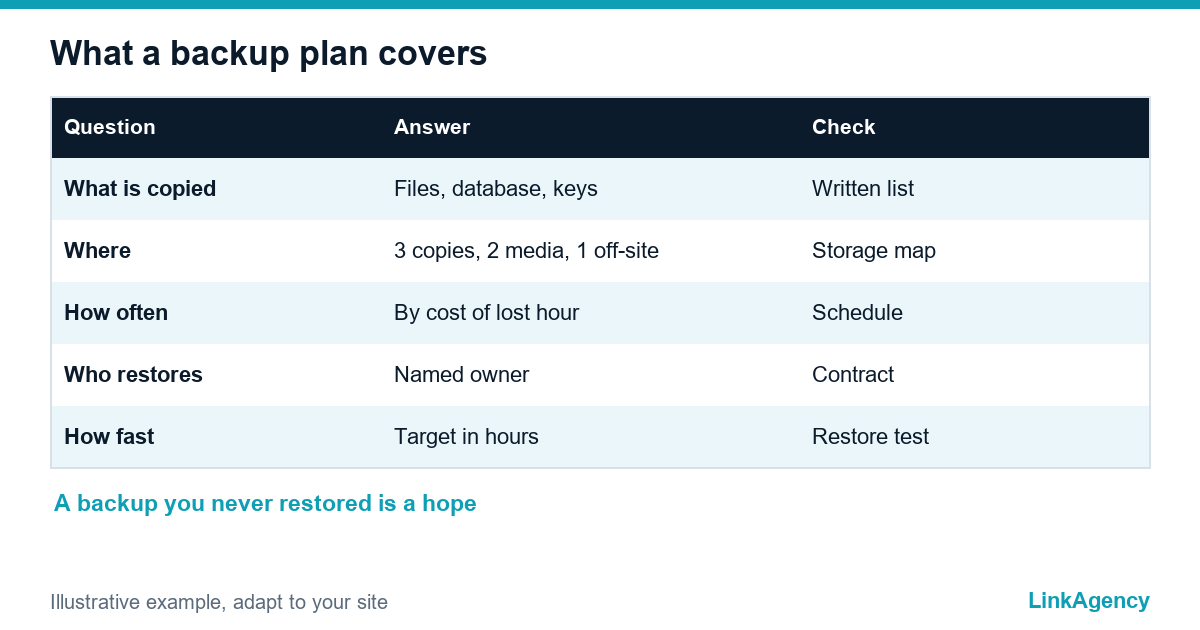
CISA describes the 3-2-1 backup rule in plain terms: keep three copies of important files, on two different types of storage, with one copy off-site. The 3-2-1 backup rule for a site means the live version plus two backups, held in different places, with at least one outside the hosting account. Copies made automatically and regularly beat copies made when someone remembers. Any serious website backup plan starts here.
How often to back up: a brochure site and an online store
The right frequency depends on how much you can afford to lose. A brochure site that changes once a month needs fewer copies than a store that takes orders every hour. So how often should I back up my website? The question to ask is simple: if the site fails now, how many hours of orders and content can the business lose?
| Site type | How often to copy | Also copy |
|---|---|---|
| Brochure site | After every content change and on a regular schedule | Before every update |
| Online store | Several times a day for the database, regularly for files | Before every release and sale |
| Site with accounts or bookings | Often, for the database | Before every update |
If you wonder how often to back up a site, start from the cost of one lost hour and work backwards. That is the honest way to set a schedule. Website backup best practices all come down to this one question.
Storage outside the hosting and protection from ransomware
Why a second place matters
A copy kept in the same hosting account can be lost with the site. A hacker or ransomware that reaches the server can reach the copies too. Keep at least one copy elsewhere, with separate access. Hosting backup is a convenience, and your own backup strategy for a business website is the safety net. CISA’s pages on stopping ransomware describe backups as one of the main ways to recover, and a ransomware website backup should be offline or immutable so that attackers cannot encrypt it. For the EU, decide where the copies are physically stored and who can open them, because they contain personal data under the GDPR. Confirm the details with a lawyer.
A restore test every quarter: a step-by-step scenario
Backup you have never restored is a hope, not a plan. Your website backup strategy for business needs this test. A website restore test proves that the copy works and shows how long recovery takes. Run it on a test address, never on the live site.
- Take the latest backup from the place where it is stored.
- Create a clean test environment and restore files and database.
- Open the site and check the home page, forms, login and checkout.
- Record how long each step took and what was missing.
- Fix the gaps and note the date of the next test.
Repeat it every quarter and after any big change. Simple as that. The result is a number you can plan around.

The owner and the target time to get back online
For a business website, name one person responsible for backups and one for restore, even if the work is done by a contractor. Agree a target: how many hours the site may be down and how much data you can lose. Write both numbers in the contract with the hosting or the contractor, and compare them with the result of the restore test. If the test shows more hours than the target, change the setup, not the target.
What to ask the hosting and the contractor
- What exactly is copied, and what is not?
- Where are copies stored, and in which country?
- Can I restore on a test address, and have you ever done it?
- Who has access to the backups, and is one copy outside the account?
- How fast can you bring the site back, and in writing?
Vague answers mean the backup is unverified, and the website backup strategy for business is incomplete. Our website maintenance plan includes backups and restore tests, our DevOps services set up copies outside the hosting account, and a move to new infrastructure is covered by our cloud migration services.
Website backup strategy for business: free check and a trial restore
We will check what your hosting really saves and make a trial restore on a test address. No obligations.
- review of what is copied and where it is stored;
- trial restore and a note of the recovery time.
Leave a request and we will reply within one working day with a free check plan from our DevOps team.

Frequently Asked Questions (FAQ)
What should a website backup include?
Files and media, the database, settings, certificates, keys, DNS records, source code and deployment instructions. A website backup plan that skips one of these may restore only halfway.
How often should I back up my website?
It depends on how much you can afford to lose, and a good website backup plan states it in hours. A brochure site needs fewer copies than a store with orders every hour. Start from the cost of one lost hour and work backwards.
What is the 3-2-1 backup rule for a website?
Three copies, on two types of storage, as in any website backup strategy for a business, with one copy off-site. For a site it means the live version plus two backups, with at least one outside the hosting account. This is the core of website backup best practices.
Is the hosting backup enough?
Often not. Hosting backup vs your own backup is a real difference: a copy in the same account can be lost with the site. Keep at least one copy elsewhere, with separate access.
How do I protect backups from ransomware?
Keep a copy that is offline or immutable and with separate access, so attackers cannot encrypt it. A ransomware website backup is only useful if it survives the attack, which is why a backup strategy for a business website names the offline copy.
How do I run a restore test?
Restore the latest backup on a test address, check the home page, forms, login and checkout and record how long it took. Repeat it every quarter.
How can LinkAgency help with backups?
Leave a request with your hosting details and ask how to back up a business website without gaps. We run a free check of what is really saved, make a trial restore on a test address and tell you the recovery time and what to fix.