The app is live, the team breathes out, and the project is marked closed. Then a new iOS version ships, a user finds a bug in checkout and the store changes a requirement, and nobody knows who is responsible or how much it will cost. Mobile app maintenance is not an optional extra after release. It is the part of the product that keeps it working, and it answers what happens after app launch, and this guide shows how to structure it so there are no unpleasant surprises, without quoting a single price.
Mobile App Maintenance After Launch: What Happens to Your App Next
A release closes the project, not the product. Maintenance of the app matters most to mobile users, who notice every crash. Operating systems update every year, devices change, libraries age and users find scenarios nobody tested, and the server side ages too: PHP2Shell forced owners to update the PHP version within days. If support is not defined, every one of those events becomes an urgent request and an argument about who pays. The same applies to web app support for a SaaS product: usage grows, load grows, and the first real bugs arrive within days of going live.
App Maintenance and Support: Four Kinds of Work in One Plan
Maintenance of a mobile app is four different jobs, and mobile app support covers all of them, and they should be separated in the plan and in the report. Mixing them is how disputed invoices start, and it makes app maintenance cost impossible to predict.
| Kind of work | Examples | What triggers it |
|---|---|---|
| Fixes | Crashes, wrong totals, broken forms | User reports, monitoring |
| Compatibility | New OS versions, new devices, library updates | Platform release calendar |
| Security | Patches, access review, data protection | Vulnerability notices, audits |
| Evolution | New features based on usage data | Your roadmap |
The first three keep the product alive. The fourth makes it grow, and it should be planned as development, not as support.
What Apple and Google Require, and How It Affects Your Plan
Stores change their rules on a schedule. For Android, Google Play’s target API level policy says that from August 31, 2026 new apps and updates must target Android 16 (API level 36), while existing apps must target Android 15 or higher to stay available to new users on newer devices, with an extension available until November 1, 2026. The Apple App Store has its own rules, and Apple publishes its upcoming requirements, for example updated age-rating questions that must be answered to avoid an interruption when you submit updates. Put these dates in the calendar for app maintenance and support, and ask your vendor who watches them.
How to Set Up Mobile App Maintenance: Channels, Response Times and Priorities
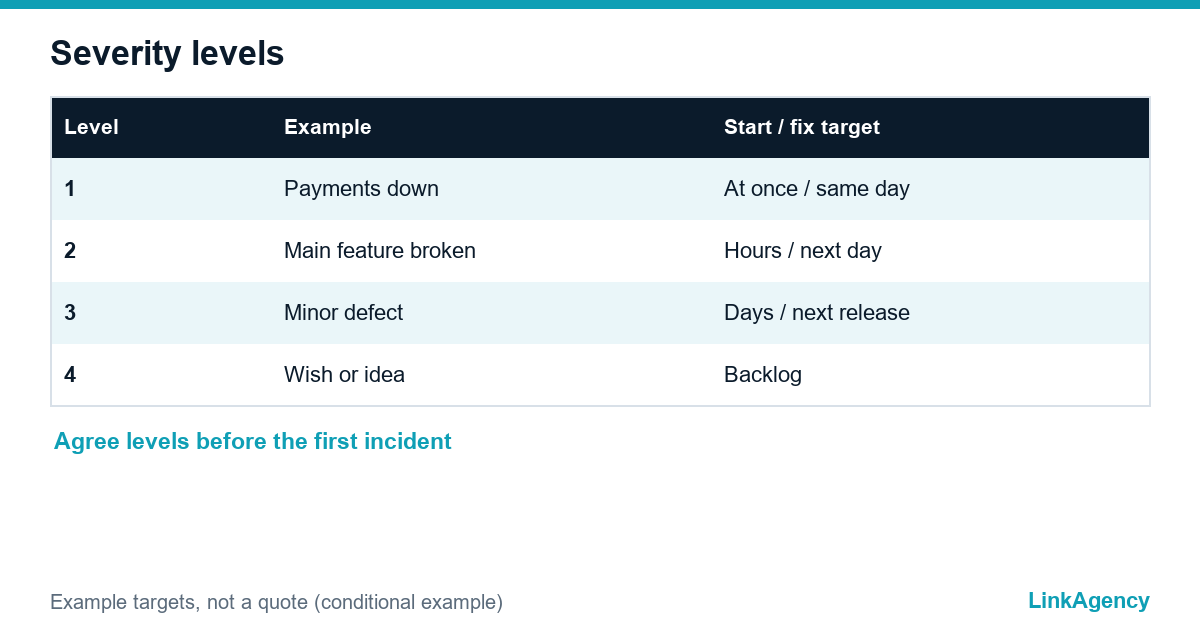
Agree on four things before the first incident, not after it. First, severity levels with a clear definition, for example “payments do not work” against “a button is misaligned”. Second, response and fix targets for each level. Third, one channel for urgent issues and another for routine requests. Fourth, a named person on each side. A clear app update and bug fix process then becomes a routine, not a debate.
Four severity levels
- Level 1: the app or payment is down, work starts at once.
- Level 2: a main feature is broken, fix within the working day.
- Level 3: a minor defect, fix in the next planned release.
- Level 4: a wish or improvement, goes to the backlog.

What to Put in the Contract: Access, Source Code and Knowledge Transfer
A software maintenance and support agreement should say what is included in app maintenance services, what counts as new development, how requests are reported and what the monthly report contains. Ask for the source code, build scripts, store accounts and credentials to be held by you, not only by the vendor, and for documentation to be updated with every release. The simplest test of a vendor is a question: “What happens when a new iOS version ships six months from now?” If the answer is vague, the cost will arrive later as a surprise.
Which Metrics to Show Leadership Every Month
A short monthly report beats a long dashboard. Show crash-free sessions and open incidents by severity, the time to respond and to fix, the updates shipped for new OS versions, security patches applied, and the share of time spent on fixes against new features. When fixes eat most of the budget, the product needs attention, not just more hours, because maintaining a mobile app should get cheaper per release, not dearer.
In-House or Vendor: Who Should Keep the Support
Mobile app maintenance works best when you keep in-house what depends on your business knowledge, such as priorities, product decisions and customer contact. A partner offering app maintenance services often handles the platform-specific work better, such as store updates, OS compatibility and monitoring. Our guide to choosing between outsourcing and an in-house team helps with the trade-offs, and if you need extra engineers fast, staff augmentation can fill the gap. For infrastructure, monitoring and releases, see our DevOps services.
Get a Free Review of Your App Support Model From LinkAgency
We look at your current arrangement, the risks around access and store requirements, and the split between fixes, compatibility, security and growth. If you want a partner, our mobile app development team can take over mobile app maintenance and report to you monthly, or you can order app support for one product as a pilot, or ask for a free app support review first.
- review of your support terms and severity levels;
- check of source code, store accounts and handover;
- plan for the next release calendar.
Send a request and we will reply within one working day.

Frequently Asked Questions (FAQ)
When should app maintenance start?
On the day of release, or better, before it. Agree the support terms while the app is still in development, because the first bugs and the first store questions arrive within days.
What is the difference between support and new development?
Support keeps the product working: fixes, compatibility and security. New development adds features. Write the boundary into the agreement so each task has a clear category.
Who should hold the source code and store accounts?
You should. A vendor can have working access, but the owner of the product must keep the repository, the store developer accounts and the credentials.
How often does an app need updates?
Plan for at least one compatibility release a year around each major iOS and Android version, plus security patches as needed. Features follow your own roadmap.
What should a monthly support report contain?
Incidents by severity, response and fix times, crash-free sessions, updates and patches shipped, and the split of time between fixes and new work.
Can LinkAgency take over support for an existing app?
Yes. We review the code, access and store accounts, agree severity levels and run a pilot period. Send a request and we reply within one working day.