An order arrives by email, someone retypes it into the CRM, someone else retypes it into accounting, and a third person copies the totals into a spreadsheet; the same retyping loses leads, see lead generation system for small business. Every hop costs minutes and invites a typo. This guide shows how to automate manual data entry without buying a big system: find the places where data is retyped, rank them in three questions, and pick the lightest fix for each.
How to automate manual data entry: where it hides in your company
Manual data entry rarely sits in one department. It lives wherever two tools do not talk to each other: the inbox and the CRM, the CRM and the invoicing tool, the shop and the stock sheet. People call it “just copying”, so nobody counts it. Yet the same hour of retyping repeats every week, and one wrong digit in an invoice becomes a customer complaint.
Data entry automation starts with seeing the problem, and manual data entry becomes visible once you ask. Ask each team one question: what do you copy from one place to another every day?
| Source | Destination | Typical retyping |
|---|---|---|
| Email and forms | CRM | Leads and requests |
| CRM | Accounting | Orders and invoices |
| Shop | Stock sheet | Orders and quantities |
| Accounting | Report | Totals for the owner |

How to build the retyping map in one hour
Draw boxes for tools and arrows for manual data entry
Take one sheet of paper. Draw a box for every tool that holds customer or order data, then draw an arrow wherever a person moves data by hand. Write on each arrow how often it happens and who does it. The entry of each data point then shows which systems it crosses. That is the whole map, and it shows how to stop copying data between systems before you spend a euro on software. Our guide on mapping a business process before you automate it goes deeper if one arrow turns out to be a long chain.
Three questions that rank manual data entry: frequency, minutes, cost of a mistake
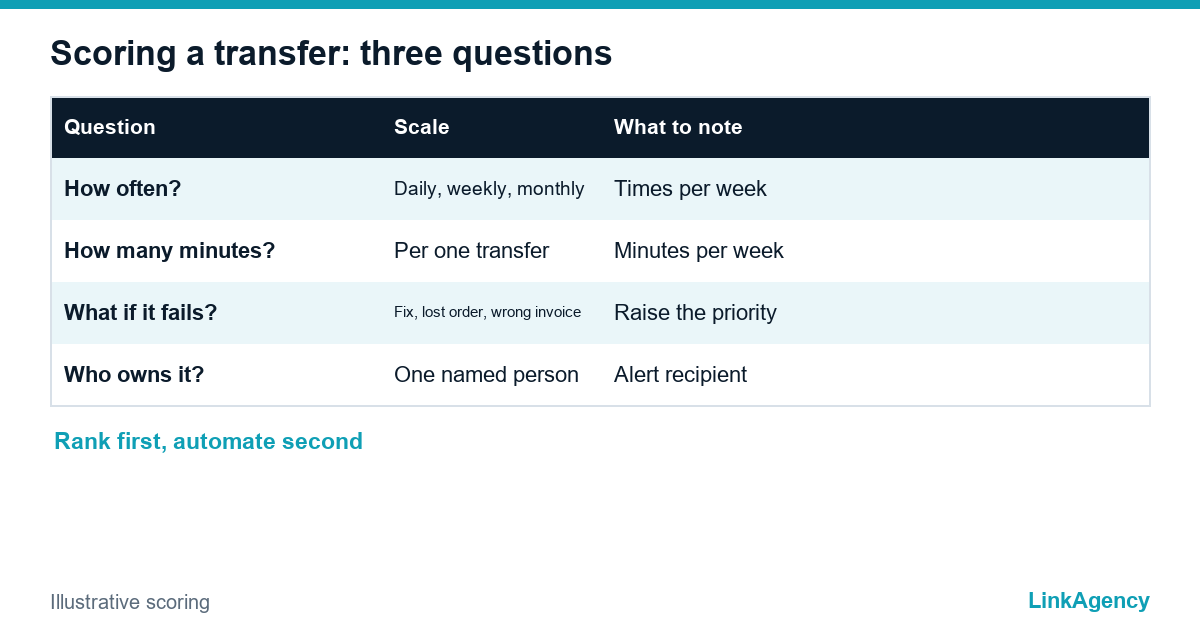
Score every arrow with three questions. How often does it happen: daily, weekly, monthly? How many minutes does one transfer take? What happens when it goes wrong: a small fix, a lost order, a wrong invoice? Multiply frequency by minutes, then raise the priority when the cost of a mistake is high, because the error rate of a tired person is never zero. A duplicate entry in two systems is the classic example. A rare transfer that can cost a customer beats a daily one that nobody notices.
What to automate first: manual data entry for leads, orders, invoices
To automate manual data entry well, start where the data enters your company. Leads and orders come first, because an error there spreads to every later step. Invoices come second, since money depends on them. Reports come last: they only read data, so a mistake costs little. Begin with the ten to twenty transfers that score highest and leave the rest for later. Manual data entry automation for small business works best in small steps, and AI workflow automation helps where the data arrives as free text.
Ready integration, no-code scenario or custom work: how to choose
There are three routes. A ready integration between two products is the cheapest, so check it first. A no-code scenario, built in a visual tool, fits when the logic is simple and the volume is moderate. Custom work, or RPA that clicks through screens, fits when no connector exists or the rules are unusual. Integration vs rpa for small business is rarely a close call: prefer an API connection, because screen-clicking robots break when a page changes. When a connector is missing, our custom software development services build one.
How to avoid multiplying errors: one source of truth, checks, a log
- Pick a single source of truth for each kind of data, such as the customer record in the CRM, and let other tools read it.
- Add validation: reject an empty email or a negative quantity before it moves on.
- Keep an audit log, so you can see what moved, when, and why it stopped.
- Name an owner for each transfer, a person who gets the alert when it fails.
Automation copies mistakes as fast as it copies facts, so reduce data entry errors at the source first and automate afterwards.
Data protection: access, GDPR and who sees what
Moving data between systems means more copies of personal data. Under the accuracy and minimisation principles of the GDPR you should move only the fields you need, and under Article 32 on security of processing every connection needs its own limited access and not a shared admin password. Ask a lawyer to confirm the details for your country.
A 30-day plan and the numbers that prove the effect
- Week 1: draw the retyping map and score every arrow.
- Week 2: pick the top three transfers and choose the route for each.
- Week 3: build one transfer, run it beside the manual process and compare.
- Week 4: switch off the manual copy, set alerts, and write down who owns it.
Track three numbers before and after: minutes of retyping per week, corrections per month, and the time an order needs from arrival to invoice. If you want help to connect crm and accounting software, our business process automation team can take it from the map to a working pilot.
Automate manual data entry: a free review of two or three transfers
Send us the two or three places where your team retypes data. We will tell you what to automate first, which route fits each one, and who should own it. If you want it built, our business process automation and custom software development services cover it.
- a ranked list of your retyping points;
- a suggested route for the first transfer.
Leave a request and we will reply within one working day.

Frequently Asked Questions (FAQ)
How can a small company stop manual data entry?
Draw a map of every place where people retype data, score each by frequency, minutes and cost of a mistake, and start with the top few. Choose the lightest route for each: a ready integration, a no-code scenario or custom work.
What is the difference between integration and RPA?
An integration connects two systems through an API, so data moves directly and reliably. RPA imitates a person clicking through screens, which works when no connector exists but breaks when the interface changes. Prefer integration for small business.
How do I reduce data entry errors before automating?
Fix the source first: name one source of truth, add validation for empty or impossible values, and keep a log. Automation will otherwise copy the same mistakes faster.
Can I connect CRM and accounting software without a developer?
Often yes, if both products offer a ready connector or work with a no-code tool. When rules are unusual or a connector is missing, custom work is simpler and more stable.
Does moving data between systems affect GDPR?
Yes, every copy of personal data is a point to protect. Move only the fields you need, give each connection limited access and keep a record of who sees what. Ask a lawyer about your case.
How can LinkAgency help to automate manual data entry?
We review two or three of your transfers, rank them and propose the route for the first one. The first consultation is free. Leave a request and we will reply within one working day.