You want to hand a routine to a robot, but nobody can say exactly how the process runs today. Automating a badly described process speeds up the mistakes instead of removing them. This guide gives a method for one process: who does what, when, where the data lives, where work waits and which exceptions break it. Process mapping on one sheet of paper will show three places where the work stands still for no reason and help you decide what to fix by organisation and what to give to automation. Most guides I read come from vendors, so I name them and treat their numbers as their own estimates.
Process mapping before automation: why an undescribed process does not work
Workflow mapping starts from a simple fact: a robot repeats what it is told, so it repeats the gaps too. If two people handle the same request in two ways, the script will pick one way and break the other. Decisions, a software vendor, calls process documentation a living document and lists ten steps for it. I use a shorter route of six steps, and each step ends with something you can check. Business process documentation also helps when a person leaves, and a business process map is the first thing a new hire asks for, because the knowledge stops living in one head.
Step 1: pick one process and mark where it starts and ends
Workflow mapping is not a big project. Document business processes one at a time. Choose one process that repeats often and annoys people, for example a quote request or an invoice approval. Write the trigger that starts it and the result that ends it, in one line each. Without edges the map grows until nobody uses it. To map a business process well, stay with one. Business process mapping for a whole company can wait. Short answer: one process. The as-is state comes first, the to-be state second. If the choice is hard, rank the candidates by how often they run and how much they annoy people.
Step 2: write the actions, the people and the data
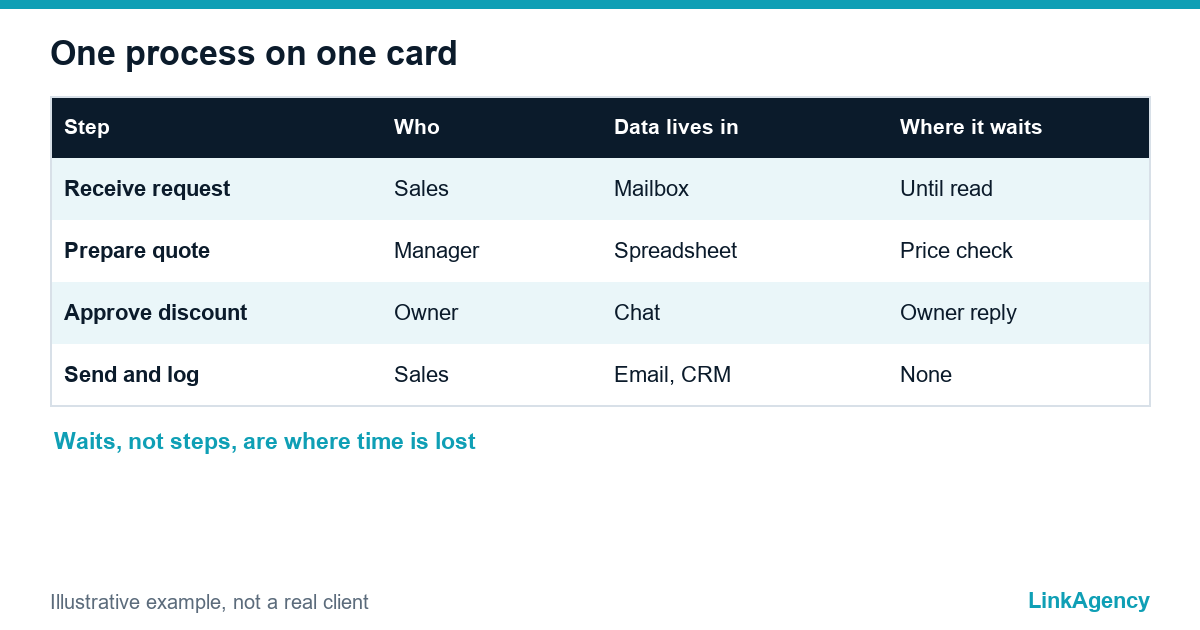
Follow one real case from start to end and write every action as a short verb phrase. A process with a map and an owner is ready for automation. Next to each action write who does it and where the data sits: an email, a spreadsheet, a form, a head. Describe what happens, not what should happen. Document business processes as they run, with every workaround. A checklist of fields per step keeps the notes uniform. Process documentation that nobody opens is waste. A flowchart in plain boxes is enough, and BPMN is optional. The table shows one illustrative card, not a real client.
| Step | Who | Data lives in | Where it waits |
|---|---|---|---|
| Receive the request | Sales | Shared mailbox | Until someone reads it |
| Prepare the quote | Manager | Spreadsheet | For the price check |
| Approve the discount | Owner | Chat | Until the owner replies |
| Send and log | Sales | Email and CRM | None |

Step 3: workflow mapping of waits and handoffs between people
Most of the lost time sits between steps, not inside them. Here the job is finding the bottleneck, and the same bottleneck often repeats in other processes. Mark every handoff where work moves from one person to another and every wait where nothing happens. A swimlane layout makes this visible, with one lane per person. The three longest waits are your first candidates: some need a rule, some need a reminder and only some need software. An approval that waits for the owner is a classic case, and our approval workflow guide shows how to route it.
Step 4: collect the exceptions that break the process
Ask the people who do the work what goes wrong and write each case on a card. Typical exceptions are:
- a request with missing data;
- a customer who changes the order midway;
- an approval that arrives after the deadline.
Each exception needs a rule: who decides, how fast and what happens if nobody does. Writing rules for the odd cases matters too. If the rule is not clear, the automation will stop on that case and a person will take over by hand.
Which exceptions can wait
Rare exceptions can stay manual. Automate the normal path first and route the odd cases to a named person.
Step 5: estimate frequency and time to choose what to automate
For each step write how often it happens and how long it takes. Doing Better Business, a software vendor, gives a hypothetical case of 20 employees losing 15 minutes a day, which it turns into 1,250 hours a year. It is an illustration by its author, not a measurement, so use your own numbers. A step that is frequent, slow and rule-based is the best candidate. A rare step that needs judgement is not. This estimate also shows the cycle time you want to cut.
Step 6: fix the process, name an owner and run a pilot
Fix the waits and unclear rules first, because those need no software. Rework after a failed pilot costs more than a day of mapping. Then name one owner who answers for the process, and run a small pilot on the normal path. The method ends with a pilot. Check the pilot against a short list:
- The start and the end are written in one line each.
- Every step has a person and a data location.
- The three longest waits have a rule or a reminder.
- Each exception has a named decision maker.
- One owner can change the process and read the result.
With that sheet in hand, business process automation becomes a task you can brief. For connected steps in documents and mail, AI workflow automation can take the routine part, and a person keeps the decisions. When you need help to rank the processes, our business services consulting starts from the same sheet.
Process mapping: free walkthrough of one process
Bring one process, and we go through it with you and show which steps to fix first and which to automate. If you then need business process automation, we scope it after the walkthrough.
- a one-page map of the process with owners and waits;
- a short list of steps worth automating first.
Send a request and we will reply within one working day.

Frequently Asked Questions (FAQ)
How detailed should a process description be?
One page per business process map is usually enough: start, end, steps, owners, data locations, waits and exceptions. If a step needs two pages, split it. Detail that nobody will read only makes the map harder to keep current.
Do I need BPMN to map a business process?
No. Plain boxes and arrows, or a table with steps and owners, are enough for business process documentation in most small businesses. BPMN helps when you need a shared standard with developers, but it is optional.
Who should describe the process?
The people who do the work, with one facilitator, should document business processes. A manager’s version often shows how the process should run, not how it runs, and automation built on it will miss the real cases.
Which processes should I automate first?
Steps that are frequent, slow and rule-based, and clear on a business process map. Estimate frequency and time with your own numbers, not with a vendor’s example, and leave rare steps that need judgement to people. Workflow mapping shows the order.
What if the process is broken?
Fix it first, before any business process automation. Waits, unclear owners and missing rules need no software, and automating them only makes the mistakes faster.
How does LinkAgency help with process mapping?
Bring one process and our AI workflow automation team will go through it with you, mark the waits and exceptions and say which steps to fix and which to automate. The walkthrough is free and comes with a short plan.