Most company presentations open with “About us”, a founding story and forty slides. The client loses interest by slide five, and each manager edits the file in their own way, so the firm looks different at every meeting. A B2B sales presentation fixes this when it is built around the client’s problem instead of your history. Below are ten slides in the order that tends to win deals, three versions of one deck for a meeting, an email and a tender, and a way to tie the slides to your website, your case studies and your CRM.
B2B sales presentation: why most decks do not sell
The usual mistake is to talk about the seller first: the company, the awards, the partners. Buyers have already read about you online, so the first two minutes spent on your history are minutes they do not give to their own problem. Sales guides such as the ZoomInfo sales presentation guide repeat the same advice: name the buyer’s pain point first, then show how you help.
Second, a sales deck tries to tell everything at once. A company that sells design, development and consulting in one file gives the client no clear thing to say yes to. One deck should answer one question: why this client should talk to you now.
Sales deck structure: ten slides from the client’s problem to the next step
Treat the sales deck structure below as a frame, not a law. Cut a slide only if you can say what question it was answering.
| # | Slide | Question it answers |
|---|---|---|
| 1 | Title with the outcome | What will change for me? |
| 2 | The client’s problem in their words | Do they understand my situation? |
| 3 | The cost of leaving it as it is | Why act now? |
| 4 | Your solution in one sentence | What exactly do you offer? |
| 5 | How it works in three to five steps | What happens after I say yes? |
| 6 | Proof: two or three cases with results | Has this worked for someone like me? |
| 7 | The team and who will do the work | Who will I deal with? |
| 8 | Price logic or ranges | How much and what drives it? |
| 9 | Guarantees and risks | What if it goes wrong? |
| 10 | One concrete next step | What do we do on Thursday? |

How to make a sales deck from this frame takes an afternoon, in this order:
- Write slide four first, in one sentence, because every other slide supports it.
- Describe the client’s problem in the words they use.
- Collect two or three cases and one result for each.
- Add the price logic, the guarantee and the next step, and leave design for the end.
Slide eight deserves a line of ROI for the person who signs, and slide nine should answer the usual objection: what if it does not work?
Proof: case studies, process, team and guarantees without empty promises
What a good case slide shows
A logo wall is decoration. A short case is proof: the client’s situation, what you did together and a result they can measure. Pick cases from companies close to your prospect in size, industry or problem. Our guide on how to write a B2B case study gives a format you can reuse on slide six.
Describe the process in plain steps, name the people who will do the work, and state the guarantee in words you would accept in a contract, because a promise on a slide that the contract does not repeat will cause questions later. Show the client proof first and the price after it. A client who sees the price before the proof will question the value.
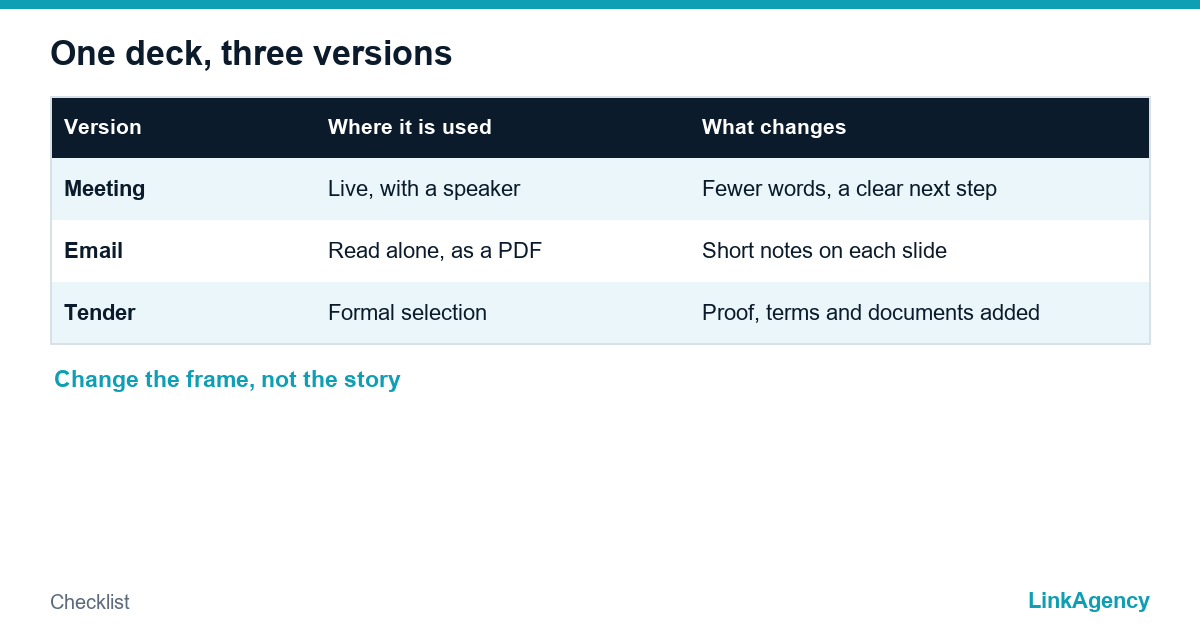
One sales presentation, three versions: meeting, email and tender
Who reads which version
| Version | Length | What changes |
|---|---|---|
| Meeting | Ten slides plus spare slides | Short text, you tell the story aloud |
| Email PDF | Six to eight slides | Each slide stands alone, a summary comes first |
| Tender | Follows the request | Same order as the brief, with references and compliance |
The email version has to work without you. A buyer may forward one slide to a colleague, so each slide must be understandable alone, as SyncGTM’s slide-by-slide guide also recommends. For a tender, mirror the structure the client asked for and move your own storyline to the cover note. A capabilities deck for small business follows the same logic: lead with what the client needs.
Design: brand style, readability on screen and in PDF
The slides are a visual aid, not a script, as 24Slides design tips also stress. Keep one idea per slide, large text and plenty of white space, and use your brand colours and fonts so the sales deck looks like your website. Test it on a laptop and as a PDF on a phone, because that is how it will be read. If you lack a ready style, our graphic design services can prepare a template with locked layouts, and our guide to a brand style guide lists what to define first.
How to link the sales presentation to your website, case studies and CRM
The promises in your sales deck should match what the client finds online. Use the same wording for your offer and the same numbers for your cases, so the company looks like one company. A company profile presentation that contradicts the website costs trust in the first week.
Keep one master sales deck and give managers locked slides for the price and the cases. Record in the CRM which version went to which client and what the client did next. Over time that record shows which slide produces replies. Our business packaging work covers exactly this: one story across the sales deck, the site and the sales documents.
How to know the sales presentation works and when to update it
Ask three questions about your B2B sales presentation every month: how many meetings ended with a next step, which slide buyers asked about most, and where they stopped reading the PDF. Update the sales deck after each lost deal, because the loss reason is free feedback. A B2B pitch deck for clients is never finished, but the sales deck structure should survive every edit.
B2B sales presentation: a free review of your current deck
Send us your presentation. We will show what to remove, what to put first and which proof is missing, and we will check that the slides match your site. Our business packaging and branding services team can then rebuild the deck and the template.
- a list of slides to cut or merge;
- a proposed order and the missing evidence.
Leave a request and we will reply within one working day.

Frequently Asked Questions (FAQ)
How many slides should a B2B sales presentation have?
Around ten for a meeting, and six to eight for an email PDF. Count slides by the questions they answer, not by a number: cut any slide you cannot justify.
What should the first slide of a sales deck say?
The outcome or the client’s problem, not your company name. The goal is to show in a few seconds that you understand their situation.
Should a sales presentation include prices?
Yes, as ranges or the logic behind the price, placed after the proof. Clients who cannot find any price at all tend to assume the worst and move on.
How is a tender version different from a meeting version?
A tender deck follows the order and wording of the client’s request, answers every point and adds references and compliance. The sales story moves to the cover note.
How do I keep every manager using the same deck?
Keep one master sales deck in the brand style, lock the price and case slides, and let managers change only the problem slide and the next step.
How do I know the presentation works?
Track meetings that ended with a next step, the slides buyers ask about and the reasons deals were lost. Update the deck after each lost deal.
Can LinkAgency review our company profile presentation?
Yes. We show what to remove, what to put first and what proof is missing, and we check it against your site. The first consultation is free. Leave a request and we reply within one working day.