The insurer sends a questionnaire with questions about MFA, backups and updates, and nobody in the company can prove the answers. An inaccurate answer or a missing control can complicate a payout or lead to a refusal. Cyber insurance for small business is not a product review here but a preparation task: which controls insurers ask about most often, how to check that they really work and how to collect the evidence in advance. This guide does not replace advice from an insurance broker or a lawyer. Most sources I read are vendors or insurers, so I name them and treat their figures as their own estimates.
Why insurers ask about your cyber insurance for small business protection
Security matters to the insurance business first: the insurer prices a risk it cannot see, and security evidence is how you show it, so it asks what you already do. Coalition, an insurer, lists five controls for meeting cyber insurance requirements: multi-factor authentication, training, good backups, identity and access management and data classification. A broker or an underwriter will ask the same questions again at renewal. Read the questionnaire and the policy together: the questionnaire shows what the insurer fears, and the coverage list shows what you are buying. A policy for a small business cyber insurance buyer should state first-party and third-party cover clearly.
The controls insurers ask about most: MFA, backups, updates, device protection
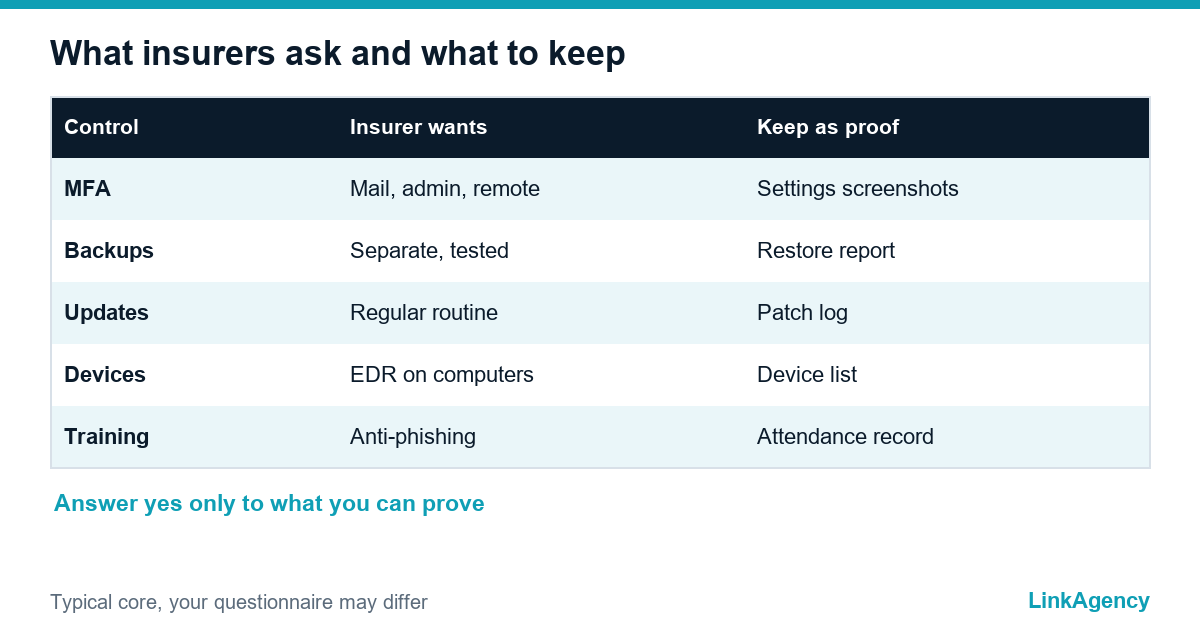
The Cyber Readiness Institute says carriers want to see training, MFA, backup and recovery, access management, email security and patching. Coalition adds strong passwords, endpoint detection and response, firewalls, an incident response plan and risk assessments. The business, the insurer and the broker each read the list differently. Not every insurer asks for all of them, so check the questionnaire you actually received. The table gives the common core.
| Control | What the insurer wants to see | Evidence to keep |
|---|---|---|
| MFA | On email, admin and remote access | Screenshots of the settings |
| Backups | Copies kept apart and tested | A restore test report |
| Updates | A patching routine | A patch log |
| Device protection | Endpoint detection on workstations | A device list |
| Training | Phishing awareness for staff | Attendance records |

Why a “yes” in the questionnaire must be provable
A “yes” that nobody can prove is a risk. If a claim follows a breach, the insurer or its expert may check whether the control existed on the day. A claim can be complicated or refused when the answer turns out to be wrong, so the rule is simple: answer only what you can show. Policy wording and exclusions differ, and I cannot judge your policy, so ask your broker how the questionnaire answers affect a claim. Treat the cyber insurance application as a statement you may have to defend, and the cyber insurance policy as a document to read before you sign.
How to check backups and access before you apply
A cyber insurance checklist in five steps
- Restore one backup into a test place and note the time.
- List every admin account and every remote access.
- Switch on MFA for each of them.
- Check that the updates ran in the last month.
- Save a screenshot of each setting.
Do two checks yourself, because ransomware is the loss insurers fear most. The security of a business depends on both. First, restore a backup into a test place and note how long it took, because a backup that never restored proves nothing. Second, list every account with admin rights and every person with remote access, and switch on MFA for each one. Short sentences help here. Our guide on MFA for small business covers the six accounts to protect first, and keep immutable copies of what matters. Keep backups apart from the systems they protect, so ransomware cannot reach both.
Incident response plan and staff training
A cyber insurance policy usually expects a plan. A short incident response plan names who decides, who calls the insurer and the broker, and what to switch off first. Many policies have a reporting window, so keep the claim phone number where the team can find it, and read the policy to see what is required. Add a half-day of phishing training and keep a record: a cyber insurance checklist without training is incomplete. Training is cheap, and several sources, including the Cyber Readiness Institute, name it as a lever on premiums.
Cyber insurance requirements you do not meet yet: what to do
Do not guess an answer. Mark the gap, write a plan with dates and tell the broker. Insurers often accept a control that is in progress, or offer a policy with limits until you close it. The Cyber Readiness Institute gives a cost range of 500 to 5,000 dollars a year for a business policy and does not name a source, so use it only as a rough idea and ask for real quotes. Cyber liability insurance for small business is easier to get when the cheap controls are done. A short cyber insurance cost estimate comes only from real quotes. Fix the cheap controls first: MFA, backups and updates.
How to keep protection in order between renewals
Protection decays. Review the access list every quarter, test a restore twice a year and keep the patch log current. A cyber insurance renewal is the moment insurers look again. Before each renewal, rerun the questionnaire against the real state of the systems. When you need an engineer to set this up, our DevOps services cover patching, backups and access, our cloud hosting services give you a controlled place for the data, and cloud migration services help when old servers are the weak spot.
Cyber insurance for small business: free pre-application review
We compare your current protection with the typical questions of an insurer and show what to fix before you submit the application. This is not insurance or legal advice, and we can scope DevOps services after the review.
- a list of controls with a status for each: ready, partly ready or missing;
- a short plan with the cheapest fixes first.
Send a request and we will reply within one working day.

Frequently Asked Questions (FAQ)
Is cyber insurance for small business required by law?
For small business cyber insurance it depends on your country, sector and contracts. A customer contract or a regulator may ask for it even where no law does. Check with your lawyer, because this guide is not legal advice.
Which controls do insurers ask about most?
For a cyber insurance application: multi-factor authentication, backups, updates and patching, endpoint protection, staff training and an incident response plan. The exact list depends on the insurer, so work from the questionnaire you receive.
What happens if I answer the questionnaire inaccurately?
A cyber insurance policy claim can be complicated or refused if an answer turns out to be wrong. Answer only what you can prove, and ask your broker how the answers affect a claim under your policy.
How do I prove my backups work?
Restore a backup into a test place, note the time it took and keep the report. Keep copies apart from the systems they protect, so one attack cannot reach both, and a tested restore can also lower your cyber insurance cost at renewal.
What if I do not meet every requirement yet?
Mark the gap on your cyber insurance checklist, write a plan with dates and tell the broker. Some insurers accept a control in progress or offer limited terms until you close it. Fix MFA, backups and updates first.
How does LinkAgency help before an application?
Send us your questionnaire. Our DevOps services team compares your protection with the typical questions, marks each control as ready, partly ready or missing and gives a short plan for the cyber insurance renewal too. The review is free and is not insurance or legal advice.