The photoshoot is ordered, the day is paid for, and half of the frames fit neither the site, the ads nor the phone version. The photographer is rarely to blame. It is a photoshoot brief that says “nice photos of our team” and nothing else. This guide shows how to write one: a list of frames tied to real pages, formats for desktop and phone, permissions of the people in the pictures, usage rights and file preparation. One shooting day can then serve the site, social networks and ads. We rely on published photographers’ briefs and name the sources where numbers appear.
Photoshoot brief: why stock photos lower trust and when stock is still fine
A smiling group in a glass office looks the same on a thousand sites, and visitors notice. Real people at real work show who they will deal with. That does not make stock useless. Stock fits generic subjects you cannot shoot, such as abstract concepts, and it is a sensible stopgap while a site is being built. The common advice of agencies is a mix: custom photos for the team, the place, the product and the process, and stock for the rest. Thirteen05 advises checking the licence of every stock image for commercial use and keeping a record of where each image came from. The stock photos vs custom photography choice is a question of subject, not of principle.
Pages first, then frames: a map of photos for your site
List the pages and the job of each picture
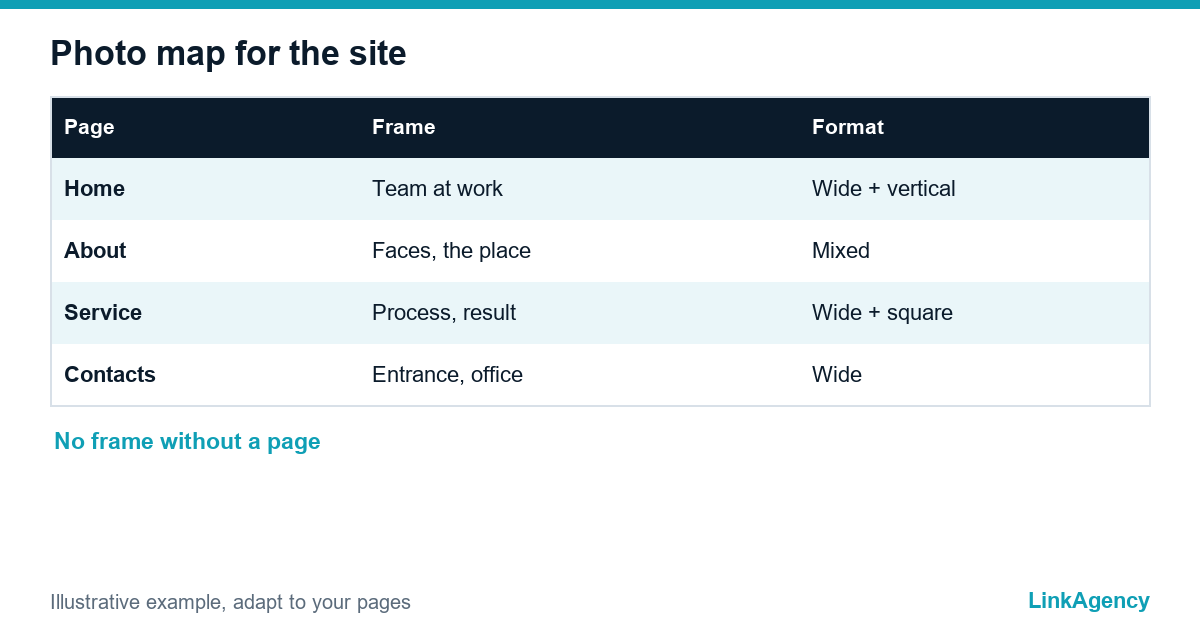
Do not start with “what to photograph”. Start with the pages. Business website photography works when every frame has a page. List the pages that need photos: the home page, about, team, each service, contacts, the blog header. For each page write the job of the picture: a first-screen banner needs room for text, a team page needs faces, a service page needs the work itself. Then the way to brief a photographer is a table, not an essay: page, subject, orientation, where the text will sit.
| Page | What the photo must do | Orientation |
|---|---|---|
| Home, first screen | Show the business at work, leave room for a headline | Wide, plus a vertical crop |
| About and team | Faces, the place, how people work together | Mixed |
| Service page | The process and the result, not a handshake | Wide and square |
| Contacts | The entrance, the office, the person who answers | Wide |
The shot list: people at work, process, result, place, details
A shot list for a company website needs five groups. People at work, shot candid and posed. The process, with hands and tools. The result, the finished product or a happy customer if the customer agrees. Next, the place: the entrance, the room, the street. And details, such as materials and equipment, which help to break up a page. Add what to avoid: the cluttered desk, a competitor’s logo, a screen with private data. Give the photographer references, because pictures explain a style faster than adjectives do. Every brief tells the photographer which pages need what. A shot list for a company website should also name the team photos you need and who appears in them.
- Write the goal of the shoot and the pages it serves.
- Attach three to five reference images and say what you like in each.
- List the frames group by group, with the page next to each.
- State the number of people, places and products.
- Agree on retouching: published briefs note that retouching is often priced separately.

Preparing the day: schedule, place, clothes and props
A good brief ends with a plan for the day itself. Plan the day as a schedule. One example from a published brief splits a day by person: a short block for make-up and a longer one for the shoot, with a lunch break and a time to pack up. Agree on the place early, including parking and the freight lift if equipment is heavy. Ask people to wear plain, comfortable clothes in muted colours, and to bring one or two accessories that fit their work. Decide who keeps the day on time. Without that person, the first hour always grows.
Permissions of people in the frame and rights to the photos
Ask the question a Luminus guide asks about old photos: did the people in them agree to appear on the website and in other marketing? A signed model release answers it. In the EU, an image of an identifiable person is personal data under the GDPR, so get a written permission that names the uses and says how a person can withdraw it. Confirm the wording with a lawyer. Then settle the rights with the photographer in the contract. Published briefs mention that a full transfer of exclusive rights, including a ban on the photographer’s own portfolio use, usually raises the price. Decide what you need before you ask for a quote, and use photos for a company website only after the paperwork is signed.
Formats and files: horizontal and vertical, space for text, image weight
Web-sized files and originals go in separate folders. Ask for horizontal and vertical versions of key frames, and for empty space where a headline will go. Aspect ratio matters: one photographer’s guide suggests about 2:3 or 3:4 for a website and 4:5 for an Instagram feed, and notes that sliders need much narrower crops. Ask for two sets: originals and web-sized files made for the site, as one studio does by sending two folders. One brief example names a long side of 2000 pixels for uploads, and says limits differ by site, so check yours. Heavy pictures slow a site, which is where our web development services and checks of page speed help.
One shooting day for the site, social networks and ads
Plan the frames so that one day feeds every channel. A wide frame becomes a site banner, a vertical crop of the same scene goes to stories, a detail becomes an ad. Write the channel next to each shot in the list. If you are rebuilding the site at the same time, a website redesign is the moment to replace stock in one pass, and our branding services keep the new photos consistent with your style.
Photoshoot brief: free review of the photos your website lacks
We check which frames your pages miss and help you write the brief for your niche. No obligation.
- map of photos per page and a shot list;
- formats, rights and file requirements for the photographer.
If the site needs rework for the new photos, we offer branding services and website redesign. Send a request and get a reply within one working day with a free review plan.

Frequently Asked Questions (FAQ)
What should a photoshoot brief for a website include?
The goal, the pages the photos serve, a shot list with a subject per page, orientation, references, the number of people and places, retouching and delivery terms. This is the core of business website photography, and the way to brief a photographer who is new to your site.
When are stock photos acceptable?
For generic subjects you cannot shoot and as a stopgap during a site build. Stock photos vs custom photography is usually a mix: photos for a company website should be custom for team, place and process, with stock for the rest and a licence check.
Do I need permission from people in the photos?
Yes. For business website photography, get a written permission (a model release) that names the uses and how to withdraw it. In the EU an identifiable image is personal data under the GDPR, so confirm the wording with a lawyer.
Who owns the photos after the shoot?
It depends on the contract. A full transfer of exclusive rights may raise the price, so decide what you need before you ask a photographer for a quote.
Which formats should I ask for?
Horizontal and vertical versions of key frames, space for text and two sets of files: originals and web-sized files, as a business website photography brief should state. Check the aspect ratio and size limits of your site.
How many photos can one day give?
It depends on people, places and retouching, so agree the number in the brief. A shot list for a company website with the channel for each frame lets one day serve the site, social networks and ads.
How can LinkAgency help?
Leave a request with your site address. We run a free review of the photos each page lacks, help write the photoshoot brief for your niche and prepare the site for the new images.