Many stores pick a platform because everyone does, or because the first developer suggested it. A year or two later the ERP integration does not fit, B2B prices will not set up, app subscriptions keep growing, and moving looks risky because of SEO and orders. The Shopify vs WooCommerce vs custom question is really about who owns what and what your business must do. Below are three approaches, five business scenarios, ownership, cost structure, integrations, signs that it is time to move and a six-step migration plan.
Shopify vs WooCommerce vs custom development: three approaches in one paragraph
Shopify is a hosted platform: you rent the software, and hosting, security, checkout and updates come with it. WooCommerce is an open-source plugin for WordPress: you host it, maintain it and own the code. Custom development builds the store around your processes on a stack your team or agency chooses, so you own everything and pay for every part of it. The choice of Shopify or WooCommerce is a question of who carries the technical work. Custom is a question of whether your business fits any existing platform at all. Treat Shopify and WooCommerce as two answers to the same question.

Five business scenarios and the platform that fits each
Judge the options by how your business sells, not by a list of features. A review of WooCommerce vs Shopify that ignores your catalog tells you little. Shopify compared with WooCommerce looks different for a store of twenty products than for one with twenty thousand. Our Shopify development services team sees the same five cases again and again.
| Scenario | Usually fits | Why | Watch out for |
|---|---|---|---|
| D2C brand with a small catalog | Shopify | Fast launch, checkout and hosting included | App subscriptions piling up |
| Store where content and SEO matter as much as products | WooCommerce | WordPress is a full content system | Maintenance and plugin conflicts |
| B2B with individual prices | Shopify Plus, WooCommerce or custom | Depends on how complex the price rules are | Workarounds that outgrow the platform |
| Deep integration with warehouse and ERP | Custom or WooCommerce | Full control of data flows | Cost of building and supporting integrations |
| Several EU countries | Shopify or WooCommerce with a markets setup | Currencies, languages and tax rules per market | Legal pages and delivery per country |
Data and code ownership: what you control in each option
This table is the part owners most often skip. Data ownership decides how hard a future move will be. With Shopify you can export products, customers and orders, but the platform code and the checkout stay with the vendor. With WooCommerce development services you own the database and the code and choose the hosting. A custom store gives you everything, including the obligation to document and maintain it.
| Aspect | Shopify | WooCommerce | Custom |
|---|---|---|---|
| Store data | On the vendor’s servers, export possible | In your own database | In your own database |
| Source code | Theme yours, platform closed | Open source, yours to change | Fully yours |
| Hosting | Included, chosen by the vendor | Chosen and paid by you | Chosen and paid by you |
| Checkout | Standard, deeper changes need Shopify Plus | Changeable with code | Built to your flow |
| Leaving later | Possible, with a data migration | Easy to move the data | Needs documentation and a team |
What the cost adds up to over several years
Compare the platforms by the structure of costs, not by the price on day one. Shopify vs WooCommerce on price is never one number, and the cheapest start can be the dearest year three.
- Shopify: subscription, transaction fees for outside payment gateways, paid apps, theme work.
- WooCommerce: hosting, security and backups, premium extensions, developer time for updates.
- Custom: the build, then hosting, support and every new feature.
Count your own time and downtime too. That is total cost of ownership. Our ecommerce development services start with this list, and the numbers come from your catalog and traffic.
Integrations, B2B, multi-currency and several EU countries
Ask first what the store must connect to. ERP, warehouse, CRM, marketplaces, payment and delivery services all count. Hosted platforms connect through apps and an API. That is quick until the process is unusual. Some teams also consider headless commerce, where the storefront is separate from the back end. Open code connects through plugins and your own code, which is flexible but needs a developer. For several EU countries add currencies, VAT display, translated content, and GDPR consent for analytics. Accessibility is part of the plan too: the European Accessibility Act applies to online shops from 28 June 2025, and the text of the directive is public.
Questions to ask before you commit
- Which of our price rules fit standard features and which need code?
- Who owns the data, the code and the domain if we part ways?
- How will a second country be added without a rebuild?
Signs your current platform is slowing growth
Look for repeated workarounds. Staff export spreadsheets by hand because an integration will not work, B2B prices live outside the store, and the monthly bill for apps keeps growing while page speed falls. Checkout changes take weeks. A new market means copying the store. One sign is a nuisance; three mean you should compare options and, if needed, replatform.
Moving without losing SEO and orders: a six-step plan
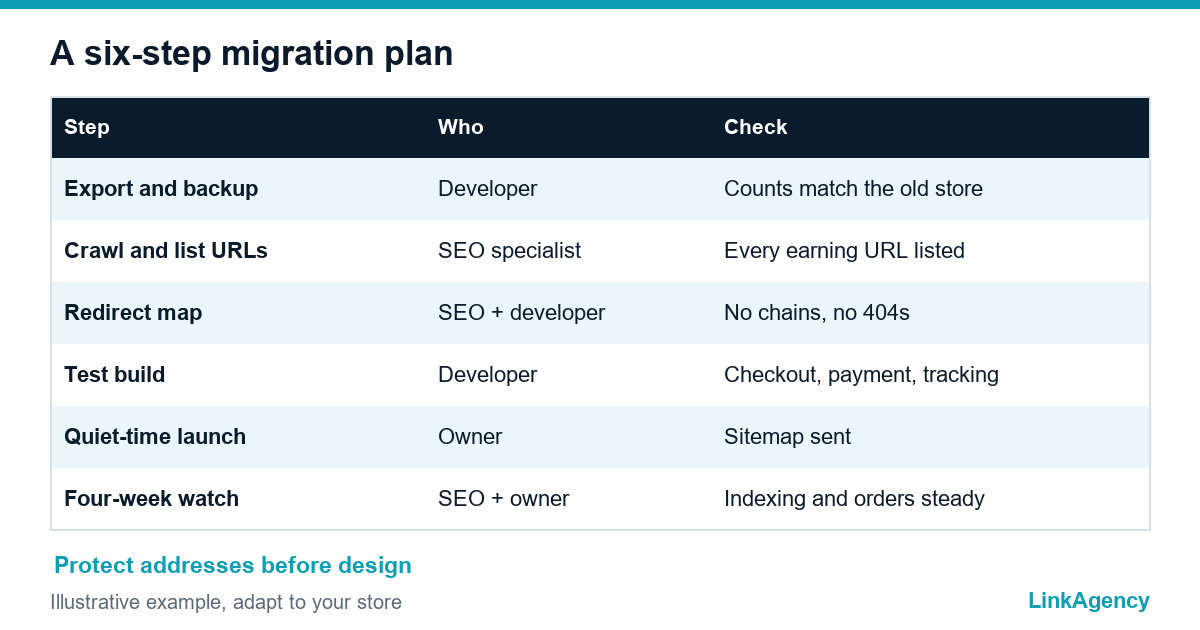
A move is not a redesign. It is a transfer of addresses, data and trust, and the same Shopify vs WooCommerce decision should be checked against it first. Google describes the basics in its guide to site moves with URL changes.
- Export products, customers, orders and content, and take a backup.
- Crawl the old store and list every URL that earns traffic or sales.
- Build a redirect map from old addresses to new ones.
- Rebuild the store on a test site and check checkout, payments and tracking.
- Launch at a quiet time and submit the new sitemap.
- Watch indexing, orders and errors for four weeks.
Free consultation on choosing or switching your ecommerce platform
Tell us how you sell, what you integrate with and what annoys you now. We compare Shopify vs WooCommerce and a custom build for your case and show the ownership, cost structure and migration risks. If you need a team to build, you can hire a Shopify development agency from us, or order an ecommerce platform audit as a separate project.
- a scenario-based comparison for your store;
- a migration plan that protects SEO and orders.
Leave a request and we reply within one business day.

Frequently Asked Questions (FAQ)
Which is better for a small store, Shopify or WooCommerce?
For a small catalog and a team without a developer, Shopify is usually easier because hosting, security and checkout come with it. WooCommerce fits when content and SEO matter as much as products and someone can maintain it.
When does custom ecommerce development make sense?
When your price rules, integrations or checkout flow do not fit any platform without constant workarounds. You own the code, and you also take on the cost of building, documenting and supporting it.
Who owns the data if I use Shopify?
Your products, customers and orders can be exported, but they live on the vendor’s servers and the platform code is closed. Check the export options before you commit, so a later move is not a surprise.
How do I move a store without losing SEO?
List every URL that earns traffic, build a redirect map from old to new addresses, test on a staging site, launch at a quiet time and watch indexing for several weeks.
Do EU rules affect the platform choice?
Yes. GDPR consent for analytics and advertising applies to any store, and the European Accessibility Act has applied to online shops since 28 June 2025. Check that the platform and theme can meet both.
Can LinkAgency help us choose or switch?
Yes. We compare the options for your scenario, show ownership, cost structure and migration risks in writing, and agree scope with you before any work starts.