Everyone is discussing advertising inside ChatGPT, but few owners have a method to test it. On 21 October 2026 OpenAI extended ChatGPT ads to 26 more countries, 89 in total. A day earlier it told advertisers that at the end of the month it will switch on “creative enhancements” by default, so the system may rewrite headlines, translate text, resize images and change destination URLs without anyone approving each version. This guide treats ChatGPT ads for business as a six-week pilot with clear criteria and shows what to set before the default changes your ads.
ChatGPT ads for business: what changed in October 2026
There are two changes. The first is geography: ads are now sold in 89 countries, so the question “is it available where we sell?” has a new answer for many European and Ukrainian companies. The second is control. According to PPC Land’s report on the OpenAI email, creative enhancements apply to new and existing self-serve campaigns and can run without per-version approval. Per the email, 30 October is the start. OpenAI’s help page has shown other dates, so check the page itself before you rely on one.
Who should try ads in ChatGPT now, and who should wait
Ads appear only to adult users on the Free and Go plans, below the answer and labelled as ads. Plus, Pro, Business, Enterprise and Edu accounts see none, and sensitive topics such as health and politics are excluded. Your audience in this channel is therefore the non-paying layer of users, not everyone who uses ChatGPT.
- Good fit: considered purchases with a research phase, such as software, professional services, education, travel and stores where buyers compare products.
- Wait: impulse or commodity purchases, very local businesses with a tiny audience, and regulated categories where the advertising policy may not allow your offer.
- Check first: the self-serve tool is available only if the company that advertises and pays is registered in a supported country.

Creative enhancements: what the system changes and how to switch it off
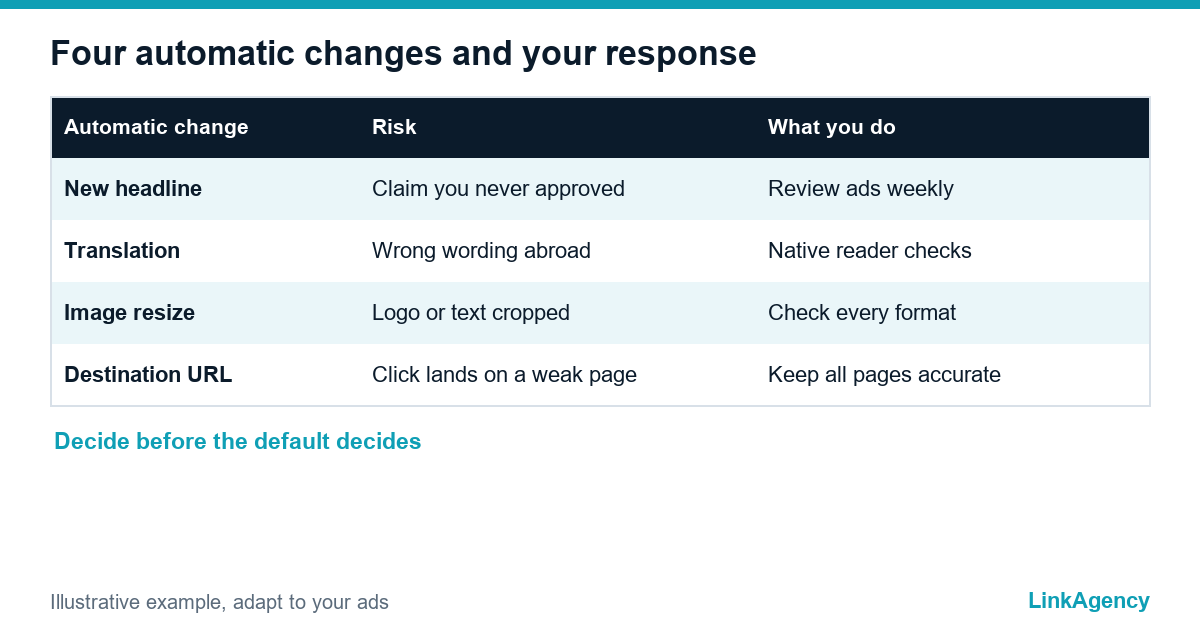
OpenAI’s help page on creative enhancements lists four kinds of change: new or updated headlines and descriptions, translation into other languages, resized images and optimised destination URLs. It draws on the conversation, your existing ad and the content of your landing page. You also get no preview of every variation, according to the same page.
How to opt out
Find the control in Settings in Ads Manager, at account or campaign level. A campaign setting overrides the account default, and earlier opt-outs are preserved. As a rule, switch the feature off for any campaign with prices, legal wording, regulated claims or a strict brand voice, and test it on a separate campaign only if you can watch every landing page.
A six-week pilot plan: goal, budget logic and metrics
Plan the pilot so that ChatGPT gets at least six weeks, not six days. It answers one question: does this channel produce qualified leads at a cost you accept, compared with what you already run? Fix the answer in advance. Our performance marketing agency team writes the success line before the first click, for example a maximum cost per qualified lead.
| Weeks | Work | Decision |
|---|---|---|
| 0 | Tracking, landing pages, creative enhancements setting | Go or fix first |
| 1 and 2 | Three to five intent groups, consideration goal | Cut groups with no clicks |
| 3 and 4 | Rewrite weak ads, check conversation fit | Keep the best groups |
| 5 | Compare with Google Ads and Meta | Cost per qualified lead |
| 6 | Read the result against the line set in week 0 | Scale, hold or stop |
Treat ChatGPT advertising like any test and set the budget as an amount you can lose without regret, large enough to collect at least a few dozen clicks per ad group. OpenAI recommends a starting maximum bid for cost-per-click campaigns, so read its current guidance instead of copying numbers from agency pages.
How to measure the result: UTM, conversions and comparison with Google Ads and Meta
Advertising in ChatGPT needs one tag scheme from day one, such as utm_source=chatgpt and utm_medium=cpc. Install the conversion pixel and, if possible, the Conversions API, and count a lead only when it passes your qualification step. Ads Manager reports impressions, clicks, spend, CTR and attributed conversions, but the help page warns that these changes over time do not by themselves prove the effect of creative enhancements.
Then put the three channels side by side. Our guide to Google Ads management shows the same lead-quality approach, and the checks in our article on high cost per lead on Meta apply here too. Check attribution windows too. Volumes may be low, so read small samples with care, and remember that ads on ChatGPT are shown rarely.
Brand risks and regulation: GDPR, health, finance and legal wording
A pixel that sets cookies needs consent under GDPR and ePrivacy rules, so the banner and the tags must agree before launch. Because the system adapts the ad from your landing page, outdated prices, promotions or claims on that page can reach the ad. In regulated sectors read the advertising policy first: medical, financial and legal advertising has restrictions that vary by country. If translation is switched on, someone who reads the language should check what actually ran.
Checklist before the first campaign
- Confirm the channel is available for your company and category.
- Decide the creative enhancements setting for every campaign.
- Check landing pages: prices, promotions, claims, consent banner.
- Install the pixel, set UTM tags and define a qualified lead.
- Write the success line and the stop line before spending.
- Book a weekly review of ads and landing pages.
Free review of your ad system before a new channel
Send us your accounts and goals. We check analytics and conversions so that a new channel can be compared fairly with the current ones, and tell you whether a pilot of ChatGPT ads for business makes sense now. If you need a team, ask for Google Ads management or order an ad account audit as a separate project.
- a list of tracking gaps and conversion errors;
- a pilot plan with a success line.
Leave a request and we reply within one business day.

Frequently Asked Questions (FAQ)
Who sees ads in ChatGPT?
Adult users on the Free and Go plans. Plus, Pro, Business, Enterprise and Edu accounts see none, and ads are kept away from sensitive topics, so your audience is only part of all ChatGPT users.
Can I stop OpenAI from rewriting my ads?
Yes. Creative enhancements can be switched off in Settings in Ads Manager, for the whole account or for one campaign. A campaign setting takes priority over the account default.
How long should a test of a new ad channel run?
Six weeks is a practical minimum: a week to set up tracking, two to learn, two to optimise and one to compare. Define the success and stop lines before you spend.
How do I compare ChatGPT ads with Google Ads?
Use the same lead definition and the same UTM logic, then compare cost per qualified lead, not clicks. Volumes may be small, so treat early differences as signals, not proof.
Does GDPR apply to ChatGPT ads?
Your landing pages and tracking fall under GDPR and ePrivacy rules as always. A pixel that sets cookies needs consent, and regulated sectors have extra restrictions in the advertising policy.
Can LinkAgency review our ad setup before a pilot?
Yes. We check analytics, conversions and landing pages, compare the new channel with your current ones and give you a written pilot plan before you spend on it.