
“Let’s automate everything” is how many automation projects begin, and how many of them stall. The team spends hours moving data between systems, answering the same customer requests and chasing approvals, so it wants to fix all of it at once. Nothing reaches a result. Business process automation pays back only when it starts with one question: which routine eats the most time and money?
This guide gives a business owner a way to answer it. You will get a four-question filter, a list of what to keep manual for now, a short data protection check and a plan for a first pilot project.
Start business process automation with a process map
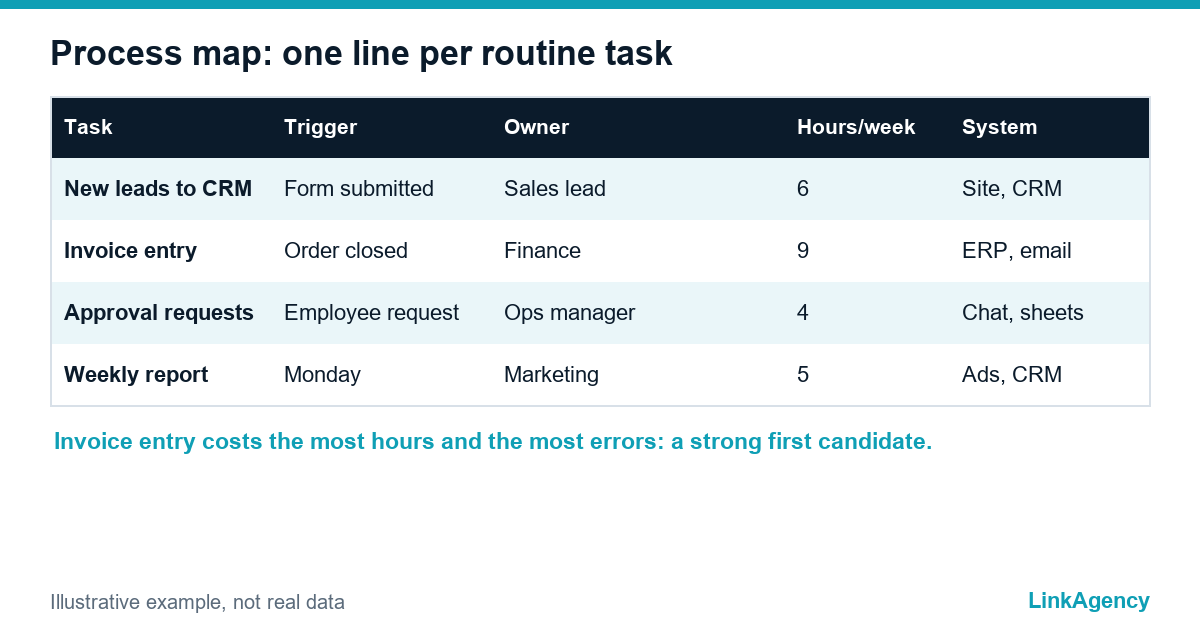
Automation sounds technical, but every business process starts as a habit, and you cannot choose well from memory. Ask each team to list the routine work they repeat every week, then write one line per task: what triggers it, who does it, how long it takes and which systems it touches. That list is your map, and a simple table is enough.
If you want a shared notation for the larger flows, the BPMN standard gives teams one language for drawing steps, owners and handoffs. For a first pass, plain rows work better than diagrams. Name a process owner for every row, because a process without an owner cannot be changed.
The four-question filter for picking processes
Score every row on four questions. A process that passes all four is a good first candidate to automate. One that passes two can wait.
| Question | What to look for | Example |
|---|---|---|
| How often does it repeat? | Daily or weekly, with the same steps each time | Entering new leads from a form into the CRM, or onboarding paperwork for a new employee |
| Where do errors happen? | Copy-paste between systems, missed fields, wrong versions | Retyped invoices with mismatched totals |
| What does a delay cost? | Lost leads, late invoices, missed deadlines | A request that waits two days for approval |
| Is the data ready? | Good data quality: structured, in a system, reachable through an API | Orders in the ERP rather than in email threads |
Count hours too. Ten minutes a day across five people is already about two working days a month, and that is the figure to put next to the cost of the project.
What not to automate yet
Automating business processes that are not ready is the commonest way to waste a budget. Some candidates look attractive and fail in practice, so leave these manual until the cause is fixed. Business process automation works on stable, repeatable work.
- A process that changes every week, because each change breaks the automation.
- Work built on judgment with no stable rules, such as pricing exceptions.
- Steps whose data lives in people’s heads or personal spreadsheets.
- A broken process: automation makes a bad flow faster, not better, and the same goes when you automate repetitive tasks that should not exist at all.
When a task has many exceptions, split it. Automate the common path, send exceptions to a person and track how often they occur. If exceptions dominate, the process needs redesign before it needs software.
Check personal data and GDPR first
Map the data before you build
The automation of business processes often moves names, emails or payment details between tools. If you operate in Europe, map which personal data each process touches before you build anything, because it shapes the architecture. The European Commission explains the core principles in its data protection overview: collect only what you need, keep it only as long as you need it and know who processes it on your behalf.
In practice that means a data minimisation rule per flow, access limited to the people and tools that need it and a signed processor agreement with every vendor in the chain. Design them in; adding them later costs more.
Launch a pilot in four steps
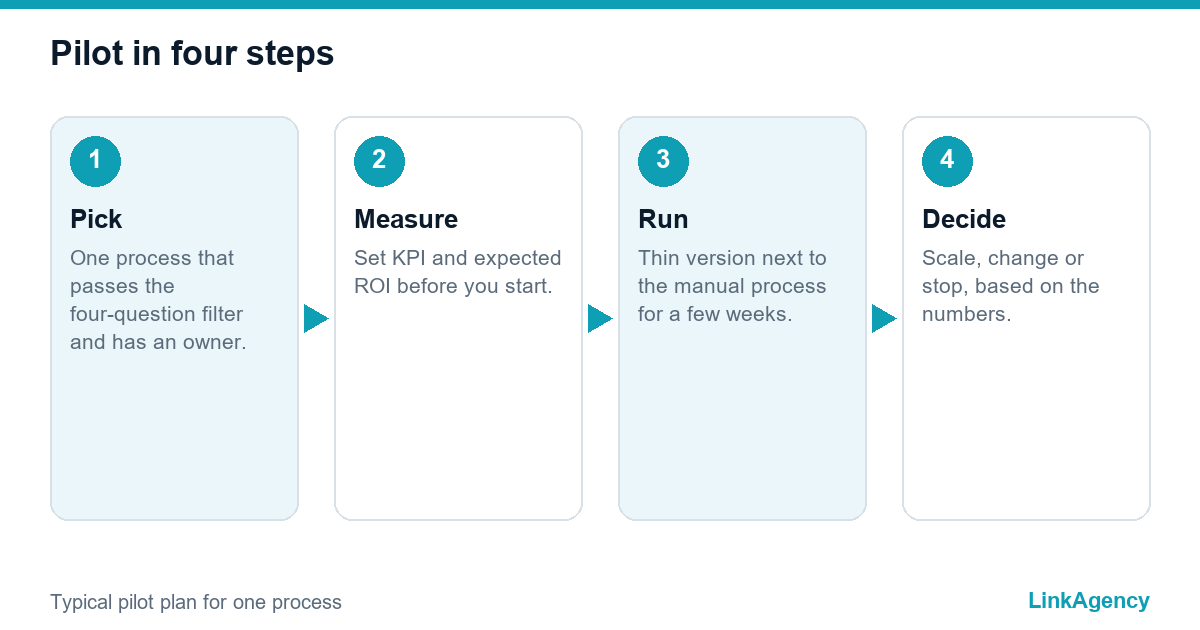
- Pick one process that passes the four-question filter and has a named owner, so the pilot has someone accountable.
- Define success with a KPI and an expected ROI before you start: hours saved, error rate, time to complete.
- Build a thin version with existing tools, using an API, no-code connectors or RPA where they fit, and run it next to the manual process for a few weeks.
- Compare results, fix exceptions and decide whether to scale, change or stop.
A pilot project of this size usually takes a few weeks, not months. Automating business processes in small steps limits risk. Keep a short log of exceptions, since they show where the next improvement sits. Treat the pilot as a test of business processes automation in your own setting, not as a launch.
How we help you automate business processes
We start business process automation with the process map and the filter, not with a tool. Without a clear business owner, process automation drifts, so we agree on one first. Workflow automation here means connecting your CRM, email, spreadsheets and documents so routine steps run without hands. If the pilot needs those connections, our AI workflow automation work covers building and running them. The automation of business processes is easier to fund when it starts small. When the question is strategic, AI consulting helps you decide where automation will pay back before you spend on it.
Where flows span several systems, AI integration services connect them through APIs while keeping access narrow. Teams that want to automate repetitive tasks around support or sales can add an assistant later, once the data flows are stable.
Order a process review for business process automation
Tell us which routine eats the most time. We will map it, run the four-question filter and propose a pilot with a clear measure of success.
- A map of routine work with hours, owners and exception rates.
- A ranked list of candidates and what to leave manual.
- A pilot plan with scope, timing and success metrics.
Send us a short description of your process. The first conversation is a free consultation, and we reply within one business day.

Frequently Asked Questions (FAQ)
Which business processes should I automate first?
Start with processes that repeat often, produce errors, cost money when delayed and already have structured data in a system. A process that passes all four checks makes a good pilot, and the rest can follow after the first results.
How long does a first automation pilot take?
A narrow pilot on one process usually takes a few weeks, including a parallel run next to the manual process. Larger flows that touch several systems need more time for integration and testing.
Do I need developers to automate business processes?
Not always. Simple flows run on no-code connectors, while flows with several systems, custom rules or sensitive data usually need developers to build and maintain the integration safely.
What should I check for GDPR before automating a process?
List the personal data the process touches, define why and how long you keep it, limit access to the people and tools that need it and sign processor agreements with vendors. Design these controls before launch, not after.
What happens when automation meets exceptions?
Automate the common path and send exceptions to a person with the context attached. Track how often exceptions occur: if they dominate, the process itself needs redesign before more automation.
How do I start with LinkAgency?
Describe the routine that costs your team the most time through the contact form on this page. We offer a free consultation, map the process, run the filter and propose a pilot with scope, timing and success metrics, usually within one business day.