
You paid for the click, the shopper landed on your store, picked a product and added it to the shopping cart, although Google now offers a cart inside Search and Gemini. Then they left. Losing someone at the last step hurts twice, because the interest is already there and the thing that stopped them is rarely the price. More often it is the checkout itself, although a discount that an ad promised and the page no longer shows, as Google Ads automated promotions can do with stale banners, loses buyers too. Baymard Institute puts average cart abandonment at roughly 70% across online stores.
Below are seven checkout mistakes that push that number up, a one-hour way to find yours in analytics, and an order of fixes that shows results within a few weeks.
Cart abandonment starts at one specific step
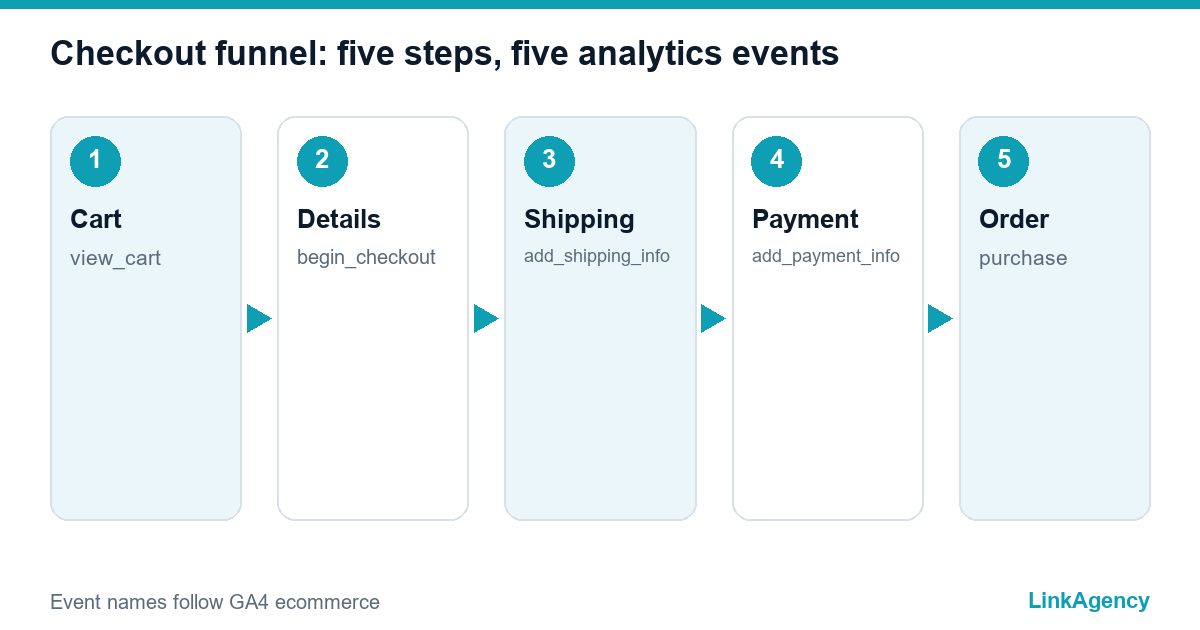
Every abandoned cart has its own story. Checkout abandonment looks like one number, yet it hides five different problems. Shoppers do not leave “the shopping cart” in general. They leave a particular step, and each step has its own reason, and a cart gets abandoned for one concrete reason far more often than for ten. A typical journey runs through five stages: cart, details, shipping, payment and confirmation. Baymard’s research keeps pointing at surprise costs first and forced account creation second. That is why changing a button colour at random almost never helps.
Seven checkout mistakes and the data trail each one leaves
Every mistake leaves a mark in your analytics, usually a sharp drop at one stage. Match your funnel against the table and you will see which row to tackle first.
| Mistake | What it looks like in analytics | What to fix |
|---|---|---|
| Forced account creation | Sharp drop right after the shopper enters checkout | Let shoppers pay without registering, offer an account after purchase |
| Long forms | High exit rate on the details step | Cut optional fields, enable address autofill |
| Shipping revealed late | Exits at the moment the delivery cost appears | Show a delivery estimate on the product page and in the basket |
| Unclear total price | Shoppers bounce back from checkout to the basket | Show the full total, with tax or VAT, before the card step |
| Missing payment method | Drop at payment, failed transactions | PayPal, Apple Pay, Google Pay, buy now pay later |
| Clumsy mobile checkout | Large gap between phone and desktop conversion | Bigger buttons, right keyboard type, faster pages |
| Low trust | Exits on the payment page | Clear returns policy, contact details, secure payment badges |
Two of these are underrated. Phone shoppers abandon far more often than desktop ones, so read mobile numbers on their own and never average them into one store-wide figure. On phones a cart is far more likely to end up abandoned, so look there first, especially for traffic from Meta catalog ads.
Phones and page speed
On a phone, a tiny button or a text field that opens the wrong keyboard has the same effect as forced registration. Check load times against Google’s Core Web Vitals, because a payment page that takes over three seconds to open loses people before they reach it, and speed is the first line of any Black Friday checklist. Field and button layout belongs in the brief for your ecommerce web design, not in a patch afterwards.
Payments and trust
US shoppers expect cards, PayPal, Apple Pay and often Klarna or Afterpay. In the UK, add Google Pay and pay-by-bank options. If the familiar choice is missing, few people go looking for a workaround. Add a plain returns policy, a visible phone or chat contact, and an SSL connection, since trust at the last step outweighs a discount. For UK and EU cards, strong customer authentication is mandatory, and Stripe’s SCA guide explains how to keep that step short.
What to test in the payment form
Run a test payment from a phone and confirm the bank prompt opens without freezing, since a stuck prompt is a common reason a cart gets abandoned at the final click.
How to find the weak step in your checkout process
Google Analytics 4 and its standard ecommerce events are enough, and the GA4 ecommerce documentation lists them. The work fits into one working hour:
- Check first that view_cart, begin_checkout, add_shipping_info, add_payment_info and purchase all fire.
- Build a funnel from those events and count how many people move from each step to the next.
- Split the funnel by device and traffic channel, since paid visitors often behave differently from organic ones.
- Find the biggest drop and compare it with the table above.
If the events are not set up, that is already a finding: without them you cannot see where the funnel leaks, and every change becomes a guess. One cause of abandoned carts usually stands out on the chart. When a cart sits abandoned at the payment step, check failed transactions first and only then move on to design, button colours and form hints.
Where to start so that sales actually grow
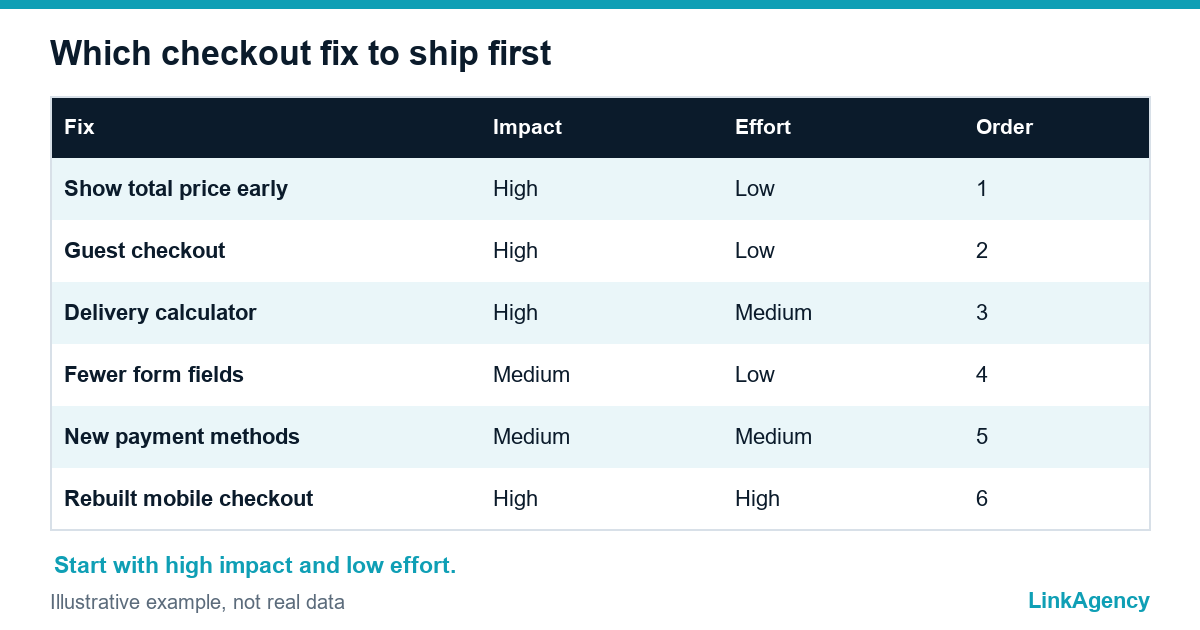
Do not fix everything at once, and if the whole store feels dated, first check whether it is time to redesign the website. Pick one. Ship it. Measure it, and only after the result is clear, with numbers from the same funnel, move to the next mistake on the list. Any change should exist for one reason only: to lift sales in real revenue, not in a flattering percentage on a dashboard. Pick the mistake with the biggest drop, ship one change and compare it against a control group with an A/B test, otherwise you will never know what worked. The usual order is delivery cost and total price first, then guest checkout, then mobile and payment methods. Abandoned carts stop being a mystery and the checkout process becomes something you manage.
- Quick fixes: paying without an account, a clear total price, fewer fields.
- Medium effort: a delivery calculator, extra payment methods.
- Longer projects: a rebuilt mobile checkout and faster pages.
If the drop starts before the basket, the problem may be wider. We covered how to trace weak site performance in fixing conversion on a site that looks stunning. One fixed mistake often beats ten small ones, and that is how cart abandonment actually falls.
How we help get more orders over the line
We start with the funnel, not a redesign: we check the events, find the weak step and propose one or two changes with a clear metric. Whether your store runs on WooCommerce, Shopify or a custom platform, the changes fit into our ecommerce development services. We rework the ecommerce checkout, connect payment and shipping options, and track how the share of completed orders moves. That is the core of our ecommerce conversion rate optimization services.
It makes sense to hire an ecommerce developer when analytics already shows a drop at checkout and your team lacks the capacity to remove it. The result is then easier to measure, and the budget stops going into blind tweaks.
Ecommerce conversion rate optimization services: cart abandonment under control
Send us your store link and analytics access. We will find the step where orders are lost and name the fixes that pay back fastest, so your ad budget stops leaking at the last step.
- A step-by-step funnel split by device.
- A list of checkout mistakes ranked by impact.
- A fix plan with timings and a way to verify results.
If you want the changes shipped as well, we can take over the whole checkout rebuild. The first review is free and we reply within one working day.

Frequently Asked Questions (FAQ)
What is a normal cart abandonment rate?
Baymard Institute reports an average of roughly 70% across online stores, so track your own trend rather than one benchmark number. Compare week to week and by device: a rising mobile figure usually points to checkout problems.
Which checkout mistake should I fix first?
The one with the biggest drop in your funnel. That is usually surprise delivery costs or forced account creation, because both are easy to confirm in analytics and the fixes are quick and cheap.
Do I still need guest checkout if customers can have an account?
Yes. Many shoppers will not create another login for a single purchase. Let them pay without registering and offer to save their details once the order is complete.
How do I know a fix worked and not just a lucky week?
Run an A/B test, or at least compare equal periods while accounting for seasonality and traffic channels. Decide the metric in advance: step-to-step completion and the final order conversion rate.
Do abandoned cart emails help?
They win back a share of shoppers but do not remove the cause. Fix the checkout first, then use reminder emails as an extra layer once the order process is clear and fast.
How do I hire LinkAgency to improve my checkout?
Send your store link and analytics access through the contact form on this page. We run a free first review, find the weak funnel step and propose a fix plan with timings, usually within one working day.