
Your systems still run on an old server or cheap hosting, and every outage reminds you of it, and an old server often means an old PHP version, a risk that PHP2Shell made urgent. Yet a move frightens people: downtime, lost data, a bill nobody can predict. The fix is not a better tool but a better order of decisions. Here is a checklist for cloud migration in a mid-size company that puts the business questions before the technical ones.
Cloud migration checklist: start with a business goal
Write the goal in one sentence a CFO would accept, such as “stop weekly outages of the order system” or “close the single point of failure in the office server room”. A goal in technology terms, like “be cloud-first”, gives you nothing to measure. Name an owner, a deadline and the one number that proves success. Without them even a perfect cloud migration plan turns into a wish list. Our cloud migration services begin with exactly this conversation.

Steps 1 and 2: inventory and dependencies for your cloud migration plan
List every application, database, scheduled job and integration, with the person who owns each. Then draw the links between them. The system nobody remembers is the one that breaks on moving day, and a cloud migration checklist for your business has to catch it before then. Integrations deserve extra care, as we showed in our piece on cloud integration security. Mark each item as move, replace or retire.
How to run the inventory
Ask each team lead for a list, then compare it with what the network actually shows. The two lists never match.
Quick test
Switch off nothing. Just ask who would notice if a server vanished tomorrow.
| Step | Decision to make | Owner |
|---|---|---|
| 1. Inventory | What exists, what moves, what retires | IT lead |
| 2. Dependencies | Which systems must move together | IT lead |
| 3. Data and GDPR | Which data, which region, which contract | COO and legal |
| 4. Access | Who gets which rights after the move | Security |
Steps 3 and 4: data, GDPR, storage region and access
Decide where each data set will live before you pick a plan. If you hold personal data of EU residents, the provider acts as your processor, and GDPR Article 28 requires a contract that covers sub-processors too. Moving to the cloud under GDPR also means asking where backups and support staff sit, because the answer decides whether a transfer outside the EU happens at all. Then rebuild access on least privilege with MFA, rather than copying old admin rights across, and review it with a website security checklist. Every checklist before a cloud migration should put this near the top.
Steps 5 and 6: backups, rollback and downtime window
Take a full backup, test the restore, and agree the rollback plan on paper, as an incident response plan does for an attack. A contingency planning guide from NIST is a useful template for the recovery part. Agree a downtime window with the business: nights, weekends, or a quiet week.
- Name the person who decides to roll back, and the deadline.
- Keep the old environment running until the new one has proved itself.
- Rehearse the restore once, with a stopwatch.
No rollback plan means no migration.
Step 7: pilot one system first
Start with something small and low-risk, such as an internal tool, and run it for a few weeks. Mid-size firms gain most from this, which is why a cloud migration checklist for mid-size companies always includes a pilot. A pilot migration shows the real latency, the real invoice and the real surprises, while the stakes are low. The cloud migration steps before it were theory; now you have evidence. Hand the repeatable parts to DevOps services, so the second move takes a fraction of the first.
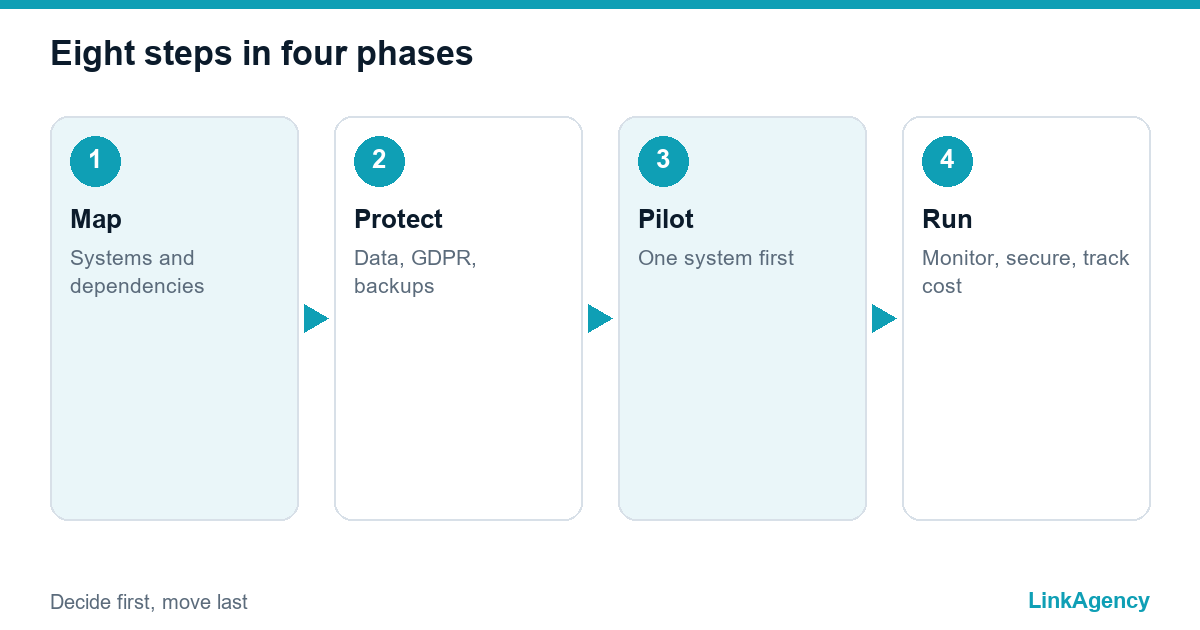
Step 8: monitoring, security and costs after moving to the cloud
Switch on monitoring and alerts on day one, and review security settings weekly in the first month. Costs drift upward quietly. Assign someone to read the bill, and keep the cloud migration risks list open: forgotten test servers and oversized plans are the usual culprits. The FinOps Foundation describes a practice of shared cost ownership between engineering, finance and business teams, and even a small firm can borrow it.

Common mistakes and questions for a cloud migration company
The usual failures are skipped inventory, no tested restore and a pilot that never happens, and each of them is cheap to prevent. Ask any cloud migration company four things: where will our data live, who holds the keys, how do we go back if it fails and how will costs be reported. Check also the hosting side, from cloud hosting services to support terms. A cloud migration checklist is only useful when someone owns each line. Name the owners first. Before any cloud project, a migration without a checklist is a gamble. A checklist helps because every cloud migration hides boring work. Do it first.
Free cloud migration checklist review for your infrastructure
Send us your system list and we will assess readiness, flag the risks and propose an order of moves. You can also order cloud migration consulting if you want a partner for the whole project.
- A list of systems with a move, replace or retire verdict.
The consultation is free, and we reply within one working day.

Frequently Asked Questions (FAQ)
How long does a cloud migration take for a mid-size company?
It depends on the number of systems and dependencies. A pilot of one small system often takes a few weeks, while a full move can take months. The inventory step gives you a realistic estimate.
Do we need a GDPR contract with the cloud provider?
If you process personal data of EU residents, yes. Article 28 requires a contract with your processor, including rules on sub-processors. Also check where data and backups are stored.
What does a rollback look like?
A written procedure for returning to the old environment if the move fails: who decides, by what time, from which backup. Test the restore before the move, not during it.
Why start with a pilot migration?
A small system shows real latency, real costs and surprises while the stakes are low. It also gives your team a repeatable process for the larger moves.
How do we keep cloud costs under control after the move?
Name one owner for the bill, set budgets and alerts, and review usage monthly. Shared ownership between engineering, finance and business teams works best.
How do I ask LinkAgency to review my migration plan?
Use the contact form on this page and send a list of your systems. We will assess readiness, flag risks and propose an order of moves, usually within one working day.