Your site brings in enquiries or orders, and nobody in the company can say who has the admin password, when the plugins were last updated or whether a backup would actually restore. Most small business website security failures start with that kind of gap, not with a clever attack. This website security checklist for business has ten basics, each with a question for your team or vendor and a sign that something is wrong, so you can review it in one meeting.
Website Security Checklist for Business: Why It Is Not Only a Developer’s Job
If the site stops, leaks customer data or shows spam pages, the cost lands on the business: lost sales, support load, legal exposure and a damaged name. The OWASP Top 10 lists broken access control and outdated components among the most common web risks, and both are management problems before they are technical ones, because they come from unclear ownership. Website security best practices come down to a short list, and a security checklist for your website makes the owner of each item visible.

Access and Roles: The Website Security Checklist Starts With Who Can Do What
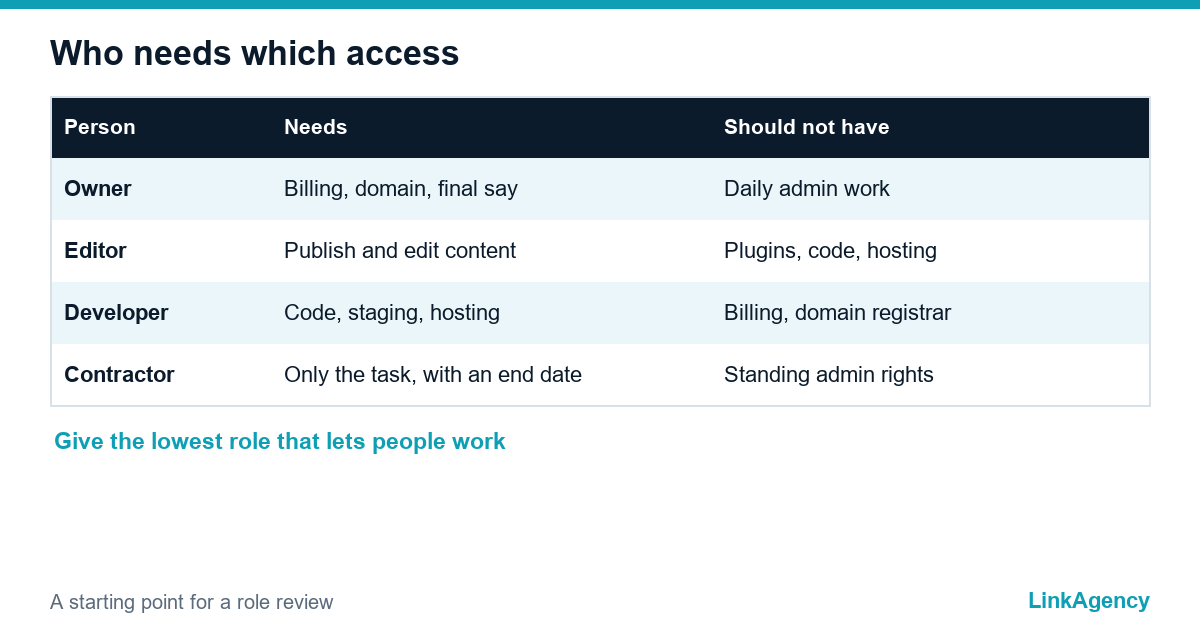
List every account on the site, hosting, domain registrar, analytics and email. Next to each name write the role and the reason. Remove former contractors and staff the same day they leave, and give each person the lowest role that lets them work. Shared logins hide who did what, so replace them with named accounts. Ask the team: who can publish, who can install plugins and who can change the domain? A bad sign is an admin account nobody can explain, and this security checklist for small business websites treats it as urgent.
Two-Factor Authentication and Passwords
Turn on two-factor authentication for the site admin, the hosting panel, the domain registrar and the email that resets them. Use a password manager and a unique password for each service, never a shared spreadsheet. Check the list of administrators once a quarter. If a key account still depends on one password, fix that first, since a single stolen login can undo every other small business website security measure.
Updates for CMS, Plugins and Dependencies
Outdated software is the usual way in. Update the CMS, themes, plugins and code libraries on a schedule, as any website security audit will ask, test on a copy before you push to the live site, and remove anything you no longer use, because an unused plugin is still an open door, and the PHP version on the server needs the same care, as PHP2Shell and the push to update the PHP version showed. For a WordPress security checklist, the official hardening handbook is a good reference for your developer. Our web development team can take over updates if no one owns them. Ask: when was the last update, and who approved it? A warning sign is a site that has gone six months without a patch.
Backups and Restore Tests
A website backup you have never restored is only a hope, so put it on your checklist. Keep copies of files and the database outside the web server, keep several generations and test a restore twice a year on a spare environment. The UK’s NCSC guidance on backing up data makes the same point plainly. Ask: how long would it take to bring the site back, and how much data would we lose? If nobody can answer, the backup is not a plan.
| Measure | Question to ask | Red flag |
|---|---|---|
| Access review | Who has access today? | Former contractors still active |
| Two-factor login | Is it on for hosting and domain? | Only the admin panel |
| Updates | When was the last patch? | Months without updates |
| Backups | When did we last restore one? | Never tested |
| Monitoring | Who gets the alert at night? | Nobody named |
Network Protection: WAF, SSL and Login Limits
Use HTTPS on every page with a certificate that renews automatically. Put a web application firewall (WAF) in front of the site to filter malicious traffic, and limit login attempts so that password guessing stops after a few tries. These website security best practices cost little and block a lot of automated noise. Add this to your website security checklist: ask your provider which rules are active and who reviews them; a firewall that is installed but never looked at gives a false sense of safety.
Monitoring, Alerts and Named Owners
Set up uptime monitoring with alerts to a person, not to a shared inbox, plus a notice for new admin accounts and file changes. Write down the owner of each item, with a backup person, and the reaction time for a night or weekend alert. Each checklist item should name an owner, because security without one fails on any website. If you need help with the setup, our DevOps services and website security services cover monitoring, backups and the pipeline for safe updates, and our guide to the incident response plan for ecommerce covers what to do when prevention fails.
The first hour after you spot a problem
- Take a copy of the current state and note the time.
- Switch the site to a maintenance page.
- Change every password and revoke unknown accounts.
- Restore from the last clean backup and update everything.

GDPR: Customer Data, Processors and Notification Deadlines
If you serve people in the EU or UK, the General Data Protection Regulation expects a breach that puts people at risk to be reported to the authority without undue delay and, where feasible, within 72 hours. Know which tools receive customer data, have a contract with each processor, and keep a short breach plan with phone numbers. Use this checklist for website security as an annual review for processors too, and collect only the data you need, because data you do not hold cannot leak.
Get a Free Express Website Security Audit From LinkAgency
We check accounts and roles, two-factor settings, updates, backups, firewall and monitoring against this website security checklist and send a priority list. If you want the fixes handled for you, you can order a security audit together with the setup, or ask for a free website security audit and a fixed scope.
- review of access, hosting and domain accounts;
- update, backup and restore check;
- alert and ownership plan for the next 90 days.
Send a request and we will reply within one working day.

Frequently Asked Questions (FAQ)
How often should I review website security?
Review access and updates monthly, test a website backup restore twice a year and run the full list once a quarter. After a staff change, review access the same day.
Is an SSL certificate enough to protect my site?
No. HTTPS protects traffic between the visitor and the server, but it does not stop weak passwords, outdated plugins or stolen logins.
Who should be responsible for website security?
One named owner on your side, even if a vendor does the work. They approve access, receive alerts and confirm that backups and updates happened.
What should I do first if my site was hacked?
Take a copy of the current state, switch the site to a maintenance page, change all passwords and restore from a clean backup. If personal data leaked, start your GDPR notification process.
Do small businesses really get attacked?
Yes. Attacks are mostly automated and look for known weaknesses, so a small site with outdated software is as easy a target as a large one.
Can LinkAgency check and secure my site?
Yes. We review access, updates, backups, firewall and monitoring, then fix the gaps or hand you a priority list. Send a request and we reply within one working day.