A plugin update on Friday afternoon, and by Monday the contact form sends nothing and the cart rejects cards; a template change can break the prices in a product feed too, see Google Merchant Center disapproved products. The owner hears about it from a customer, not from the developer. A staging site is a private test copy of your website where updates are tried first, so that a mistake costs an hour on the copy and not a day of lost orders. This guide is for owners and commercial directors whose site is changed by a contractor or an in-house developer. It explains the idea without jargon, with four checks and five questions to ask.
What is a staging site and how it differs from the live one
The live site is the one customers see. The copy has the same pages, plugins and settings, and it sits at a private address. Developers call the live version production, and the staging vs production rule is short: nothing is tested on production. A website staging environment is the place where you are allowed to break things.
What breaks when updates go straight to the live site
Updates change code and sometimes the database, and every change can collide with the plugins already installed. The usual victims are the contact form, the cart and payment page, the mobile menu and the tracking code. Downtime is the visible part. Test first. In a seasonal business the damage is not only the repair hours but the orders lost while nobody knew. A shop carries the highest risk, which is why our ecommerce development services start with a release routine. A test website before update shows the collision while it is still harmless, which is the whole point of safe website updates and the reason every serious team keeps a staging environment next to production.
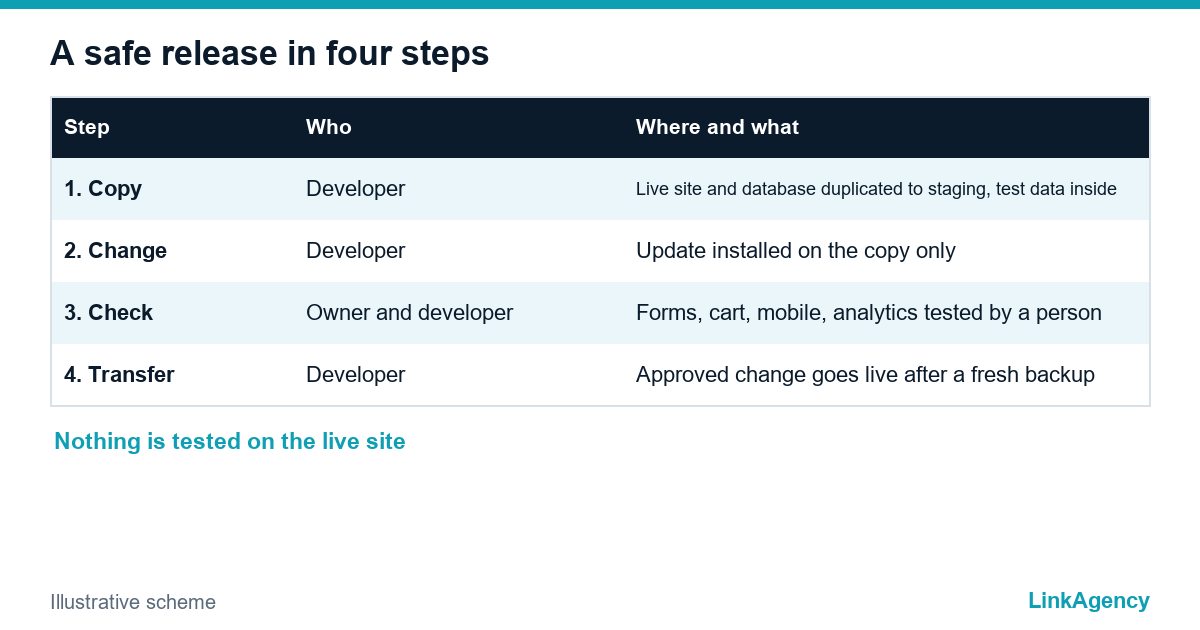
How a safe release works: copy, check, transfer
- Copy: the live site and its database are duplicated to the staging address, with test data instead of real customer data.
- Change: the contractor installs the update or the new feature on the copy only.
- Check: the four checks from the table below are done by a person, not only by a script.
- Transfer: only the approved change goes to the live site, in a quiet hour, after a fresh backup.
Do not copy the whole database back over the live one. Never. New orders arrive while you test, and they would be erased. Our web development services keep code and content apart for this reason.

After the test: four checks before the change goes live
| Check | What to do | Passed when |
|---|---|---|
| Forms | Send a test enquiry | The message reaches the right inbox and the CRM |
| Cart and payment | Place a test order in sandbox mode | Order, confirmation and payment record appear |
| Mobile | Open the key pages on a phone | Menu, buttons and forms work with a thumb |
| Analytics | Check the tag and the conversion event | The event fires once, not twice |
Keep the staging site out of search and away from customers
Search engines
A copy that appears in Google creates duplicate pages and confuses customers. Add a noindex rule and protect the copy with a password. Google explains how to block a page from search results, and its robots.txt introduction says that file alone is not a way to keep a page private.
People and email
The copy must not send real emails to customers or charge real cards. Turn off outgoing mail, use test payment keys and replace customer data with test records. Give access only to the people who need it, and remove it when the contractor changes, as in our guide to a safe handover between web developers.
Backups and rollback: how fast can you go back
Take a full backup of the live site and database just before every release, and keep the old version of the changed files. Hosts often include staging sites in their plans, yet a plan does not test anything for you. A wordpress staging copy is only as good as the person who checks it. Ask for the real time of a return, and ask to see one restore done. A backup that was never restored is a hope, not a plan. Our DevOps services set up backups and a one-step way back, so that safe website updates become routine.
Five questions to ask your contractor
- Is there a staging copy, and who keeps it up to date?
- Who approves a change before it goes live?
- How fast can you return to the previous version, and was it tested?
- Where are the backups stored, and who can restore them?
- Is the copy hidden from search and from customers?
Update the copy first, and the staging step costs an hour. Skip it, and one release can cost a week of orders, a pile of angry emails and a weekend of unplanned work for a developer who was not paid for it.
Staging site for your business: a free check of how your website is updated
Send us the address of your site and the name of the person who updates it. We will check whether there is a copy, a backup and a way back, and tell you what to fix first. If you need the work done, our web development services and DevOps services set up the copy and the release routine.
- a short list of gaps in your update process;
- the first three fixes in order of risk.
Leave a request and we will answer within one working day.

Frequently Asked Questions (FAQ)
What is a test copy of a website in simple words?
It is a private staging environment, a copy of your website where updates are tried before they reach customers. If something breaks on the copy, nobody loses an order. Only the approved change is then moved to the live site.
Does every update need a staging copy?
Not a typo fix, but anything that touches plugins, forms, checkout, payments or the theme should go through the copy first. If you run a shop in season, test every release.
Can a test copy of your website hurt my SEO?
Yes, if the copy is open to search engines, because it creates duplicate pages. Use a password and a noindex rule, and do not rely on robots.txt alone.
How is staging different from a backup?
A backup restores the past, and a staging site lets you test the future. Staging vs production is a question of where you test, and a backup is a question of how you return. You need both: the copy to catch the problem and the backup to go back if one still slips through.
How much does wordpress staging cost?
Many hosts include a one-click copy, and the real cost is the contractor time to keep it updated and to check it. Ask for a fixed price for the routine, not only for the copy, and for the test copy of your website to be checked by a person.
Can LinkAgency check how my website is updated?
Yes. Send us the address and the name of the person who updates it. We check the copy, the backup and the way back, and tell you the first three fixes. The first check is free.