Your developers already write code with AI agents such as Codex, Claude Code or Cursor, and delivery is faster. What most owners cannot say is what those agents are allowed to touch, what they can install or send out, and who answers if a malicious package or a leaked key reaches the product. This guide turns last week’s research into plain rules for AI coding security: where agents may run, which permissions stay on, what goes into a vendor contract and what to do in the first 24 hours after a suspected leak.
AI coding security: how one instruction file hijacked a developer’s agent
On 25 October 2026, BleepingComputer reported research by Forever Security. On a customer’s computer, a coding agent tried to install a rogue npm package called function-color. The trail led to an AGENTS.md file in the Downloads folder, which was also the agent’s working directory. Agents load instruction files from the folder they start in and follow them, so a file planted there works like a command. The researchers added that a web page can drop such a file into Downloads without a prompt, because Chrome, Edge and Firefox save downloads there by default.
The figures come from the lab, not from real attacks. With a harmless payload that opened a calculator, the attack worked against OpenAI Codex in 90% of tests, and a malicious CLAUDE.md file redirected Claude Code’s traffic and exposed its login token in roughly 50% of tests. The researchers stress there is nothing to patch: an agent that obeys the file in its folder does what it was built to do, so the defence falls on the business.
Why AI coding agent security matters to the owner, not only to programmers
An agent runs with the rights of the developer who started it: the files, the shell, the saved tokens and the network. The risk is that text the agent reads can pass for an instruction, which security people call prompt injection. A survey by the Cloud Security Alliance from April 2026, cited by OX Security, found that 53% of organisations had agents exceed their intended permissions and 47% had an incident involving an agent in the past year. If you want a wider view of what to hand to agents at all, our guide to AI agents for business covers it.
For a manager, AI coding agent security and AI coding assistant security come down to three questions: what the agent can read, what it can run, and who checks the result before it reaches customers.
Six rules for AI coding agent security in your team: folders, permissions, sandbox, access
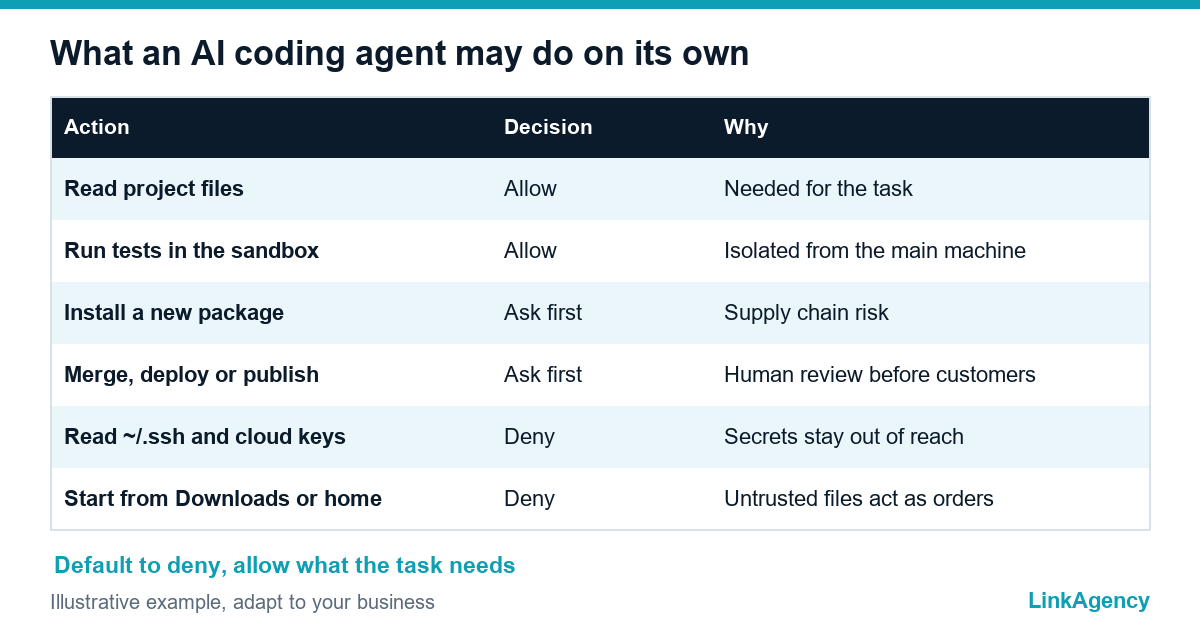
- Start agents only in the project folder, never in Downloads or in the home directory. OpenAI and Anthropic both advise keeping the working area narrow.
- Read an unfamiliar AGENTS.md, CLAUDE.md or rules file before any agent follows it.
- Keep approval prompts and the sandbox switched on, and forbid permission-bypass flags such as –dangerously-skip-permissions.
- Run untrusted code and new dependencies in an isolated environment, such as a container, not on the main workstation.
- Apply least privilege: give agents short-lived tokens limited to one task, and keep keys out of prompts and out of files the agent can read, including ~/.ssh and cloud credentials.
- Log what agents run, and require a human review before any merge, deploy or publish.
The OWASP AI Agent Security Cheat Sheet states the same principle for the security of AI coding agents in its list of best practices: least privilege for every tool, treat all external data as untrusted and require human approval for high-impact actions.
What to put in the contract and the brief for a vendor that uses AI
If an outside team writes your code, its tools are part of your risk. A short AI development policy for vendors fits on one page, and the security of AI coding agents belongs in the contract next to deadlines and acceptance rules. Our list of 12 questions for a software development company shows where to ask. The table below shows what to write down for AI coding security.
AI coding assistant security clauses for the contract
| Clause | What to require |
|---|---|
| Tools | A named list of AI agents in use, and a notice before new ones are added |
| Environment | Agents run in the project folder or a sandbox, never in the home directory or Downloads |
| Your secrets | Your keys are never pasted into prompts; vendors use scoped, short-lived tokens |
| Dependencies | Every new package is reviewed, versions are pinned and the lockfile is committed |
| Review | A human reviews every merge, and agent output is never deployed unseen |
| Incidents | Notice within an agreed time, key rotation and a written account |
Our custom software development services follow the same table, and we hand it to clients before the first sprint.

Keys, tokens and packages: software supply chain security for AI coding tools
Software supply chain security for a small business is mostly discipline. An agent that installs a package is making a purchasing decision, and a misspelled or spoofed name is enough to bring in malware. Common safeguards for agents include pinned versions, SBOM checks and explicit command allowlists. In practice, ask your team for these checks:
- new dependencies go through the same review as code;
- install scripts do not run on the main machine;
- secrets live in a vault, not in .env files next to the code;
- access tokens expire in minutes or hours, not months;
- CI shows who approved each release.
If you suspect a compromise: the first 24 hours
- Stop the agent and disconnect the machine from the network.
- Revoke and rotate every token the agent could reach: repository, npm, cloud and the agent’s own login.
- List packages installed and files changed since the session began.
- Check CI logs and recent merges for changes nobody remembers.
- Tell the vendor, and your customers if their data could be involved, then write down what happened.
Our DevOps and security services include setting up this runbook before you need it. An injection can land on any day, so the runbook should exist before the first incident.
How to adopt AI in development without a ban and without extra risk
A ban pushes agents back onto personal laptops with no rules, and every coding task done with AI still needs a security owner. AI coding security works best as a narrow start: one team, one project folder, a sandbox, short-lived tokens and a weekly look at the logs. When that works, widen it. Coding with AI is fast, but the security checks cannot be skipped. Securing AI coding tools is cheaper at the start than after the first incident, and an AI development policy for vendors makes the same rules binding for outside teams.
Free audit of AI coding security in your development process
We review which AI tools your team or vendor uses, with what rights, where keys are stored and how dependency updates work. You get a short list of rules for the team and the contractor. If you prefer, you can also order a development security audit as a separate piece of work.
- a map of agents, permissions and secrets;
- a one-page rule set for your team and vendors.
Leave a request and we reply within one business day.

Frequently Asked Questions (FAQ)
Is it safe to use Claude Code or Codex at work?
It can be, if the agent starts in the project folder, runs with a sandbox and approval prompts, and holds only short-lived tokens. The risk comes from loose setups, not from the tools alone.
What is prompt injection in plain words?
It is text that an AI agent reads and treats as an order, for example a line in a file, an email or a web page. The agent cannot always tell your instructions from instructions hidden in the material it processes.
Should we ban AI coding tools after this research?
A ban usually moves the same tools to personal laptops with no rules. Narrow rules work better: one project folder, a sandbox, limited tokens, logs and a human review of every merge.
What should we ask a vendor about AI tools?
Ask which agents they use, where they run, how your keys are handled, how new packages are reviewed and how fast you are told about an incident. Put the answers into the contract as an AI development policy for vendors.
How can we tell if agents run from the Downloads folder?
Ask developers where they start the agent, and check shell history and session logs if you keep them. In the Forever Security data, hundreds of customers ran agents from Downloads.
Can LinkAgency check our development process?
Yes. We review the tools, permissions, key storage and dependency updates, then give you a short list of rules for your team and your vendors. The first review is free.