One agency built the site, another runs the ads, a third set up the CRM, and nobody sees the whole picture. The budget grows, and the owner still cannot say where clients are lost: on the site, in the ads or in the handling of enquiries. This digital marketing audit checklist is written for the owner, not for a marketer. It has six zones with five yes or no questions each, red flags that mean “stop and fix before you add budget” and a one-page health map at the end.
Digital marketing audit before you raise the budget: where clients usually get lost
A digital audit for small business starts from a simple fact. More budget makes a leak bigger, not smaller. A broken form wastes every bit of advertising spend that sends people to it, and a slow reply wastes every lead that did arrive. The order matters: first prove the numbers can be trusted, then find the weakest step between ad and sale. Every digital channel and every marketing hand-off gets one audit question, so you review all of them with the same logic.
Treat it as a digital marketing audit that fits in a day: one hour per zone, with analytics, the ad account and the CRM open. Answer honestly. Write “do not know” where you do not know. That answer is a finding too, and often the most valuable one. For a deeper view of priorities, our digital marketing plan for 2027 explains how to rank the fixes.
Zone 1: website, speed, mobile version, forms and accessibility
This website and marketing health check starts where every ad ends. Record today’s answers as your baseline before you change anything.
- Do key pages load fast on a phone, judged by Core Web Vitals?
- Does the first screen say what you do, for whom, and how to contact you?
- Does every contact form send a test message to a real inbox or CRM?
- Can a keyboard user and a screen reader user reach the form and the phone number?
- Is there one clear next step on each service page?
Zone 2: visibility in Google, maps and AI answers
- Do you appear for service searches, and not only for your own brand name?
- Is your Google Business Profile complete, with current hours and replies to reviews?
- Do titles and descriptions differ page by page?
- Does an AI assistant name your company when asked about your category?
- Do you know which pages bring enquiries, not just visits?
Keep the results in one marketing audit template, a plain sheet with zone, answer, owner and date. A technical SEO audit goes deeper than this list, which is what our SEO audit services are for.
Zone 3: advertising, goals, analytics and cost per client
In this zone, audit your online marketing from the click to the enquiry. Read the funnel backwards, from a sale to its first ad.
- Is each campaign tied to a goal that counts a real enquiry or sale?
- Does analytics record a conversion once, and only after a real action?
- Do you know the cost per lead and the cost per paying client by channel?
- Do ads lead to a page that repeats their promise?
- Are UTM tags consistent across the team and contractors?
Zone 4: the lead path from form to CRM and manager reply
A digital marketing audit that skips this zone misses the most expensive leak, because it sits after the click.
- Does every form and phone call land in the CRM with its source?
- Does a manager reply within the time you promise on the site?
- Is each lead given a status, including the reason for a lost deal?
- Do you check enquiries that nobody touched for a day?
- Can you trace one sale back to its first ad or search?
Zone 5: repeat sales and the customer base
Short and cheap: a free digital audit of your own list. and repeat sales cost less than new clients.
- Do you have a list of past customers with consent to contact them?
- Does a customer hear from you after the sale, and when?
- Is there a simple request for a review or a referral?
- Do you know the share of repeat orders?
- Are inactive customers reactivated by a message that is not a discount blast?
Zone 6: access, security and GDPR
- Does the owner hold admin access to the domain, hosting, analytics and ad accounts?
- Are former contractors removed and passwords unique with two-step sign-in?
- Do you have a recent backup of the site and a tested restore?
- Does the cookie banner follow the GDPR rules for consent where you target EU visitors?
- Is it written down who answers when something breaks?

One-page health map: how to read the result
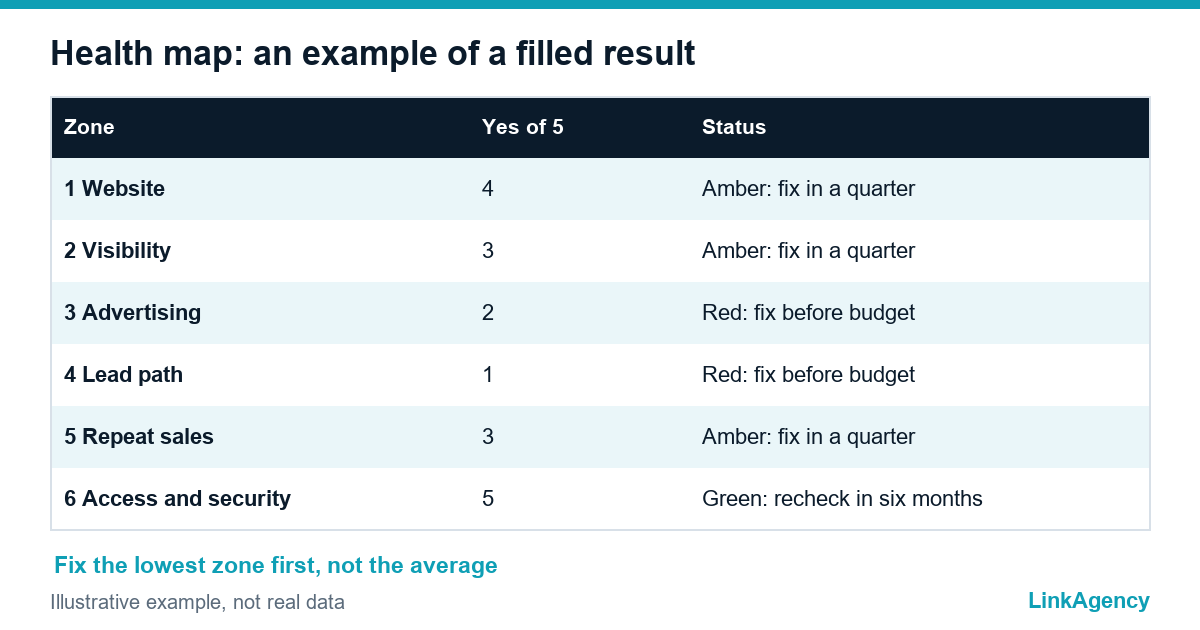
Count the “yes” answers in each zone. Then use this table to decide what comes first, and remember that the audit is a decision tool rather than a report to file away for next year, so a free digital audit of this kind should end with names and dates.
| Zone | Yes answers | What to do |
|---|---|---|
| Any zone | 0 to 2 | Red: stop and fix before you add budget |
| Any zone | 3 to 4 | Amber: fix within a quarter |
| Any zone | 5 | Green: keep and recheck every six months |
Red flags that stop budget growth
- A form that does not deliver. A goal that counts twice.
- Ads that lead to the home page instead of a relevant page.
- No one owns replies to leads.
- Owner without access to accounts.
An audit of your digital marketing is only useful if it ends in action. Start with the lowest zone, not the average. A marketing audit template of this kind helps you recheck after every fix, and an online presence audit once a year keeps the map current. A digital health check each quarter is enough for the lowest zone.
Free digital audit: a digital marketing audit checklist and your red flags
Fill in the checklist yourself, then send it to us. We will check the red flags with you and show what to fix first, so it is clear where budget will work. Our business consulting can run the full review, or you can order a digital audit as a separate project.
- a health map of the six zones;
- a ranked list of fixes with owners.
Leave a request and we reply within one business day.

Frequently Asked Questions (FAQ)
How long does a digital audit for small business take?
A first pass takes about a day if you have access to analytics, the ad account and the CRM. Allow an hour per zone, and write down every answer you could not give. This is a snapshot, not a project, and an online presence audit once a year keeps it current.
Who should run the audit, the owner or the marketer?
The owner should read the results and ask the questions, while the marketer or contractor brings the data. An outside reviewer helps when the people being audited also built the setup.
What are the biggest red flags before raising the ad budget?
Forms that do not deliver, goals that count twice, ads that lead to irrelevant pages, nobody replying to leads and owners without access to their own accounts.
How often should we repeat the checklist?
Run the full version once or twice a year and recheck the lowest zone after each fix or after a big change such as a redesign or a new campaign.
Is a free audit enough, or do we need a paid one?
Your own pass finds obvious gaps. A paid review adds an outside view, deeper checks of tracking and CRM, and a ranked plan with owners and dates.
Can LinkAgency check our red flags?
Yes. Send the filled checklist and we will review the red flags with you, show what to fix first and explain where more budget would actually help.