An employee leaves on Friday. On Monday the company still pays for an ad account registered to their personal email, the domain registrar sends renewal notices to their inbox, and the CRM accepts their old password. Nobody did anything wrong, because nobody was asked to look. An employee offboarding checklist is the fix, and for a small business without an IT department it has to start from a simple question: where does this person actually have access? This guide gives a map of the places access hides, a three-stage plan, rules for contractors and freelancers, what GDPR expects and a quarterly review.
Employee offboarding checklist: why forgotten access is riskier than it looks
Ex-employee access that outlives the role is a security problem in two ways, and employee offboarding checklists rarely cover it fully. The former colleague, or anyone who gets into their old mailbox, can still reach data and money. And the company loses control of assets it thinks it owns: a domain, an ad account or a social page tied to a personal login can be hard to recover if the person does not respond. A checklist is only useful if each employee leaving has someone who owns offboarding. Give the task a name and a deadline.
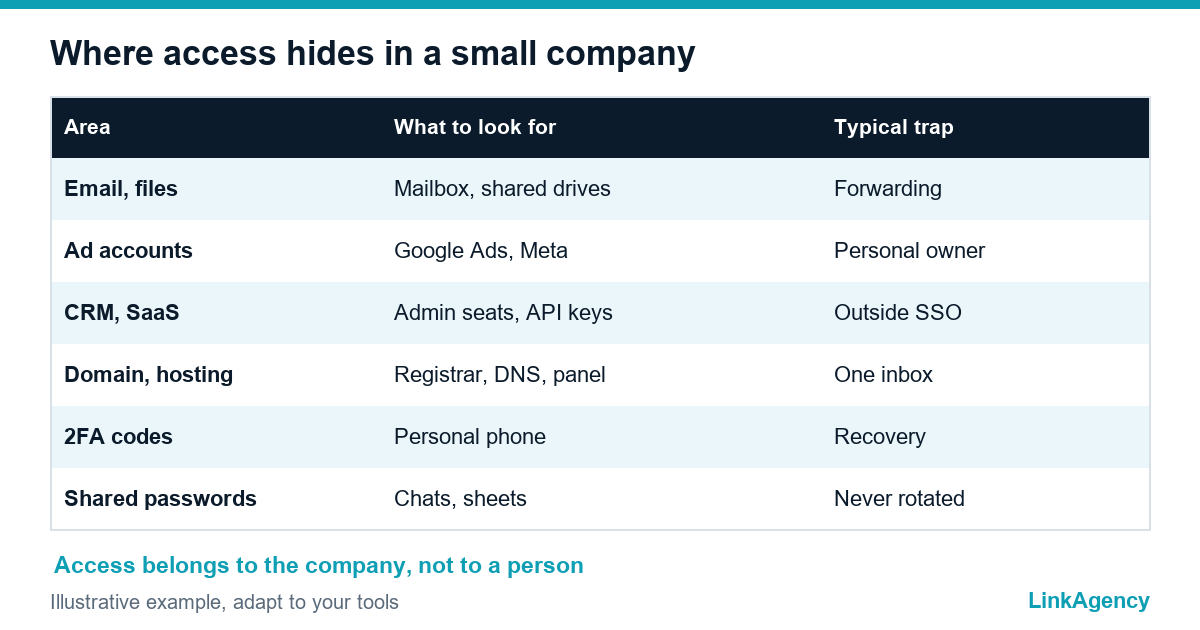
Where access hides in a small company: a map of services
| Area | What to look for | Typical trap |
|---|---|---|
| Email and files | Mailbox, shared drives, calendar invitations | Auto-forwarding to a private address |
| Ad accounts | Google Ads, Meta, analytics, tag manager | Account owner is a personal login |
| CRM and SaaS tools | Admin seats, API keys, integrations | Apps outside single sign-on |
| Domain and hosting | Registrar, DNS, hosting panel, CMS admin | Renewal emails go to one person |
| Social pages and listings | Brand pages, business profile, app stores | One admin only |
| Two-factor codes | Authenticator on a personal phone | Recovery tied to the departing person |
| Shared passwords | Spreadsheets, chat messages, password manager | Nobody rotates them |
Build this list once and keep it current. It is the foundation of every employee offboarding security checklist and of any offboarding checklist for small business, and it also helps with continuity when someone is simply ill.
Before the last day: a list of services and a second administrator in each
- Confirm the leaving date and name the person who owns offboarding.
- List every service the employee uses, with the help of their manager and the email “reset password” history.
- Add a second administrator, tied to a company address, in each critical service.
- Reassign owned files, tasks and customer accounts.
- Schedule a rotation of shared passwords for the last day.
Moving ownership before the person leaves is far easier than asking them afterwards. Do it while they are still cooperative.
On the last day: what to close, what to change, what to move to work addresses
The last-day order
- Disable the main account, end active sessions and sign the person out of everything: this is the step to revoke access when employee leaves, and it needs a person, not a tool.
- Revoke access when the employee leaves in each tool outside single sign-on, such as ad accounts and the CRM.
- Remove the person’s two-factor devices and backup codes, and register the company’s own.
- Change shared passwords and API keys the person knew.
- Move the account owner role to a company address in ad, domain and social accounts.
- Collect devices, and remove the mailbox from phones.
An IT offboarding checklist such as Bitwarden’s IT offboarding checklist follows the same order of before, on the day and after, and stresses that disabling one directory account does not close every door. Passwords written in chats or spreadsheets are the usual gap, which the UK NCSC covers in its guide to protecting data with passwords.
One week later: sign-in logs, mail forwarding, connected apps and tokens
Do a second pass after a week, because some things only show up later. Review sign-in logs for attempts on the closed account, which is the SaaS account offboarding check most teams skip. Check that mail forwarding rules are gone or pointed at a company mailbox. List connected apps and tokens that the person authorised, and remove the ones you do not recognise. Confirm that the inventory of services matches what you pay for, since a forgotten subscription often means a forgotten admin. Our website security checklist covers site-level basics that belong in the same review.
Contractors and freelancers: how not to leave them the keys to the business
Give contractors accounts under company addresses, with the least access that does the job and an end date. Keep ownership of domains, hosting and ad accounts with the company, never with the vendor. When a developer or agency leaves, the same steps apply, and our guide to a safe handover when you switch web developers explains ownership and GDPR points in detail. For ongoing infrastructure, DevOps and security services can take over access control and logs.
What GDPR requires and how to document it without bureaucracy
Article 32 of the General Data Protection Regulation asks you to keep personal data secure with appropriate technical and organisational measures. An ex-employee with working access to customer data is a gap in exactly that, so ex-employee access is a compliance question too. Keep a short record for each departure: who owned the task, what was closed and when, and who checked it. One page is enough. Confirm details for your country with a lawyer.
A quarterly review and one rule: access belongs to the company
- Once a quarter, list admins in each critical service and compare with current staff using the same IT offboarding checklist.
- Look for any account owned by a personal address and move it.
- Check that each service has two administrators.
- Test one recovery, so you know it works.
One rule covers most cases: access belongs to the company, not to a person. A tool that cannot follow this rule should be replaced.

Free access review before the next departure
Our access audit lists your services, who administers them, what is tied to personal addresses and what should move to the company, with a short action plan.
Employee offboarding checklist in practice: a free access review
We build the list of services, show who administers each, what is registered to personal addresses and what to move to the company, and give a short action plan. No obligation.
- list of services and administrators;
- items tied to personal accounts and a transfer plan.
Leave a request and we will reply within one working day.

Frequently Asked Questions (FAQ)
What should an employee offboarding checklist include?
A list of every service the person uses, a second administrator in each, the last-day steps (disable accounts, rotate shared passwords, move ownership to company addresses) and a check a week later.
How quickly should access be closed when someone leaves?
On the last day, or earlier for a risky departure. Prepare the list and second administrators in advance so the last day is only execution.
What are the most common forgotten accounts?
Ad accounts, the domain registrar, DNS and hosting panels, CRM admin seats, social pages and authenticator codes on a personal phone.
Why are shared passwords a problem at offboarding?
The departing person still knows them, and they are often kept in chats or spreadsheets. Rotate every shared password they knew on the last day.
How do I handle contractors and freelancers?
Give them accounts under company addresses with minimal access and an end date, and keep ownership of domains and ad accounts with the company.
What does GDPR require when an employee leaves?
Article 32 requires appropriate security for personal data, so an ex-employee must not keep access to customer data. Keep a short record of what was closed and when, and confirm details with a lawyer.
How can LinkAgency help with access and security?
Leave a request with your list of tools. We run a free access review, show who administers each service and what is tied to personal accounts, and give a transfer plan.