Every agency recommends a different platform and each one is sure about its own. The mistake shows up later: marketing cannot change a page without a developer, the site slows down, updates break plugins, and a move turns into almost a new build. This guide compares platforms by business scenario instead of by feature list, so you can find the best CMS for business website needs, and then asks the questions that decide it: who edits the site, who owns security and accessibility after launch, and what happens when you enter a new country.
Best CMS for business website: three classes of solutions
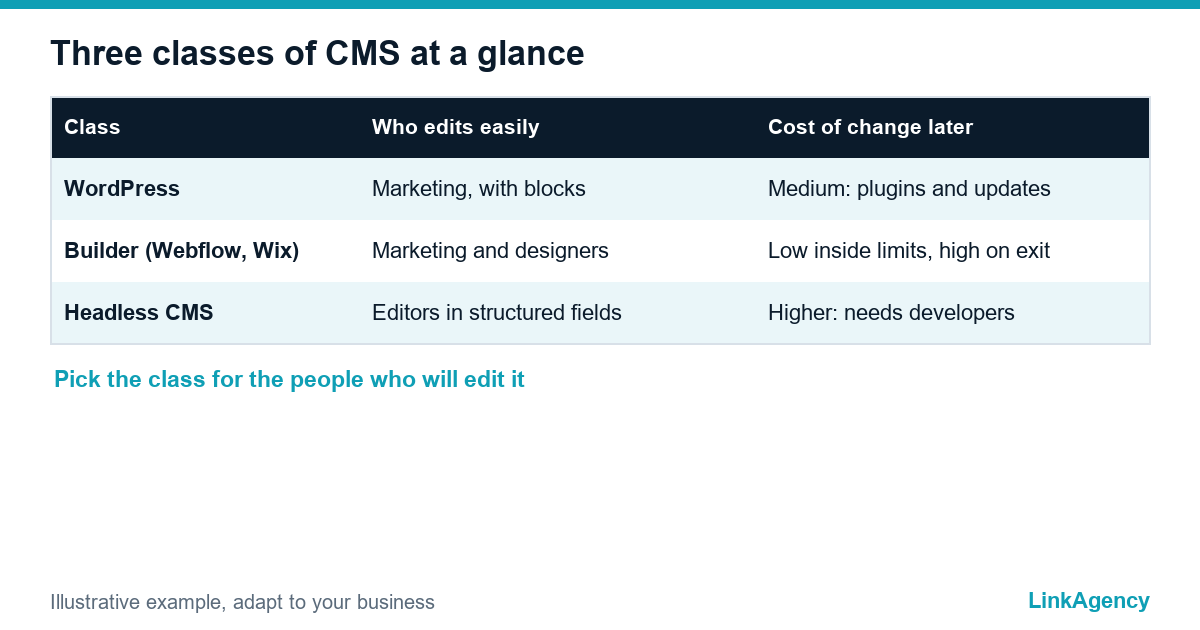
Platforms fall into three classes. The choice of class matters more than the brand, and the best CMS for a company website is the one whose class fits the team. The first is WordPress, a self-hosted CMS with a huge ecosystem of themes and plugins. Second come website builders such as Webflow, Wix and Squarespace, where hosting, editor and security are one product. Third are headless CMS platforms such as Contentful, Strapi or Sanity, which store content and send it through an API to a front end that developers build.
WordPress vs Webflow is the comparison most owners start with, and headless CMS vs WordPress is the one developers push. When to use a headless CMS depends on the product, not on fashion. Neither side is wrong, because they answer different questions.
Who will edit the site: the question everyone forgets to ask
The best answer depends on who edits the CMS, not on which website looks nicest in a demo. A marketer who publishes weekly needs a visual editor and ready blocks. A developer-led team may prefer structured content and code. Without a named editor before the contract, the site gets built for the agency and not for the people who work on it every day. A business website CMS must pass that test first.
- Marketing edits pages itself: WordPress or a builder.
- Content feeds a site, an app and a portal: headless.
- A designer owns the look and wants no plugins: Webflow-type builder.
Five business scenarios and the platform for each
The best CMS for business website projects changes with the scenario, so start from the row that looks like yours.
| Scenario | Who edits | Usually fits |
|---|---|---|
| Service company brochure site | Owner or marketer | Builder or WordPress |
| B2B content site with a blog | Marketing team | WordPress |
| Multilingual site for several EU countries | Editors in each market | WordPress with a translation layer, or headless |
| Site with a client portal or calculator | Marketing plus developers | WordPress with custom code, or headless |
| Site connected to a CRM and AI services | Developers and marketing | Headless, or WordPress with a custom integration |
Headless CMS vs WordPress is a question about editors, not speed alone. A website builder vs custom website decision follows the same logic: the more your site behaves like a product, the less a template helps. For a standard business site, a CMS for a business website that your own team can edit usually beats a clever architecture they cannot touch.

Security, updates and accessibility: what falls on you after launch
Self-hosted platforms need someone responsible for updates, backups and plugin quality. A builder takes that on for a fee and takes control in return. A headless setup moves risk to the front end and the hosting pipeline. Whichever class you choose, accessibility is no longer optional: the European Accessibility Act (EAA), Directive 2019/882, sets requirements for many consumer-facing services, while in the United States the ADA guidance on web accessibility is the reference point. Ask whether the editor lets non-developers keep alt text, headings and contrast correct, and read the WCAG 2.2 criteria your vendor will test against. Personal data in forms and analytics also falls under GDPR, so check where the platform stores it.
Multilingual sites and growth: what happens when you enter a new country
A CMS for a multilingual business website must handle separate URLs per language, translated metadata and a workflow for editors in each market. In WordPress this comes from a plugin layer that you must maintain, and WordPress vs Webflow differs most here. Builders support a few languages with limits. Headless platforms model locales in the content itself, which scales well and costs more at the start. Plan the second language before you pick a business website CMS, because adding it later is where many migrations begin.
Signs you have outgrown your CMS
The best CMS for your website today may not be the best in two years, so watch for signals.
- Marketing waits days for a developer to change a page.
- Pages load slowly despite caching and image fixes.
- Plugin updates break layouts, and nobody dares to update.
- The same content must be copied into an app or a portal by hand.
- Adding a language means duplicating the whole site.
When two or three of these are true, website redesign services with a platform review are cheaper than another year of workarounds.
Questions to ask a contractor before choosing a platform
What they should answer in writing
Before you settle on the best CMS for business website options on a shortlist, get these answers in writing.
- Who edits the site every week, and how was the editor tested with them?
- Which updates and backups are included, and who pays for plugin licences?
- How will accessibility be checked and reported?
- How can the content be exported if you leave?
- How long will the build take and what delays it? Our guide to the website development timeline covers the stages.
Our web development services start from these answers, not from the platform we prefer to build.
Free consultation: the best CMS for business website in your case
Tell us what the site must do, who will edit it and where you plan to grow, and we will recommend a platform and explain why, rather than the one we know best. You can also order a platform consultation as a separate piece of work.
- a recommendation across the three classes;
- a list of risks to check before you sign.
Leave a request and we reply within one business day.

Frequently Asked Questions (FAQ)
Is WordPress still a good choice for a business site?
Yes, as a business website CMS for content-driven sites and teams that edit pages themselves, provided someone owns updates, backups and plugin quality. It becomes costly when the site starts behaving like a product.
When should a business use a headless CMS?
Use it when the same content must feed a website, an app and a portal, or when developers already work on the product. When to use a headless CMS is rarely a question for a standard marketing site, where it adds cost without a clear gain.
Is a website builder enough for a company site?
For a small brochure site that one person edits, often yes. In a website builder vs custom website comparison, check export options, language limits and what happens to your design if you leave.
Which CMS for a multilingual business website works best?
It depends on how many languages and editors you have. Plan separate URLs, translated metadata and an editing workflow per market before choosing, and test the second language early.
How do I know I have outgrown my CMS?
Marketing waits for developers, pages are slow after fixes, updates break layouts, content is copied by hand into other channels or each new language means duplicating the site.
Can LinkAgency help us choose a platform?
Yes. We review what the site must do, who edits it and where you plan to grow, then recommend a platform with reasons and risks before any build starts.