A site rarely breaks all at once. One plugin falls a version behind, a contact form quietly stops sending leads, the last backup is a month old, and nobody notices until a customer calls. A website maintenance plan is a written list of who checks what and how often, so the site stays safe, fast and working. Hosting alone does not do that job. This guide gives a business owner a practical plan: what to check every month, quarter and year, what to put in a contract, and how to tell that no one is really looking after your site.
Website maintenance plan: hosting, support and improvements are three different jobs
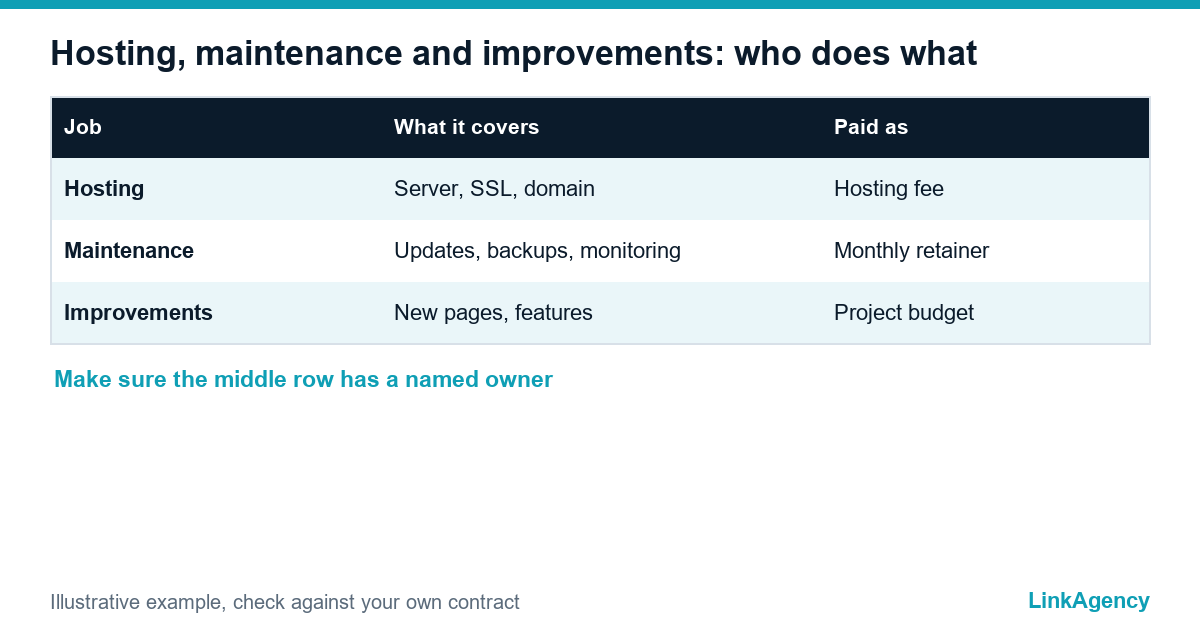
Owners often assume that paying for hosting means someone watches the site. It does not. Hosting keeps the server running, support keeps the site itself healthy, and improvements change what the site does. Mixing them up is the most common reason a site has no real care. Here is website maintenance vs hosting in one table.
| Job | What it covers | Usually paid as |
|---|---|---|
| Hosting | Server, SSL certificate, domain renewal | Fee to a hosting company |
| Maintenance and support | Updates, backups, monitoring, fixing breakages | Monthly retainer or support contract |
| Improvements | New pages, features, design, integrations | Separate project budget |
Write down which of the three you actually have. If only the first row has a name next to it, the site is unsupported. A team that provides web development services will usually offer the second row as a monthly service after launch.
Every month: updates, backups, forms and uptime
Monthly work is small, but it must not be skipped. Most website maintenance plans start from this website maintenance checklist, so ask for it in this order:
- Update the CMS, plugins and themes, first on a staging copy if the site is business-critical.
- Check that a fresh backup exists and is stored away from the server.
- Send a test message through every form and confirm it reaches a real inbox.
- Review uptime alerts and fix anything that repeated.
- Remove unused plugins, old admin users and expired access.
A backup that has never been restored is only a hope. The UK National Cyber Security Centre explains how small businesses should back up their data, including keeping copies offline and testing recovery. Our website security checklist covers the access and update basics behind this list.
Every quarter: speed, security, links and analytics
What to review each quarter
- Page speed on the home page and the top landing pages, on mobile.
- Security scan, user roles and password hygiene.
- Broken links, redirects and error pages.
- Analytics goals: are calls, forms and purchases still counted?
- Search Console messages about indexing or mobile problems.
A maintenance plan for your website works only if each quarterly check ends with a short note: what was found, what was fixed and what needs budget. Each quarter, the plan should name who does the maintenance of the website and who signs off the result. Without that note, the owner never sees the value of the work. Simple.
Every year: design, content, legal pages and accessibility
Yearly tasks are the part that website maintenance plans most often forget. Step back from the technical side once a year. Read the main pages as a new customer would: are prices, services, addresses and team names still true? Compare the privacy policy, terms and cookie banner with what the site really does. Then check accessibility. The European Accessibility Act has applied since 28 June 2025, and its rules are set out in Directive (EU) 2019/882. In the United States, the Department of Justice publishes web accessibility guidance under the ADA. We explain both in our guide to website accessibility requirements under the EAA and ADA. Which rules apply depends on your market, so confirm the details with a lawyer.
What to put in a website support contract
A good website support contract is short and specific. Vague promises such as “we look after the site” cannot be checked. Prices for web maintenance plans differ widely, so compare what each website maintenance package includes, not only the fee. Ask for these points in writing:
- Response time: one for a site that is down, another for a small request.
- Access: who holds the domain, hosting and admin accounts. They must be in your name.
- Backups: how often, where stored and when recovery was last tested.
- Monthly report: updates done, incidents, uptime and open requests.
- Data protection: a data processing agreement under GDPR Article 28 if the provider can see personal data.
The maintenance of a small website needs a plan, not goodwill. Included hours and a clear price for anything outside them prevent arguments later. For servers, deployments and monitoring, DevOps services can be added to the same agreement.
Seven signs your website support does not really exist
- No one can name the person who updates the site.
- The CMS and plugins show pending updates for months.
- You have never seen a report.
- Backups sit on the same server as the site.
- A form broke and you heard about it from a customer.
- Admin accounts belong to former staff or freelancers.
- The contractor answers only when you chase.
If three or more apply, treat the site as unsupported and ask for a proper website support plan with a named owner and a schedule. That is the minimum.
How to hand a website over to a new contractor
Every website maintenance plan should also describe the handover. Switching providers is easier when the first step is documentation, not a new quote. Ask the old team for admin and hosting access, a full backup, the list of plugins and integrations, DNS records and the history of changes. Let the new contractor audit the site before signing, and agree a short handover period when both sides are available. Keep ownership of the domain and accounts throughout, so no one can hold the site hostage. A website support plan that lists these items makes the next change painless.

Free site health check and a website maintenance plan for your business
You can order website maintenance as a monthly service or start with a one-off check. Our web development team reviews CMS and plugin versions, backups, forms, speed and access, then writes a short fix list.
Free site health check: a website maintenance plan that fits your site
We check CMS and plugin versions, backups, forms, speed and access, and send a short fix list. If it makes sense, we add website maintenance services as a monthly option with response times and a report. No obligation.
- check of versions, backups, forms, speed and access;
- short fix list and a support-contract option.
Leave a request and we will reply within one working day.

Frequently Asked Questions (FAQ)
What does website maintenance include?
Core work is CMS, plugin and theme updates, backups, uptime monitoring, form checks and fixing breakages. Many website maintenance plans add a speed and security review every quarter and a short monthly report.
How often should a website be updated?
Security updates should be applied as soon as they are tested, often within days. Content, design and legal pages need a review at least once a year, or whenever your offer, prices or contacts change.
What is the difference between website maintenance and hosting?
Hosting keeps the server running and the site online. Maintenance keeps the site itself healthy: updates, backups, monitoring and fixes. Many owners pay only for hosting and assume the rest is included.
What should a website support contract include?
Response times for urgent and routine requests, who owns the domain and accounts, backup frequency and storage, a monthly report, included hours and a price for extra work. Add a data processing agreement if the provider sees personal data.
How do I know that my backups really work?
Ask when a restore was last tested and where copies are stored. A backup kept on the same server, or never restored, may fail exactly when you need it.
Can I maintain my website myself?
For a small site, yes, if you keep a checklist and can restore from a backup. Once the site brings enquiries or sales, a named contractor with response times is usually safer than doing it between other tasks.
How do I order website maintenance from LinkAgency?
Leave a request with the site address and your CMS. We run a free site health check, send a short fix list and, if you wish, offer a website support plan with response times and a monthly report.