Most business websites carry a cookie banner. Many of those banners would not pass a regulator’s look. A bad GDPR cookie banner is no longer just a legal footnote. It costs you twice: once as a fine risk, and again as lost data in your ad accounts, because analytics and ad tags depend on the visitor’s choice. This guide lists seven mistakes that European authorities have flagged, shows a 15-minute self-check and explains where the banner meets your advertising budget. It also applies to a US company that sells to EU visitors. Short version: fix the first screen.
What a GDPR cookie banner has to do
A banner is the tool that asks for permission before non-essential cookies and tags run. Simple enough. Under the GDPR, consent must be free, specific, informed and unambiguous. In January 2023 the European Data Protection Board published a report of its Cookie Banner Taskforce that shows how national authorities read these rules. It is a report of common positions, not a new law, but it tells you what inspectors look at first. The banner, the cookie list and the privacy page each carry GDPR duties, and weak spots tend to show up in all three.
The financial side is also real. Article 83 allows fines of up to 20 million euros or 4% of worldwide annual turnover, whichever is higher, for breaches of the consent rules. Fines like that mostly hit big companies, but complaints about small sites do happen, and the same flaws also damage your measurement. Fines for a cookie banner under GDPR rarely make headlines, yet each complaint takes time and legal fees.
Seven GDPR cookie banner mistakes to look for
Mistakes 1–3: how the choice is shown
- No “Reject all” on the first layer. According to the taskforce, a banner that offers Accept but no Reject on the same layer does not give valid consent in the view of most authorities.
- Pre-ticked boxes or “continue browsing equals consent”. The taskforce repeats that pre-ticked boxes, on any layer, are not valid consent. Silence is not a choice. Neither is scrolling.
- Reject hidden as a small link or painted to look inactive. Using a link instead of a button for rejection may count as deceptive design, so Accept and Reject should look equally clickable.
Mistakes 4–6: what actually happens after the click
- Tags fire before the visitor chooses. Open the site in a private window. Watch the network panel before you click anything.
- Marketing cookies filed as “essential”, or a “legitimate interest” claim hidden on the second layer. The taskforce flagged this claim, so the legal basis for non-essential tags should be consent.
- No easy way to withdraw. Under Article 7 of the GDPR withdrawing consent must be as easy as giving it, so keep a “Cookie settings” link in the footer of every page.
Mistake 7: the banner is not connected to ad tags
Google’s consent mode passes the visitor’s consent status to Google, and its tags adjust their behaviour to match. It is not a banner. It works together with the cookie banner for GDPR you already have. In basic mode, nothing is sent to Google until consent is given. In advanced mode, denied users still send cookieless pings that support conversion modelling. A banner that does not pass the signal leaves your Google Ads account with less data. That is how a legal mistake turns into a cost per lead problem, and nobody notices until the monthly report looks odd and somebody asks why conversions fell after the redesign. Consent Mode v2 added two more signals, for ad user data and ad personalisation, so ask your developer whether all four are set. Many GDPR cookie banners in the wild still pass only two of them.

A 15-minute self-check of your cookie consent banner
- Open the site in a private window and look for Reject all next to Accept on the first screen.
- Check that every optional checkbox starts empty.
- Open developer tools, go to the Network tab, reload and see whether analytics or ad requests fire before you click.
- Click Reject all and reload. The ad and analytics requests should stay silent.
- Find the footer link that reopens the settings.
- Ask the person who runs your Google tags whether consent mode is wired to the banner.
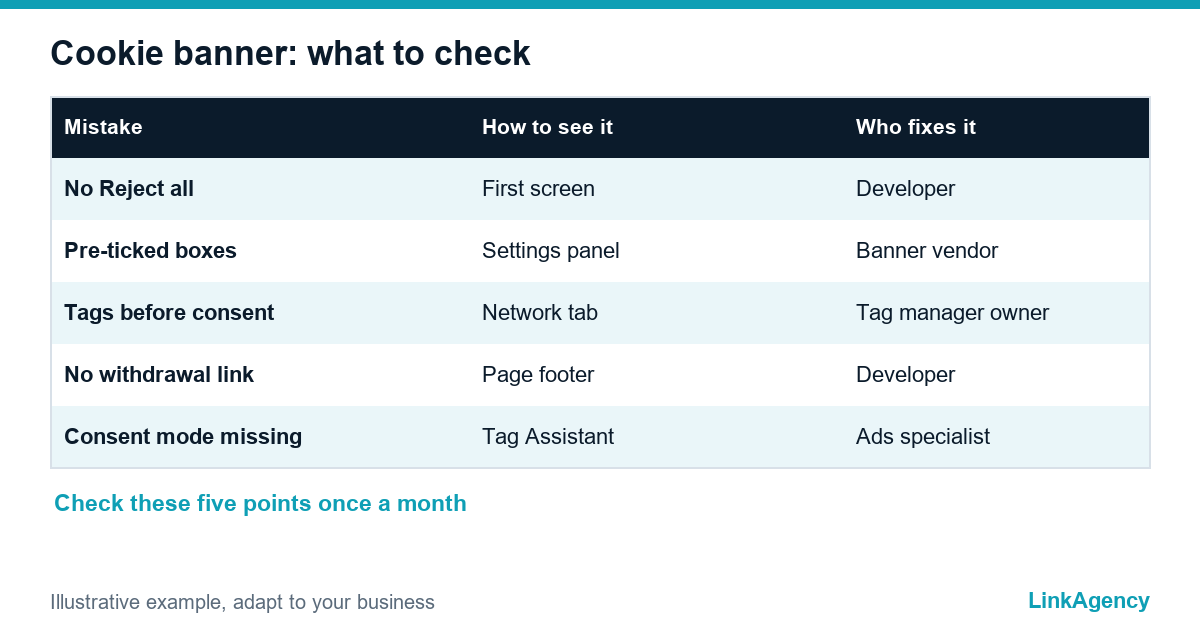
| Mistake | How to see it | Who fixes it |
|---|---|---|
| No Reject all | First screen of the banner | Developer, banner vendor |
| Pre-ticked boxes | Settings panel | Banner vendor |
| Tags before consent | Network tab, private window | Developer, tag manager owner |
| No withdrawal link | Page footer | Developer |
| Consent mode missing | Tag Assistant, ad reports | Ads specialist |
What the banner does to ad results and who should fix it
Marketing and development usually blame each other: marketers write the tags, developers own the code, and nobody owns the banner. Give it one owner. Add a monthly check. If the banner is part of a site redesign, include consent mode in the brief, as our guide to web accessibility rules under the EAA and ADA does for another legal requirement. A rejected cookie should not break the buying path either, so test the checkout and the contact forms in both states, with cookies accepted and with cookies rejected, on a phone and on a desktop browser.
On the ad side, compare conversions and cost per lead before and after the fix. Our performance marketing agency team sets this up as part of tracking, so you can see how much data returns once the signals work. Google explains the behaviour of its tags in the consent mode help page.
Order a cookie banner fix with web development services
Here is the good news. Many fixes are small and take a developer a day or two: button equality, an empty default state, a footer link and blocking of scripts until the choice. Larger sites need a consent platform and a tag audit. Our web development services cover both, and you can order a cookie banner setup as a separate task. We are not lawyers. For edge cases such as health or children’s data, add a data protection lawyer to the review.
Free review of your GDPR cookie banner
We open your site the way an inspector would, record what fires before consent and send a short fix list. If you want us to implement it, you can order a cookie banner setup together with consent mode and tracking checks.
- a screenshot report of the banner and the tags before and after the click;
- a one-page fix plan for developers and the ads team.
Leave a request and we reply within one business day.

Frequently Asked Questions (FAQ)
Do I need a cookie banner if my business is in the US?
If your site is visible to visitors in the EU or UK and uses analytics or ad tags, GDPR-style consent rules can apply to those visitors. A site that only serves a US audience has other obligations. Ask a lawyer about your exact markets.
Is a Reject all button on the first layer mandatory?
The EDPB taskforce said most authorities see a banner with Accept but no Reject on the same layer as not meeting consent rules. Not every authority agreed, so the safe choice is to show both options together.
Can I load Google Analytics before consent?
Standard analytics cookies need consent in the EU, so tags should wait for the visitor’s choice. Consent mode can adjust how tags behave, but it does not replace the choice itself.
What does Consent Mode v2 do for my ads?
It passes the visitor’s consent signals to Google so tags behave accordingly. In advanced mode, denied users can still send cookieless pings that help conversion modelling, which keeps some reporting alive.
How often should I check my cookie banner?
Check it monthly and after every site release, plugin update or new marketing tag. New scripts often start working before the banner is aware of them.
How large are GDPR fines for consent mistakes?
Article 83 allows up to 20 million euros or 4% of worldwide annual turnover, whichever is higher. Real fines depend on size, intent and cooperation, and large companies receive most of the biggest ones.
How do I order a cookie banner review from LinkAgency?
Leave a request on the site. We check the banner, the tags and consent mode, then send a short fix list and a quote for the implementation you choose.