A spreadsheet is the best first tool a business ever has. It is fast and familiar. It needs no meetings. Then the company grows, three people edit one file, and version chaos begins: the numbers start to disagree. A spreadsheet to web app move is not always the answer. Done too early, it is an expensive mistake. This guide gives an honest eight-sign test and shows when to keep the spreadsheet. It also compares your options and walks through a migration that does not stop daily work. It also covers a risk that people forget: personal data in shared files.
Spreadsheet to web app: the honest 8-sign test
Count the signs
Count how many of these describe your main file. Be strict. Ask the person who uses it every day.
- Several people edit it and nobody is sure which copy is current.
- One person understands the formulas and macros, and work stops when they are away.
- Data is copied by hand between the sheet, email, your CRM or accounting tool.
- You cannot limit who sees what, so margins, pay or customer details are open to everyone with the link.
- There is no audit trail showing who changed a number and when.
- Errors surface late, because a wrong result still looks believable.
- Monthly reports need several files merged by hand.
- The file runs revenue work, such as billing, dispatch or approvals.
Three or more signs mean it is time to study alternatives, from a stricter sheet to a decision to replace spreadsheets with a web app. One or two usually mean fix the sheet first: lock cells, add validation and name an owner. The spreadsheet horror stories collected by EuSpRIG show how small formula mistakes grow into real losses, which is why sign six matters most.
When a spreadsheet is still the right tool
Your spreadsheet may still feed a simple web page, but only a real app enforces the rules. Keep the sheet when one or two people use it, when the job is analysis rather than daily operations, or when the process changes every week. A cloud spreadsheet with shared editing solves version chaos for small teams. Size is rarely the blocker, since Excel supports 1,048,576 rows per worksheet. What breaks first is control: permissions, history and rules that cannot be bypassed by a stray paste.
Four options compared: sheet, builder, ready service, custom app
What each option does well
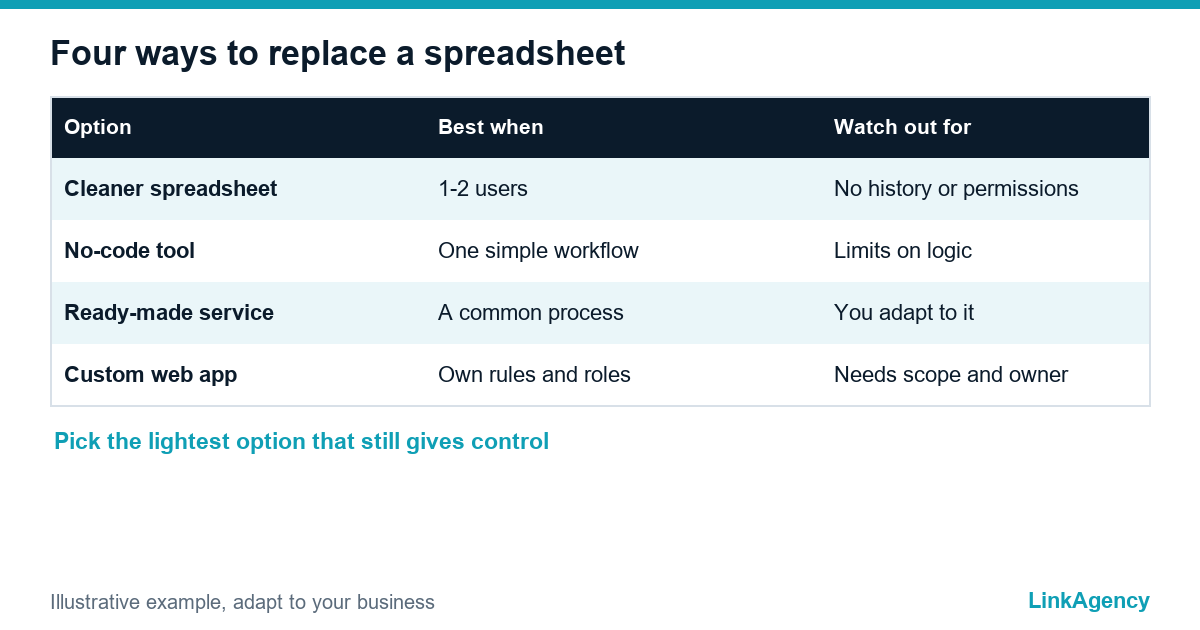
| Option | Best when | Watch out for |
|---|---|---|
| Cleaner spreadsheet | One to two users, changing process | Still no history or permissions |
| Low-code builder | A simple single workflow | Limits on logic and users |
| Ready-made service | A common process such as CRM or accounting | You adapt to its rules |
| Custom web app | Your own rules, roles and integrations | Needs a clear scope and an owner |
If your pain is mostly moving data between existing tools, check first whether an integration is enough. A no-code tool is fine for that. We covered the choice in our article on Zapier versus a custom integration. A custom app pays off when the process is your advantage, many roles touch the same records and the sheet has become the system of record.

How to move a spreadsheet to app form without stopping work
- Map the workflow. Write what the file does in one sentence, list the fields, then list who may see and change what.
- Build a pilot for one process, not the whole workbook. A single source of truth for orders, with a simple data model of customers, orders and statuses, is a good start.
- Run both for a short time. A few days of parallel entry catches mistakes, while weeks of double work create new discrepancies.
- Cut over on a fixed date and keep the old file read-only as an archive.
Teams that turn a spreadsheet to app form in stages see value sooner and argue less. Clean the data before importing: duplicates, mixed date formats and free text in number columns. Name a reference person in the team who answers questions during the first weeks. Our web application development service follows this order, so the first working version reaches users early and feedback shapes the rest.
Personal data in shared files and what GDPR expects
Sheets often hold names, phones, addresses or salary details, and a link shared too widely is a data leak waiting to happen. Article 32 of the GDPR asks for appropriate technical and organisational measures, which in practice means access by role, logs of who opened what and a way to delete records on request. A web app can give you all three by design. That is one more reason to move customer sheets from spreadsheets to web apps early. This is not legal advice, so involve a data protection specialist when the data is sensitive.
Order a spreadsheet to web app migration with a custom build
The cost depends on the number of roles, rules and integrations, so we ask to see the file first. Many teams begin with a small pilot, a single source of truth for one process, and expand once people use it. Taking a spreadsheet into a web app step by step keeps risk low. Our custom software development services cover the whole path, and you can order a spreadsheet migration as a fixed first stage with a clear scope, a data model you own and an audit trail from day one.
Free review of your spreadsheet before you replace it
Send us the file or a screen recording. We count the signs, tell you honestly whether a spreadsheet to web app move is worth it and outline the first pilot. If you want to proceed, you can order a spreadsheet migration as a separate project.
- a short report with the signs found and the risks;
- a one-page plan for the pilot, roles and data.
Leave a request and we reply within one business day.

Frequently Asked Questions (FAQ)
How do I know my spreadsheet has outgrown its job?
Count the signs: several editors and no clear current copy, one person who understands the formulas, manual copying between tools, no permissions, no change history, late errors, merged reports and revenue work running on the file. Three or more means it is time to consider an alternative.
Can a cloud spreadsheet be enough?
Often yes, for small teams. Shared editing in the cloud solves version chaos, but it still lacks reliable permissions by field, a full change history and rules that cannot be bypassed.
When is a builder better than a custom app?
A no-code builder works for a simple single workflow with few users and rules. Once you need unusual logic, many roles, integrations or strict data control, its limits start to cost more than a custom build.
How long does a migration take?
It depends on the scope, so we plan it in stages. A pilot for one process usually reaches users first, and the rest follows after feedback. We give a timeline only after seeing your file.
Will we lose our history when we switch?
No, if the import is planned. Old records are cleaned, mapped to fields and loaded, and the original file stays as a read-only archive for a fixed period.
Is a spreadsheet with customer data a GDPR problem?
It can be. Article 32 requires appropriate security measures, and a widely shared file without access control or logs makes that hard to show. A web app can apply roles and logs from the start.
How do I order a spreadsheet review from LinkAgency?
Leave a request and attach the file or describe the process. We count the signs, outline a pilot and send a quote for the stage you choose.