Google’s Help Center now describes review summaries in Search ads: short AI-written lines that gather praise about a business from across the web and sit inside your ad. You do not write them and, as far as the page says, you cannot switch them off. If you pay for Google Ads, a Google Ads review of your online reputation has become part of your ad budget plan. Below is what Google has confirmed, what is still unknown and what to do over the next four weeks.
Google Ads review summaries: what Google has confirmed
The Google Ads Help page on review summaries lists the facts. Everything else you may read in the news should be checked against it. Start there.
- Summaries are AI-generated and highlight positive insights from reviews found across the web.
- They are available for Search campaigns in English in the US, the UK, Australia and India.
- Advertisers cannot edit or customise the text, because it reflects what customers wrote, and that is the whole point.
- All verticals are eligible except sensitive categories, such as pharmaceuticals.
- Google shows a summary only when it predicts that it will improve ad performance.
So the review summaries in Google Ads work like an automatic testimonial. Only positive reviews are quoted, but the source customer reviews are public, and a weak rating can mean that your ad gets no summary at all.
What Google has not said yet
The help page names no opt-out and no setting for advertisers. It also does not list which review sites feed the summaries, only that Google gathers reviews from across the web. Google Ads reviews of this kind will likely get more detail later. Treat these as open questions. Make no promises to clients about how a summary will read. If your rep asks whether to wait, the answer is to act on what you control: the reviews themselves.
How a Google Ads review ties your ads to your reputation
Why two equal bids can show different ads
Until now, an audit of the ad account was an internal check of campaigns, keywords and budgets. With summaries, public feedback becomes a visible part of the ad. Two companies can bid the same amount for the same keyword and show different ads, because one has fresh, detailed reviews and the other has none.
Where your Google Ads reviews come from
Your reviews live in several places: your Google Business Profile, marketplaces, industry directories and social networks. The profile is the one you control most directly, so start with the basics in our local SEO checklist for Google Business Profile, then follow Google’s guidance on reading and replying to reviews.

A plan for the next 2–4 weeks
- Week 1. Collect your public reviews from the profile, marketplaces and directories into one sheet, with date, rating and topic.
- Week 1. Reply to every open review, the negative ones first, in a calm and factual tone.
- Week 2. Ask recent customers for a review after a finished order, with a direct link and no incentives for a good rating.
- Week 2. Fix the cause of the most repeated complaint, whether delivery time, support speed or unclear pricing.
- Week 3. Watch your ads in the report and on live searches from the supported markets, and note whether summaries appear.
- Week 4. Compare click-through and conversion rate for ads with and without a summary, then decide where to move budget.
Do not buy or invent reviews, because AI review summaries cannot hide a bad record. The US Federal Trade Commission has a final rule on consumer reviews and testimonials, and AI review summaries will only repeat whatever is on the web.
What to measure and what to say to your team
A one-table dashboard
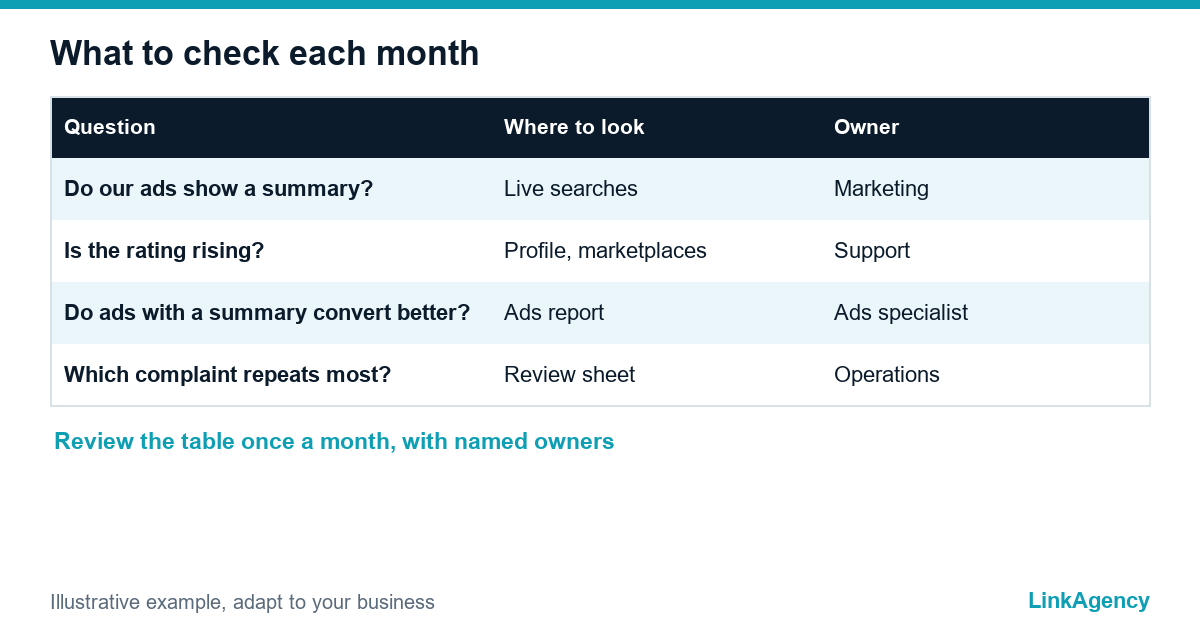
| Question | Where to look | Owner |
|---|---|---|
| Do our ads show a summary? | Live searches, ad previews | Marketing |
| Is average rating falling or rising? | Profile and marketplaces | Customer service |
| Do ads with a summary convert better? | Ads report, conversion rate | Ads specialist |
| Which complaint repeats most? | Review sheet | Operations |
With this table in hand, reviews in Google Ads become a monthly routine with named owners instead of a one-off panic. If your agency reports only clicks and spend, ask them to add reviews and ratings. Our performance marketing agency team reports them next to revenue, so you can see the link. It takes one extra column.
If you sell to the EU
The summaries are listed for English-speaking markets only, so European customers will not see them for now. That is a reason to prepare. Waiting buys nothing. The same review hygiene helps in every language, and Google has not said it will stay limited. Collect reviews in the languages your clients use, and keep the same reply standards across regions.
Order help with Google Ads and reviews
You can run this plan in-house. If you prefer help, our Google Ads management services cover account setup, tracking, ad copy and monthly reporting. Many owners order a Google Ads audit first. It is one fixed piece of work that shows where the budget goes, which landing pages leak leads and how the reviews attached to your brand affect results across every campaign you run.
Free Google Ads review of your account and ratings
We look at your campaigns, your public ratings and the gaps between them, then send a short list of fixes. If you want more, you can order a Google Ads audit as a separate project.
- a review of ads, tracking and landing pages;
- a one-page plan for reviews and replies.
Leave a request and we reply within one business day.

Frequently Asked Questions (FAQ)
What are review summaries in Google Ads?
They are short AI-generated lines inside a Search ad that quote positive insights from reviews found across the web. Google shows them only when it expects them to improve ad performance.
Can I turn off or edit review summaries?
The Google Ads Help page does not describe an opt-out, and advertisers cannot edit the text because it reflects customer feedback. Check the page again from time to time, as the feature is new.
Where are review summaries available?
Google lists Search campaigns in English in the US, the UK, Australia and India. Other countries and languages are not mentioned yet.
Will negative reviews appear in my ad?
Google says the summaries are positive only. A poor rating can still reduce the chance that your ad gets a summary, so replying to complaints and fixing their causes matters.
Does my business need to do anything right now?
Yes. Collect reviews from all sources, answer them, ask happy customers for honest feedback and set up a monthly check of ads and ratings. This takes two to four weeks.
Is it safe to buy reviews to get a better summary?
No. Fake reviews break platform rules and, in the US, a Federal Trade Commission rule. Summaries repeat public reviews, so honest feedback is the only stable approach.
How do I order a Google Ads review from LinkAgency?
Leave a request on the site. We check your account, tracking and public ratings, then send a short list of fixes and a quote for the work you choose.