Accessibility used to be a nice extra. In Europe it has been a legal duty for many online businesses since 28 June 2025, and in the United States courts keep treating inaccessible sites as discrimination claims. If you sell online to customers in either market, you need to know what the rules ask for and what a small team can fix first. This guide explains the website accessibility requirements of the European Accessibility Act (EAA) and the ADA in plain language, and ends with ten checks you can run in an hour. It is general information, not legal advice.
Website Accessibility Requirements for Business: What the EAA and ADA Say
Web accessibility requirements differ between the two laws. The EAA is a directive that every EU country has written into national law, and it lists accessibility requirements for specific products and services. The ADA is a US civil rights law that does not mention websites, so the rules come from regulators and courts. Which requirements apply to your website depends on where you sell, and accessibility is the common thread. The comparison below shows the main differences.

EAA Website Accessibility Requirements: Who Is Covered and From When
Directive (EU) 2019/882 has applied since 28 June 2025, so EAA compliance is now a live question for shops and service sites. It covers consumer-facing digital services such as online shops, banking services, e-books and passenger transport ticketing. Technical conformity is usually shown through EN 301 549, which refers to WCAG 2.1 level AA for web content. The European Commission page on the Act gives the official overview.
Microenterprises that provide services (fewer than ten people and limited turnover or balance sheet) are exempt from the service requirements, but you must check the definition and your country’s rules in the Directive text on EUR-Lex before you rely on it. Each member state sets its own supervision and penalties. A business selling across borders should check the accessibility requirements for websites in the target country too. The UK has no single web standard, yet the Equality Act 2010 expects reasonable adjustments, and WCAG 2.1 AA helps there as well.
ADA Website Compliance: No Fixed Standard, a Clear Direction
For private businesses, Title III of the ADA does not name a technical standard for websites. The Department of Justice says websites of businesses open to the public are covered, and its web accessibility guidance explains its position. Courts and settlement agreements most often use WCAG 2.1 AA as the yardstick in practice, and ADA website compliance usually means meeting it. Some US courts require a link to a physical location, so the risk is highest for retailers with stores, but suits against online-only shops are growing. For state and local governments, a separate rule sets WCAG 2.1 AA with its own deadlines, which the Department has moved, so check the current dates if you work for the public sector. Know the requirements for website accessibility in each market before you approve a redesign.
| Question | EAA (EU) | ADA (US) |
|---|---|---|
| Applies to | Listed consumer services, such as e-commerce | Places open to the public, including many online businesses |
| Technical standard | EN 301 549, which refers to WCAG 2.1 AA | No fixed standard for private sites; WCAG 2.1 AA is the usual reference |
| Enforcement | National authorities, set by each country | Private lawsuits and settlements, plus the Department of Justice |
| Small business relief | Microenterprise exemption for services | No size exemption |

WCAG 2.1 AA in Plain Language
The WCAG 2.1 guidelines rest on four principles, and each one turns into checks your team can do. WCAG 2.2 adds rules such as a minimum target size and a focus that sticky headers must not hide.
The four principles
- Perceivable: people can see or hear the content, so images have alt text, videos have captions and text has enough colour contrast.
- Operable: everything works with a keyboard, focus is visible and nothing traps the user.
- Understandable: form labels and clear errors help every user, and the page language is set.
- Robust: code works with screen readers and other assistive technology, which means valid HTML first and ARIA only where needed.
Ten Checks You Can Run in an Hour
These checks do not replace an accessibility audit, but they find the problems behind most complaints. Meeting website accessibility requirements starts with this kind of routine.
- Use only the keyboard to reach every link, menu and form, and see where focus goes.
- Check that the focus outline is visible on every control.
- Test text contrast with a free checker, aiming for at least the WCAG ratio.
- Look at every meaningful image and confirm it has useful alt text.
- Check the heading order: one H1, then H2 and H3 in logical sequence.
- Open each form and confirm labels, required fields and error messages are clear.
- Zoom the page to 200% and make sure nothing is cut off or overlaps.
- Read the link text out of context: “click here” tells nobody anything.
- Check that videos have captions, audio has a transcript and key PDF files are tagged.
- Run an automatic scanner, then read the page with a screen reader for a few minutes.
Our guide to website security basics follows the same idea: a short list that a small team can finish.
A Widget Does Not Replace Fixes
Accessibility overlays and widgets promise compliance with one line of code. They do not fix broken structure, missing labels or keyboard traps, and the European Commission has warned about relying on them. Treat a widget, at best, as an extra for user preferences. On a large website, list the accessibility problems first and map each one to its requirements. Real accessibility comes from remediation of the design and the code, and a public accessibility statement tells visitors what you have fixed.
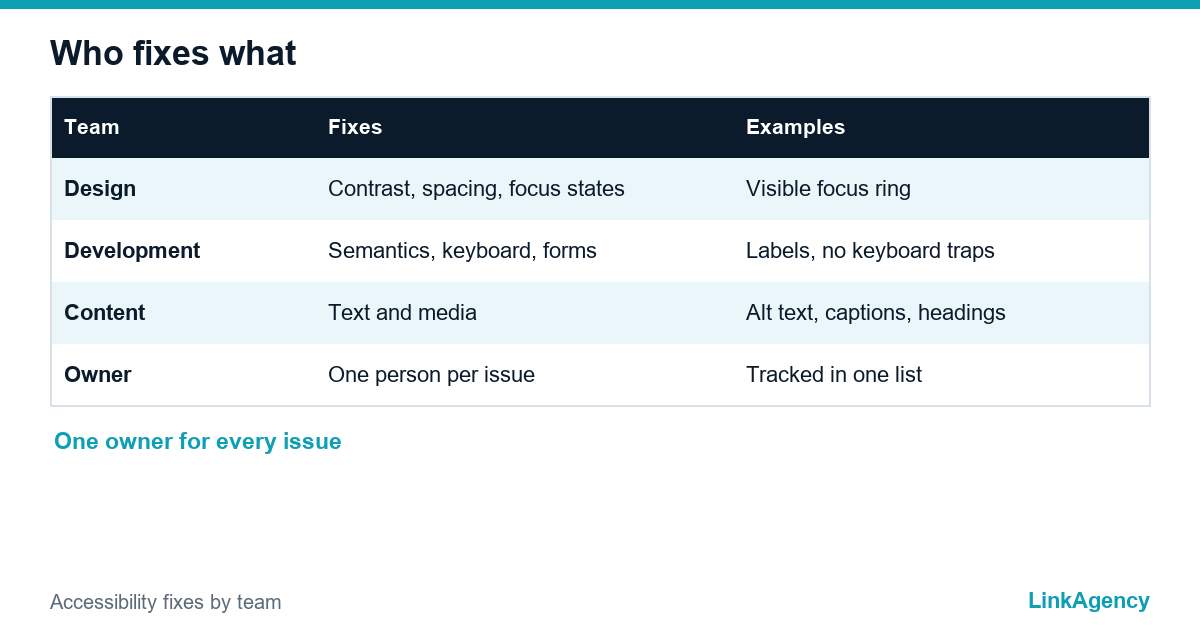
Here UI/UX design and development meet. A designer handles colour contrast and focus states. A developer handles semantics and keyboard support. An editor handles alt text and headings. When a site cannot be repaired, a website redesign can meet web accessibility requirements at lower cost than endless patches, and our web development services team can plan either route.
Free Website Accessibility Requirements Review From LinkAgency
Send us your site address and the markets you sell in for a free review. We will check it against the main WCAG 2.1 AA points, list the biggest risks and give you an order of work. If you prefer, you can order an accessibility audit with the fixes from us.
- quick scan and manual check of key pages;
- a list of problems by priority and effort;
- a plan for design, development and content fixes.
Leave a request and we will reply within one working day.

Frequently Asked Questions (FAQ)
Does the European Accessibility Act apply to my website?
It applies to consumer-facing services such as online shops and banking services sold in the EU, since 28 June 2025. Check the Directive text and your country’s law, especially the microenterprise exemption.
Does the ADA require WCAG 2.1 AA for private websites?
The ADA names no technical standard for private sites. Courts and settlements most often use WCAG 2.1 AA as the benchmark, so it is the sensible target.
Can an accessibility widget make my site compliant?
No. A widget does not repair missing labels, keyboard traps or broken structure. Use it at most as an extra, and fix the design and the code.
How do I check my site quickly?
Use only the keyboard, check contrast and focus, test forms and alt text, zoom to 200% and run an automatic scanner, then read a page with a screen reader. This finds the most common problems in about an hour.
Who in my team fixes accessibility problems?
Design handles contrast, spacing and focus states, development handles semantics and keyboard support, and editors handle alt text and headings. Assign each problem to one owner.
Can LinkAgency audit and fix my website?
Yes. We scan the site, check key pages by hand, list problems by priority and plan the fixes across design, development and content. Leave a request and we reply within one working day.