Enquiries arrive from the website and from ads, yet too few turn into customers. The reason is rarely the offer. Replies come late or differ from one manager to the next. Some enquiries vanish between the form and the first call. This guide to lead follow-up automation traces the path of one enquiry, shows where it gets lost and gives a simple scheme you can build in a few weeks.
Lead follow-up automation: where leads get lost between form and first call
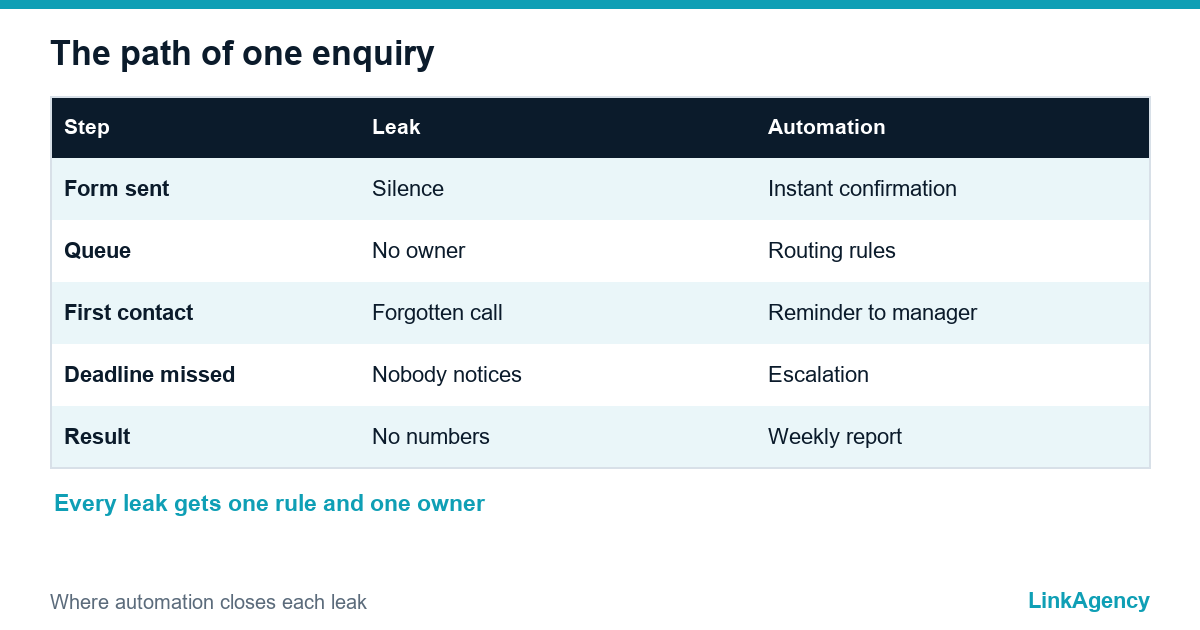
Draw the path of one enquiry on a sheet of paper: form, inbox, someone notices it, someone replies, the status changes. Each arrow is a place where a lead can wait or disappear. The usual leaks are an inbox nobody owns, messages from social networks that stay outside the CRM, requests that arrive after hours and a rep who forgets to call back, while for existing clients the repeated status questions are what customer portal development removes. Which lead can you automate first, and how should the follow-up work? Look at your own leaks before you build anything, because the fix for each is different.

Why response speed affects sales
Buyers send the same enquiry to several suppliers, and the first useful reply often wins the conversation. Research by Harvard Business Review authors on the short life of online sales leads found that most companies respond far too slowly. Speed to lead is therefore a business metric, not a nice-to-have. Measure it as the time between the form submission and the first human or automated answer, and the same clock works for back-office flows such as invoice processing automation.
One entry point: collect enquiries from every channel in one CRM
Route every channel into one place: web forms and calls, messengers and email, plus ad lead forms. Treat it as the base of CRM automation. A single queue gives every enquiry an owner and a timestamp, and it lets you track lead response time without spreadsheets. It also becomes your lead follow-up system: one list, one status, one deadline. Our guide to starting business process automation explains how to pick the first process, and this one is a good candidate. Add a source field to each record, so you can compare channels later.
Automating lead follow-up: confirmation, routing and reminders
Four small automations cover most of the gain, and together they make automated lead follow-up behave the same at noon and at midnight.
Four small automations
- An instant confirmation with the next step and the expected reply time.
- Lead routing: assign the enquiry to a manager by region, product or workload.
- A reminder to the manager if the first contact is not logged in time.
- An escalation to a team lead when the deadline is missed.
This is lead follow-up automation in its simplest form, and it needs clear rules and an owner, not an expensive platform. When the rules grow complex, AI automation services can connect the CRM with messengers and the mailbox for you.
Channels and timing: an example first-reply sequence
Different channels need different tones, so write the sequence once and adapt it. The timings below are an example, so adjust them to your sales cycle and working hours.
- Minute 0: automatic confirmation by the channel the person used.
- Within your target time: a human reply with a concrete next step.
- The next working day: a reminder to the manager and, if there was no answer, a short message with something useful.
- Day three: one more try through a different channel, such as a call after an email.
- After that: close the enquiry politely or move it to a slower nurture list.
Keep each message short, name the person who will contact the client and never pretend a bot is a human, the same rule an AI chatbot for customer service follows. Good speed to lead depends on this sequence, and a written lead follow-up system keeps it the same for every manager.
What to keep human and where an AI assistant helps
| Step | Automate | Keep human |
|---|---|---|
| Confirmation | Instant message with next step | Nothing |
| Qualification | Basic questions, tags | Judging a complex request |
| Routing | Assignment rules | Exceptions and key accounts |
| Reminders | Tasks and deadlines | The call and the conversation |
| After hours | First reply and booking | Pricing and negotiation |
An AI assistant is useful where the first answer is routine: it can reply to missed leads after hours, collect missing details and book a call. Hand it over to a person as soon as the question needs judgement. Follow-up automation for leads works best when this handover is written down, with an SLA for each step. We describe the limits in AI agents for business, and our AI agent development team can set one up.
How to choose a tool: five criteria
You do not need the biggest platform. Check these five points before you pay for anything:
- it connects to every channel you really use, including messengers;
- it supports routing rules and working-hours logic;
- it has timers, reminders and escalation to a team lead;
- it reports reply time per manager and per source;
- it can store consent and delete data on request.
Good CRM automation is the base of the tool, so if it fails two of the five, look at a lighter option or connect your current CRM with a no-code service first.
Consent and data: GDPR for automated messages
Automation does not remove the rules. For people in the EU, the ePrivacy Directive restricts unsolicited electronic marketing messages without prior consent, and the GDPR requires a lawful basis and clear information when you process the data. A reply to a request the person just made is different from a marketing sequence, so keep them apart. Record consent with a date and a source. Put an unsubscribe link in every marketing message.
Common mistakes that waste the effort
- Automating a broken process: first fix who owns the enquiry, then add rules for automated lead follow-up.
- Sending a long automatic message that reads like spam instead of a short, useful one.
- Ignoring night and weekend enquiries, which often come from busy buyers.
- Counting only forms and not calls and messengers, so the numbers look better than reality.
- Switching automation on without a person who checks the results every week.

Lead response time: how to implement in a few weeks and what to measure
Start small and measure every step, because you can automate lead follow-up in four weeks if the scope stays narrow. How would an assistant automate follow-up for a new lead that arrives at night? Add that case last. A realistic plan looks like this:
A four-week plan
- week 1: map the enquiry path and measure the current reply time;
- week 2: connect channels to one CRM and add the confirmation;
- week 3: switch on routing, reminders and escalation;
- week 4: add the after-hours reply and review the numbers.
Track four numbers when automating lead follow-up: time to first reply, share of leads contacted within the target time, share of leads that reach a meeting, and the cost per lead. If cost per lead looks high, check the ad side too, as in six checks for expensive leads.
Get a free review of your lead follow-up automation
We map the path of an enquiry in your company, show where leads are lost and what to automate first for lead follow-up automation that fits your team.
- a map of channels and the first-reply time;
- a plan for routing, reminders and after-hours replies;
- consent and data checks for automated messages.
Send a request and we reply within one working day. You can order a lead follow-up review first, and if you need extra hands later, hire automation developers for the build.

Frequently Asked Questions (FAQ)
How fast should a company reply to a new enquiry?
As fast as your team can do it reliably. An instant automatic confirmation plus a human reply within a set target, for example inside working hours, beats a perfect answer that arrives a day later.
Which part of follow-up should be automated first?
Start with the instant confirmation and lead routing. They are simple and cheap, and they remove the two most common leaks: silence after the form and an enquiry that nobody owns.
Do I need a new CRM to automate follow-up?
Not always. Many existing CRMs already support routing rules, plus tasks and reminders. The first step is to collect all channels in one place, then check what your current tool can do.
Is it legal to send automatic messages to leads?
A reply to a request the person made is usually fine. Marketing sequences need consent or another lawful basis in the EU, and every marketing message needs an easy way to unsubscribe.
Can an AI assistant replace the sales manager?
No. It handles routine first replies and questions, plus booking, especially after hours. Negotiation and pricing stay with a person, along with complex needs.
Can LinkAgency set up lead follow-up for my company?
Yes. We map the enquiry path, connect your channels and CRM, and configure routing, reminders and replies. Send a request and we reply within one working day.