A company pays for a new site, launches it, and a month later the enquiries from Google fall. Nobody can say what exactly was lost, because the old and the new site were never compared page by page, and winning positions back after the fact is harder than keeping them. This website migration SEO checklist treats a redesign as a move to a new address, not as a design project. It works as a website redesign SEO checklist and as a site migration checklist in one, with the checks an owner should demand from the contractor before launch, on launch day and during the first 30 days.
Website migration SEO checklist: why a better-looking site can lose traffic
Google knows your site by its addresses, titles, texts, internal links and markup. A redesign often changes several of them at once: new URLs, shorter texts, a different menu, a new platform. If old addresses stop working or lose their meaning, the pages that brought enquiries disappear from search, even though the new site looks cleaner. That is the usual story behind a new website that lost traffic.
The fix is to plan the move before the design is approved. Google’s own guide to a site move with URL changes starts the same way: prepare the new site, map the old addresses to new ones, then switch. Every SEO migration checklist follows that order, and so does our website redesign SEO checklist.
Before the redesign: list the pages that bring enquiries
Start from the pages that produce leads, not from the number of visitors: service pages, case studies, price pages and the articles people read before they write to you. Export them from Google Search Console and from analytics, and mark each one as keep, merge or retire.
- Pages with enquiries or calls in the last year.
- Pages with the most clicks from Google.
- Pages that other sites link to, because backlinks sit on old addresses.
- Language versions, if you sell in several markets.
Save a full crawl of the old site as well: addresses, titles, headings and canonical tags.
URL map and 301 redirects: what to redirect and where
A URL map is a table with two columns: the old address and the new one. Every old page with a close equivalent gets a permanent redirect straight to it. Pages with no equivalent should return a clear “gone” answer, not a blanket redirect to the homepage. Google also warns against a long redirect chain, so each redirect should point to the final address.
Keep the redirects live for at least a year. Google describes permanent moves in its guide to 301 redirects, and your developer should work from it. For 301 redirects for a redesign, ask for the map as a file before development ends, not after. Skipping it is one of the classic site relaunch SEO mistakes.
What to carry over to the new site
The design can change, but the signals behind the old rankings should move with the pages. Check this list page by page for every item on the keep list. This SEO checklist for a website redesign saves the most money at this step.
- Title tags and meta descriptions that already work.
- Headings and the main text of the page.
- Internal links between the pages that matter.
- Structured data and canonical tags.
- Hreflang tags and the matching language versions.
- Image names, alt texts and the forms that collect enquiries.
When the text is rewritten
New copy is fine, but keep the topic, the search phrase and the answer that made the page useful. If a service page loses its main phrase in the rewrite, it stops matching the search that used to bring the lead. To keep rankings after a redesign, change the look first and the words second.
The staging site: keep it away from Google, then remove the block
Every new site is built on a test address, called a staging site, and that address must be closed to search engines with a password or a noindex rule. The mistake that hurts most is the opposite one: the block stays in place after launch, and the new site tells Google to ignore it. Put the removal of the block into the launch plan as a named task with an owner.
Launch day checklist: robots.txt, sitemap, forms and analytics
On launch day the owner needs a short list, not a technical manual. Ask the contractor to confirm each point with proof. Here is the site migration checklist for that day.
- The robots.txt file does not block the site and the noindex rule is gone.
- The 301 redirects from the URL map work on a sample of old addresses.
- The new sitemap is submitted in Google Search Console.
- Forms, calls and chat send enquiries to the right inbox or CRM.
- Analytics and conversion tracking record a test enquiry.
- Internal links and the menu point to the new addresses, not to redirects.
Pick a quiet sales week and keep a backup of the old site for a rollback.
The first 30 days: what to watch in Google Search Console
The last part of the website migration SEO checklist is monitoring. Expect some movement in the first weeks, because Google needs time to re-read the site. Use the page indexing report to see which pages are indexed and why others are not, and compare clicks for the keep-list pages with the weeks before launch.
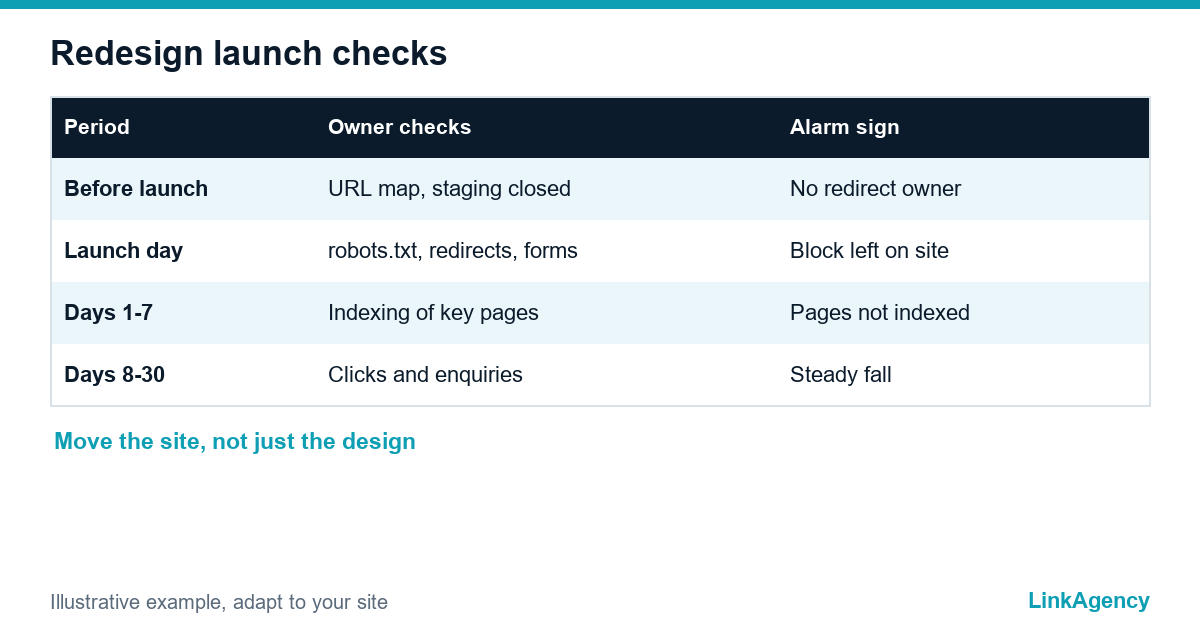
| Period | What the owner checks | When to raise the alarm |
|---|---|---|
| Before launch | URL map, staging closed, tracking ready | No map or no named owner of the redirects |
| Launch day | robots.txt, redirects, sitemap, forms | A block left on the site or forms that send nothing |
| Days 1 to 7 | Errors and indexing of the key pages | Key pages missing from the index |
| Days 8 to 30 | Clicks and enquiries for the keep list | A steady fall on pages that brought leads |
If the key pages are not indexed after a week or two, or enquiries drop on the pages from the keep list, ask for the redirect map first. Mistakes found in the first month are cheap to fix. Later, they are not.

What to put in the brief and the contract with the developer
The list only works if it is part of the agreement. Ask for a clear line in the brief: the redesign must keep the ranking pages, deliver a URL map and 301 redirects, keep the staging site closed and open the live one on launch, and include a month of support after launch. You can order an SEO audit before the contract is signed, so that the keep list comes from real data, and our SEO services cover the monitoring after launch. If you are unsure how long results take after a change, read how long SEO takes before you judge the first weeks.
Ask the developer in plain words. Who owns the redirect map? What happens to pages that disappear? How will we know that the test block is removed? What will you check in the first week? Clear answers show a team that has done a move before. Before you sign, ask to see the migration plan for the website and a checklist for each stage.
Website migration SEO checklist: free audit before your new site goes live
We will review the current site and the redirect plan before launch, show which pages bring enquiries and tell you what must not be lost. No obligations.
- keep list of pages that bring enquiries;
- review of the URL map and the launch-day checks.
Leave a request and we will reply within one working day with a free audit plan.

Frequently Asked Questions (FAQ)
Why does a new website lose traffic after a redesign?
Usually because old addresses stop working, texts and titles change, or a test block stays on the live site. Google then cannot match the new pages to the searches that used to bring enquiries, and the new website lost traffic. A website redesign SEO checklist prevents this by planning the move before design approval.
Do I need 301 redirects for a redesign?
Yes, whenever addresses change. Set up 301 redirects for a redesign so each old page points to its closest new page, not to the homepage. Keep them live for at least a year. They are the core of any SEO checklist for a website redesign.
How do I keep rankings after a redesign?
To keep rankings after a redesign, keep the pages that bring enquiries, carry over titles, headings, internal links and markup, and watch Google Search Console for 30 days. An SEO migration checklist helps you fix mistakes in the first month, while they are cheap.
What should I check on launch day?
Check that robots.txt and noindex rules are gone, that redirects work, that the sitemap is submitted and that forms and tracking record a test enquiry. Use the site migration checklist and ask the contractor for proof of each point.
What are the most common site relaunch SEO mistakes?
The common site relaunch SEO mistakes are a left-over block on the live site, missing redirects, lost page titles, broken forms and no tracking. A short launch-day list from a website redesign SEO checklist finds most of them.
When should I worry about a drop in enquiries?
Some movement in the first weeks is normal. Raise the alarm if the key pages are not indexed after a week or two, or if clicks and enquiries fall steadily on the pages from your keep list. If your new website lost traffic, start from the website migration SEO checklist and the redirect map.
How can LinkAgency help with a redesign?
Leave a request with the address of your current site and the plan for the new one. We run a free audit with a site migration checklist, show which pages bring enquiries, review the redirect plan with our SEO migration checklist and say what must not be lost.