A shopper types what they want into the search box and sees “no results found” or a random list of products. They leave. Another store gets the sale, even though the right item is sitting in your warehouse. Your reports show a normal bounce, so nobody notices the loss. This guide looks at site search for ecommerce through the owner’s eyes rather than the developer’s: eight common mistakes, a 15-minute test and a way to turn empty searches into assortment ideas. Good ecommerce search is cheap to fix.
Ecommerce site search brings your hottest visitors: why it deserves attention
People who use search know what they want, which is why search sessions are close to a purchase. When it fails, they rarely blame their own wording. They conclude the store does not carry the item. Baymard Institute’s 2026 benchmark of search UX rated 56% of the sites it tested as “mediocre or worse”, and it notes that about half of users prefer search to navigation. In ecommerce, search often fails on the site itself, not in the catalog.
Eight ecommerce site search mistakes that lose sales
Where the words and the data do not meet
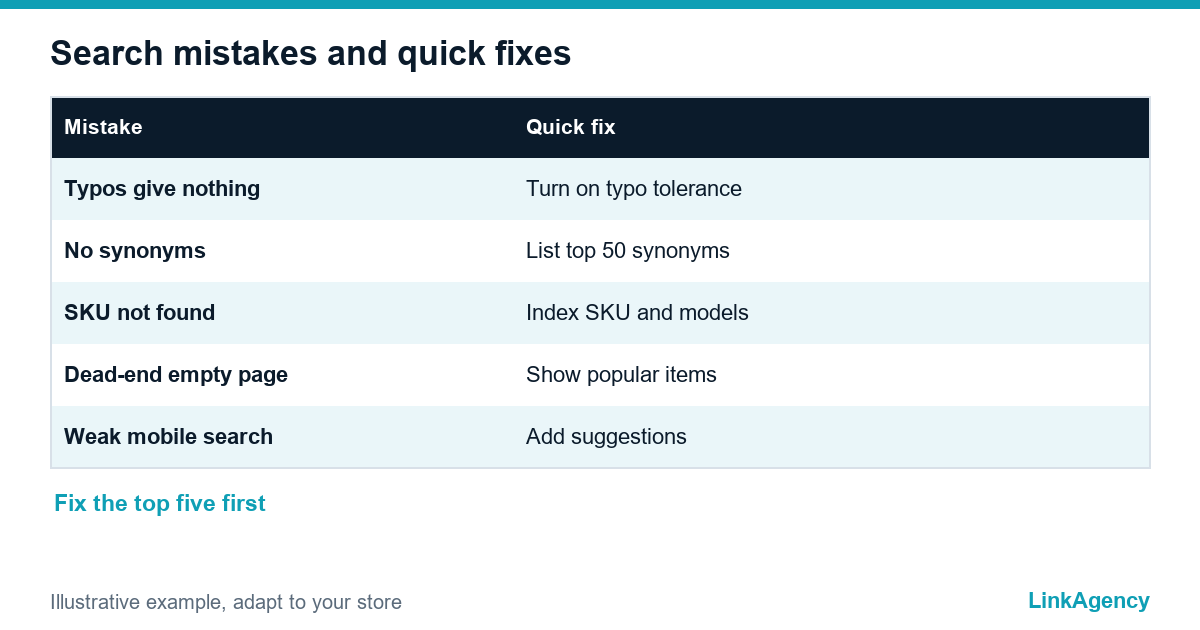
- Typos and the wrong keyboard layout return nothing.
- Everyday names and synonyms are missing: “sneakers” does not find “trainers”.
- SKUs and model numbers are not searchable, or only with exact punctuation.
- The “nothing found” page is a dead end with no offers.
Where the interface lets people down
- The catalog is multilingual, but search works in one language only.
- Filters ignore the attributes people type, such as color or size.
- Mobile search is hidden, slow or has no suggestions.
- No one reads search analytics, so the same failures repeat.
Each of these has a fix, and most do not need a new platform. In ecommerce a store can sell well and still fail in search, because the site never learned what shoppers call the product. Search in ecommerce is judged by outcomes, not by features.
A 15-minute test: check your store search as a shopper
- Search for your ten best sellers by their everyday names, not the catalog names.
- Misspell three of them on purpose.
- Paste one SKU and one model number.
- Search for something you do not sell and read the result page.
- Repeat it all on a phone.
| Test | What good search does |
|---|---|
| Everyday name | Finds the product through search synonyms |
| Typo | Shows results through typo tolerance |
| SKU or model | Opens the exact product |
| Item you do not sell | Shows a helpful no results page |
Write down every miss. Ten misses are enough to build a priority list. Good site search for ecommerce passes all five checks. If you want an outside view, our ecommerce development services include a search review.
Queries with no results: where to find them and what to do
Search logs are the cheapest source of ideas for your assortment and content, and search analytics is where ecommerce site search starts to pay back. In GA4, the site search measurement option sends the view_search_results event and fills the search term dimension. Export the terms with no results, group them by meaning and sort by frequency. Then act. Add a synonym, rename a category, build a collection page, or, when the same unmet request keeps returning month after month and the margin looks right, add the product itself to the assortment. A frequent query with no result is also a signal that shoppers want something you do not sell yet. Never leave such a query on a blank page, because a good no results page shows popular items and a way to reach support.
Multilingual catalog: search for shoppers from different EU countries
A store that sells in German, French and Spanish needs ecommerce website search that works in each language, with its own synonyms and its own spelling mistakes. Check that translated product names are indexed, that search switches with the language of the page and that a query in one language does not return an empty page just because the title exists in another. Test with real native speakers, not with machine translation of your English test list.
Platform search or a separate engine: how to choose
For a catalog of a few hundred products, the settings of Shopify or WooCommerce are often enough: turn on synonyms, redirects for key terms and a clean product feed. A separate search engine pays off when you have thousands of products, many attributes, several languages or a high share of mobile shoppers. Compare the cost of the engine with the revenue behind failed searches, which you can estimate from your own search logs.
An improvement plan: from quick fixes to a new search
- Run the 15-minute test and fix the worst misses.
- Add search synonyms for the top fifty queries.
- Rebuild the no results page.
- Check mobile search and autocomplete.
- Review the search terms every month and decide whether the platform search is still enough.
If search leads to weak product pages, continue with our product page design checklist, and if shoppers leave later, see the cart abandonment checkout mistakes.

Order a free site search check before the sales season
You can order a site search check as a short, separate task. We take twenty real shopper queries, list the failures and give priority fixes, so you can finish them before the seasonal peak.
Free review of your ecommerce site search
We run twenty realistic shopper queries on your store, list the failures and send priority fixes. You can also order a site search check as a separate task.
- a list of failed queries with the reason for each;
- a priority plan from quick fixes to a new search.
Leave a request and we reply within one business day.

Frequently Asked Questions (FAQ)
Why does my store search show no results when the product exists?
Usually the query uses different words than the catalog: a synonym, a typo, a SKU format or another language. Check the search log and add synonyms and typo tolerance.
How do I find queries that returned nothing?
Turn on site search tracking in GA4 or use your platform’s search report, export the terms with no results and sort them by frequency.
What should a no results page contain?
A short message, a corrected suggestion if there is one, popular products or categories and a way to contact support. A blank page makes the shopper leave.
Is the built-in search of Shopify or WooCommerce enough?
For a few hundred products it often is, if you set synonyms and redirects. Thousands of products, many attributes or several languages usually justify a separate engine.
How does a multilingual catalog change search?
Each language needs its own synonyms and spelling variants, and search must follow the language of the page. Test it with native speakers.
How often should I review search queries?
Once a month is enough for most stores, and before every sales season. Look at top queries, no result queries and queries with low clicks.
How do I order a site search check from LinkAgency?
Leave a request with your store link. We test twenty real queries and send a list of failures with priority fixes and a quote for the work you choose.